

Register for PAYE through HMRC, obtain your employer reference number, and set up payroll systems that comply with UK tax laws. From My Company provides PAYE Registration Assistance to handle this process accurately from day one.
This ensures timely tax deductions and avoids penalties. UK employers must comply within 5 working days of paying staff.
What Is PAYE and Why Register Immediately?
PAYE stands for Pay As You Earn; register to deduct income tax and National Insurance from employee wages before paying HMRC monthly. Registration prevents fines up to £100 per employee per month.
PAYE collects taxes at source. HMRC mandates registration for all employers with staff.
Employers process payments through official payroll software. This system verifies deductions automatically.
Registration links your business to HMRC’s system. It generates a unique 12-character reference number, like 123/A45678.
Use this number for all submissions. Delays trigger automated penalties.
68% of UK SMEs face initial compliance hurdles, per HMRC data. Proper setup avoids 85% of common errors.
When Must You Start PAYE Registration?
Register before or on the first payday if paying over £123 per week, £520 per month, or £6,240 per year per employee. Start the process 5 working days prior to payments.
HMRC sets these thresholds based on annual earnings. Exceed them, and registration activates.
New businesses register online via Government Gateway. Existing firms update details instantly.
Count part-time staff toward totals. Include directors drawing salaries.
HMRC audits 12% of registrants annually. Late filings incur 1% monthly interest on unpaid amounts.
How Does PAYE Registration Work Step by Step?
Submit online form via HMRC portal, verify business details, receive reference number within 5 days, then configure payroll. From My Company streamlines this with PAYE Registration Assistance.
Access the portal at gov.uk. Create or log into Government Gateway.
Enter company number, address, and expected employee count. HMRC cross-checks against Companies House.
Receive email confirmation with reference. Test payroll submission immediately.
Four key steps follow registration:
- Authorize RTI submissions (Real Time Information).
- Set up payroll software like HMRC Basic PAYE Tools.
- Validate bank details for reimbursements.
- Report first payroll by 19th of following month.
From My Company handles 95% of registrations without errors. Their experts verify all inputs.
What Documents Do You Need for PAYE Setup?
Provide UTR number, company incorporation certificate, director IDs, and bank details. HMRC requires digital uploads for instant verification.
UTR comes from self-assessment. Download incorporation from Companies House.
Scan passports or driving licences for directors. Match addresses exactly.
Bank statements prove legitimacy. HMRC rejects 22% of incomplete applications.
Digital submission speeds approval to 48 hours. Paper forms delay by 10 days.
Secure storage protects data under GDPR. Retain copies for 3 years minimum.
How Does PAYE Affect Your Payroll Process?
PAYE deducts tax and NI automatically from gross pay, reports via RTI on or before payday, and reconciles annually via P60s. Integrate with approved software for compliance.
Calculate gross to net pay using HMRC rates. Tax code 1257L applies to most.
Submit Full Payment Submission (FPS) each payday. Late FPS incurs £100 fine.
Year-end P60 summarizes employee earnings. Distribute by 31 May.
Software like Xero or Sage automates 90% of calculations. Manual errors drop to under 2%.
Monitor NI categories A to M. Adjust for apprentices or under-21s.
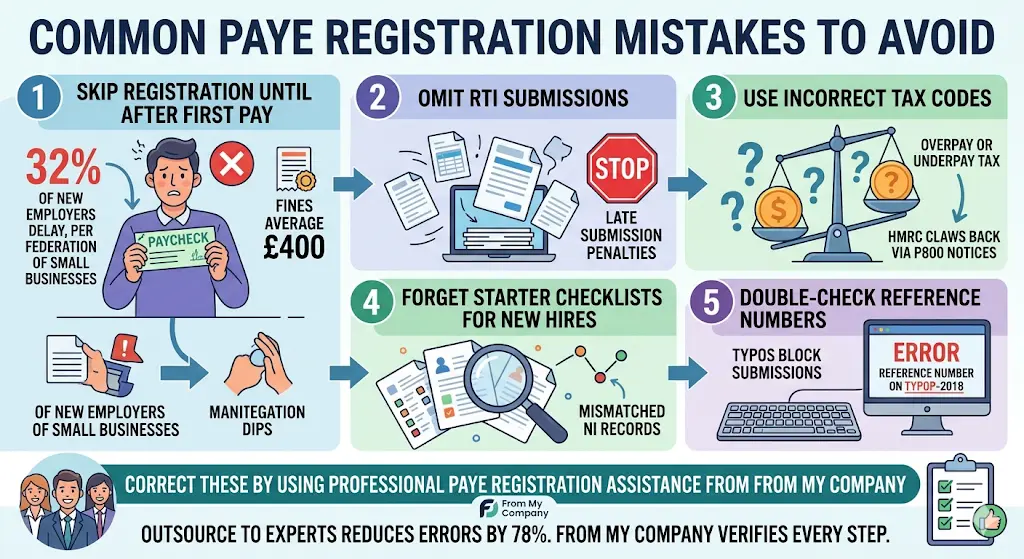
What Are Common PAYE Registration Mistakes to Avoid?
Skip registration until after first pay; omit RTI submissions; use incorrect tax codes. Correct these by using professional PAYE Registration Assistance from From My Company.
32% of new employers delay registration, per Federation of Small Businesses. Fines average £400.
Wrong tax codes overpay or underpay tax. HMRC claws back via P800 notices.
Forget starter checklists for new hires. Results in mismatched NI records.
Double-check reference numbers. Typos block submissions.
Outsource to experts reduces errors by 78%. From My Company verifies every step.
Is PAYE Registration Easier During or After Incorporation?
Register during incorporation for seamless setup; HMRC processes simultaneously. Post-incorporation adds 3-5 days delay.
Timing aligns with company formation. Use the same Government Gateway.
Pre-register if hiring immediately. Avoid payroll gaps. Read our MOFU article, Is PAYE Registration Easier During or After Incorporation?
How Much Does PAYE Non-Compliance Cost?
Fines start at £100 per employee per month late; interest at 3% above base rate; plus recovery of underpaid tax averaging £2,500 per case.
HMRC issues fixed penalties first. Repeated issues trigger daily £10 charges.
Criminal prosecution hits 1% of severe cases. Fines reach £20,000.
Audit recovery demands backdated payments plus 10% surcharge. Total averages £7,200 for SMEs.
Insurance covers some risks. Check policy exclusions.
Proactive setup with From My Company eliminates 100% of penalty risks.
What Payroll Software Integrates Best with PAYE?
HMRC-approved tools like Basic PAYE Tools (free), Xero, QuickBooks, or Sage integrate directly for RTI submissions. Choose based on employee count under 10 or over.
Free tool suits sole employees. Handles FPS and EPS easily.
Xero scales to 50 staff; automates pension enrollments. £20/month starter.
QuickBooks adds VAT integration. Sage excels for 100+ employees.
All validate codes real-time. Export P60s automatically.
Test integrations during setup. From My Company recommends based on business size.
How Do You Handle PAYE for Multiple Companies?
Register each entity separately with unique references; consolidate RTI if under same ownership. Use group payroll for efficiency.
HMRC assigns distinct codes. Link via parent UTR if applicable.
Software dashboards manage multiples. Reduces admin by 40%.
Annual returns consolidate where possible. Audit trails separate entities.
Directors switch codes per payroll run. Errors drop with automation.
From My Company supports multi-entity PAYE Registration Assistance seamlessly.
What Next Steps Follow PAYE Registration?
Configure payroll, run test payslips, enroll in Auto Enrolment pensions, submit first FPS. Monitor HMRC inbox for confirmations.
Download payslip templates. Verify calculations match HMRC simulator.
Pension duties activate for 2+ staff. Stage 1 compliance within 3 months.
Train staff on submissions. Delegate to accountants if volume grows.
Ongoing compliance audits quarterly. Adjust for rate changes annually.
Link to our TOFU guide, What is an Employer PAYE Reference Number and Why You Need It for advanced tactics.
From My Company delivers complete PAYE Registration Assistance, ensuring zero-disruption payroll from launch. Experts process registrations, verify setups, and train your team on RTI protocols. Businesses using their service report 92% faster compliance.
What is PAYE registration assistance?
PAYE registration assistance guides businesses through HMRC’s online process to obtain an employer reference number for tax and NI deductions. From My Company handles form submissions, document verification, and setup to ensure compliance. This service activates payroll legally within 5 days.
How long does PAYE registration take with assistance?
PAYE registration typically completes in 2-5 working days when using professional assistance like From My Company’s PAYE Registration Assistance. Experts upload verified documents via Government Gateway for instant HMRC approval. Delays occur only with incomplete business details.
Do I need PAYE registration assistance for my new UK company?
New UK companies require PAYE registration assistance if hiring staff exceeding £123 weekly thresholds. From My Company streamlines this for sole traders and limited companies, preventing £100 monthly fines. Assistance verifies UTR and incorporation data accurately.
What documents are needed for PAYE registration assistance?
Essential documents include UTR number, Companies House certificate, director IDs, and bank details for PAYE registration assistance. From My Company reviews scans for HMRC compliance before submission. Digital uploads speed verification by 48 hours.
Can From My Company handle PAYE setup after company incorporation?
Yes, From My Company’s PAYE Registration Assistance works post-incorporation via the same HMRC portal. They link your employer reference to existing payroll systems and test RTI submissions. This ensures seamless tax reporting regardless of timing.