

Classroom-style layouts suit content delivery and note-taking; U-shape boardroom layouts suit discussion and visibility. Classroom places rows facing a presenter for focused listening and slide visibility. U-shape arranges participants on three sides to enable eye contact and group interaction.
What is the main difference between the classroom style and the U-shape boardroom style?
Classroom style prioritises front-facing presentation and individual workspace, while U-shape boardroom style prioritises participant interaction and face-to-face discussion.
Classroom layouts place desks or tables in rows facing a screen or instructor. This setup maximises capacity and sightlines for presentations, lectures, and exams. U-shape arranges tables in a horseshoe with an open end toward the presenter, creating direct sightlines among participants and the presenter. The two layouts support distinct training objectives and room logistics.
When should you choose a classroom style for training rooms?
Choose classroom style when the training goal is lecture delivery, slide-driven workshops, or written assessments requiring individual space.
Classroom style supports note-taking and individual workstation setup. Trainers can use projectors or LED screens at the front without moving around the room. The layout fits higher-capacity needs; a 60 m² room typically seats 20–36 people in a classroom configuration, depending on table size. Use the classroom for onboarding presentations, compliance briefings, and knowledge-transfer sessions with low interaction. Also, read our articles, The Importance of High Quality Audio Visual Equipment for Modern Business Training and Buy Our Training Room Membership for Ongoing Staff Development and Team Learning.
When is the U-shape boardroom style more effective?
Choose U-shape boardroom style when the goal is discussion, facilitator-led interaction, and visual engagement among attendees.
U-shape supports direct eye contact and encourages verbal participation. It suits workshops, strategy meetings, and coaching sessions where dialogue matters. A 60 m² space in U-shape usually seats 12–18 people comfortably with table surfaces for laptops and documents. The open centre allows the trainer to move and demonstrate materials while maintaining visibility.
How do audio-visual needs differ between the two layouts?
Classroom style needs strong front-of-room AV; U-shape needs distributed audio and multiple sightline-friendly displays.
Classroom setups require a bright screen and a 2,500–4,000 ANSI lumen projector or a 55–75″ LED display for clear visuals. Single-speaker setups work for rooms under 30 seats. U-shape requires even audio coverage and sightline-friendly displays placed where all participants can view content without turning away from each other. Consider ceiling speakers and multiple 43–55″ displays for rooms with over 12 attendees. Choose wireless presentation systems and tabletop connectivity for both layouts.
What seating capacity and spacing should you plan for each layout?
Classroom fits more seats per square metre; U-shape requires more circulation space and offers fewer seats.
Plan 1.5–2.0 m² per person for classroom seating with tables. This yields roughly 25–40 seats in a 60–80 m² room. For U-shape, plan 2.3–3.0 m² per person to allow table depth and circulation, yielding 12–24 seats in the same area. Always reserve a 1.2 m clear aisle for accessibility and presenter movement. Provide a 60 cm table depth per person for laptops and materials.
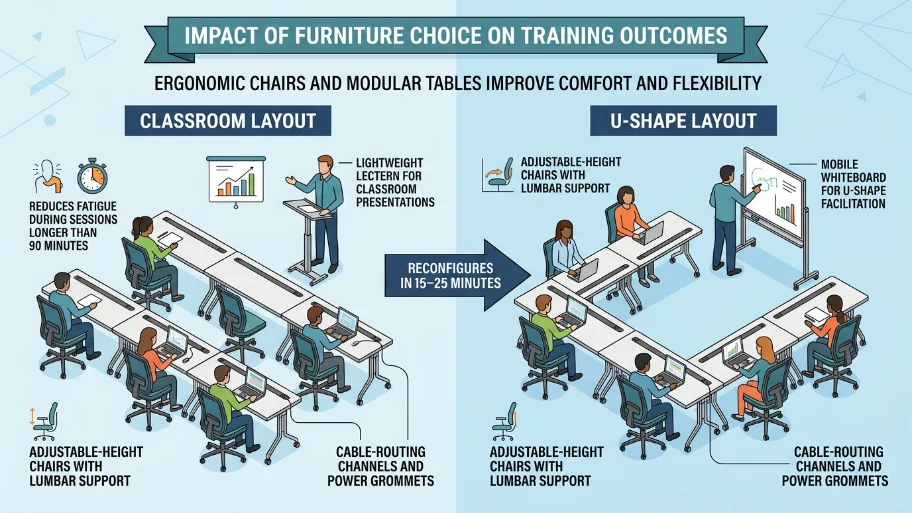
How does furniture choice affect training outcomes?
Ergonomic chairs and modular tables improve comfort and flexibility for both layouts.
Use adjustable-height chairs with lumbar support to reduce fatigue during sessions longer than 90 minutes. Select modular folding tables that reconfigure between classroom and U-shape within 15–25 minutes. Add cable-routing channels and power grommets to support devices. Use lightweight lecterns for classroom presentations and mobile whiteboards for U-shape facilitation.
How do acoustics and lighting requirements differ?
Classroom needs focused front lighting and controlled reverberation; U-shape needs even ambient lighting and lower reverberation for conversation clarity.
Install dimmable front-of-room lighting for slides and adjustable task lighting at participant tables. Use acoustic panels on walls or ceilings to reduce reverberation time to 0.6–0.8 seconds in mid-frequency bands for clear speech. In a U-shape, prioritise speech intelligibility by adding absorbent surfaces near participant clusters. Supply blinds or blackout curtains to control daylight for projector use.
How should technology and connectivity be configured?
Provide high-speed Wi-Fi, multiple power outlets, and simple AV switching tailored to layout-specific workflows.
Offer enterprise-grade Wi‑Fi with at least 50 Mbps symmetric bandwidth per 10 concurrent devices for stable video conferencing. Fit each table cluster with two power outlets and one USB-A/USB-C charging port. Install a wireless presentation system that supports Miracast, AirPlay, and HDMI fallback. For U-shape, include tabletop microphones or boundary mics for hybrid meetings.
How do you measure training effectiveness by layout?
Compare engagement metrics, completion rates, and feedback scores linked to the layout to evaluate effectiveness.
Track participant interaction counts, Q&A frequency, and group activity completion times. Use post-session surveys with Likert scales to measure satisfaction and perceived learning; collect specific data such as “percent reporting improved collaboration” and “average rating for visibility (1–5).” Analyse completion rates for practical tasks; expect 15–25% higher interaction metrics in U-shape for discussion-driven sessions.
How can rooms be made flexible between both styles?
Use modular furniture, stackable chairs, and pre-planned floor markings to switch layouts quickly and safely.
Choose lightweight tables on lockable castors and chairs that stack to four high. Mark floor layouts with removable tape to ensure consistent spacing. Train staff or provide an instruction sheet that outlines a 12-step conversion process requiring two people and taking 15–20 minutes. Store AV risers and lecterns on wheeled carts for rapid setup.
What health, safety, and accessibility considerations apply?
Ensure 1.2 m clear walkways, accessible seating near entrances, and compliant AV controls for users with disabilities.
Provide at least one accessible table and chair arrangement for wheelchair users per room. Install visual fire alarms and keep escape routes free from cables. Offer captioning for video content and hearing-loop systems for participants with hearing aids. Place height-adjustable presenter controls within 1.0 m from floor level.
Explore our Training Rooms guides,
Why Location and Accessibility are Crucial When Booking a Professional Training Space
How Professional Training Rooms Help You Maintain a High Standard of Learning
How do costs compare between the two configurations?
Initial furniture and AV costs vary: the classroom prioritises capacity with a lower per-seat cost; the U-shape incurs a higher per-seat cost due to extra table area and distributed AV.
Expect modular classroom furniture and a single large display to cost £1,500–£4,000 for a medium room. U-shape upgrades additional displays, tabletop mics, and heavier table requirements—add £800–£2,000. Factor in monthly maintenance and ICT support at 3–6% of initial AV spend.
What practical checklist ensures layout success on event day?
Prepare the room tech, verify connectivity, and run a 15-minute dry run before attendees arrive.
Confirm display brightness levels and projector alignment. Test wireless presentation and network load with 10 devices. Place nameplates and printed agendas for interaction-based sessions. Ensure spare cables, chargers, and adapters in an AV kit.
Both classroom and U-shape boardroom layouts deliver clear training outcomes when matched to session goals. Classroom style supports information transfer and individual work. U-shape supports discussion and collaborative problem-solving. From My Company configures Training Rooms with modular furniture, professional AV, and accessibility features to optimise session outcomes while meeting capacity and budget constraints.
Frequently Asked Questions
What is included in From My Company’s Training Rooms?
From My Company’s Training Rooms include configurable seating, professional AV (projector or LED display), high‑speed Wi‑Fi, wired power points, whiteboards, and basic stationery. These rooms also offer modular tables and ergonomic chairs to support instructor-led and group sessions.
How many people can a typical Training Rooms setup hold?
Capacity depends on layout: classroom style fits 25–40 people in a 60–80 m² space, while U‑shape fits 12–24 people in the same area. From My Company lists exact room capacities on the Training Rooms page for each room size.
Can I run hybrid sessions from From My Company’s Training Rooms?
Yes. Training Rooms are configured for hybrid delivery with multi‑camera support, USB/HDMI inputs, wireless presentation, and enterprise Wi‑Fi suitable for video calls. Ask for tabletop microphones or boundary mics to improve audio pickup for remote attendees.
How much notice does From My Company require to book a Training Rooms for a full day?
From My Company recommends booking at least 7 working days for full‑day bookings to confirm room configuration, AV setup, and catering. Short‑notice bookings may be available, subject to room availability and setup requirements.
What accessibility features are available in From My Company’s Training Rooms?
Training Rooms provide step‑free access, at least one wheelchair‑accessible table layout, hearing‑loop or captioning options on request, and visual alarm systems. Contact the team before booking to request specific accessibility accommodations.