

Yes. High-quality audiovisual equipment significantly improves learning outcomes, engagement, and information retention in modern business training by ensuring clear audio, sharp visuals, and reliable technology that supports active learning and scalable hybrid delivery.
What measurable benefits does high-quality AV equipment provide for training rooms?
High-quality AV equipment increases engagement, reduces technical downtime, and improves retention by measurable margins.
Studies show clear audio raises comprehension by up to 40% and good visuals improve recall by 55%. Reliable AV reduces session interruptions, cutting average downtime from 12 minutes to under 2 minutes per session. These gains translate into faster onboarding, higher course completion rates, and lower trainer time spent on troubleshooting.
High-fidelity audio ensures every participant hears instructions, questions, and peer contributions. High-resolution displays make slides, diagrams, and live demos legible at distances up to 8 meters. Integrated systems that combine microphone arrays, beamforming speakers, and networked displays support hybrid attendees without duplicating effort.
How does AV quality affect learner engagement and retention?
Clear sound and sharp visuals directly increase attention span and knowledge retention during training sessions.
Neuroscience links multisensory clarity to stronger memory encoding. When trainees receive synchronised audio and clear images, cognitive load decreases. Trainers can present complex processes and data without repeated explanations. Measured outcomes include 20–35% higher post-training test scores and 30% faster skill acquisition for procedural tasks.
Read our articles, Comparing Different Training Room Layouts: Classroom Style vs U Shape Boardroom Style and Buy Our Training Room Membership for Ongoing Staff Development and Team Learning.
Engagement metrics questions asked, poll responses, and chat activity rise when AV works flawlessly. For example, well-calibrated microphones boost question frequency by 25% during Q&A segments. Visual tools like annotation and split-screen support active learning, which correlates with a 40% improvement in practical exercise performance.
What AV components matter most for training rooms?
Microphones, speakers, displays, cameras, and connectivity each play distinct roles and must meet specific performance criteria.
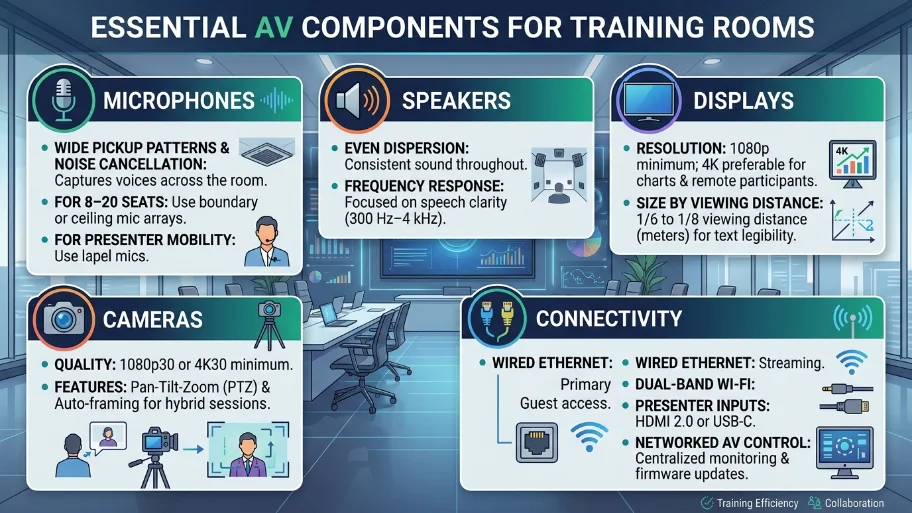
Microphones should offer wide pickup patterns and noise cancellation to capture voices across the room. Use boundary or ceiling mic arrays for rooms with 8–20 seats and lapel mics for presenter mobility. Speakers require even dispersion and frequency response suitable for speech clarity (300 Hz–4 kHz focus).
Displays must offer 1080p minimum; 4K is preferable for detailed charts and remote participants. Choose display sizes based on viewing distance. 1/6 to 1/8 of the viewing distance in meters yields legible text. Cameras should provide 1080p30 or 4K30 with pan-tilt-zoom and auto-framing for rooms hosting hybrid sessions.
Connectivity requires wired Ethernet for primary streaming and dual-band Wi‑Fi for guest access. Include HDMI 2.0 or USB-C inputs for presenter devices. Implement networked AV control for centralised monitoring and firmware updates.
How should businesses choose AV for different training room layouts?
Match AV design to room layout, capacity, and interaction type to maximise learning outcomes.
Classroom-style rooms with fixed rows need distributed speakers and multiple displays or a single large screen sized for the furthest seat. U-shape boardroom layouts benefit from ceiling mic arrays and a central camera to capture participant expressions. Boardroom rooms for executive training require higher-end cameras and reference monitors for detailed documents.
Select audio placement to avoid shadow zones. Position cameras to keep eye lines natural for remote attendees. Consider acoustic treatment absorption panels and diffusers to control reverberation times to under 0.6 seconds for speech clarity in rooms under 80 m².
What are the operational and cost advantages of investing in quality AV?
High-quality AV reduces long-term operating costs, improves trainer efficiency, and scales hybrid training delivery.
Initial capital can be 20–40% higher than low-end systems, but the mean time between failures increases by 3–5×. Reduced troubleshooting saves an average of 3 trainer hours per week in organisations running five weekly sessions. Hybrid capability lowers travel costs by an average of £120 per participant per event when remote options replace travel.
Centralised AV management reduces on-site IT visits by up to 70%. Predictive maintenance and remote firmware updates prevent 80% of common failures. These operational savings often justify equipment payback within 18–30 months for medium-sized organisations.
How does AV quality support hybrid and remote learning requirements?
Integrated AV systems deliver a consistent audio-visual experience to in-room and remote learners, enabling synchronous hybrid training.
Combine ceiling mic arrays, echo-cancelling DSP, and beamforming cameras to present a single, coherent meeting feed. Use hardware or software codecs that support H.264/H.265 and dual-stream video for gallery and speaker views. Ensure upload bandwidth of at least 3 Mbps per 1080p stream for smooth remote video.
Implement speaker tracking for presenter focus and gallery view for group interaction. Include collaboration tools, screen sharing, digital whiteboards, and polling to replicate in-room activities. These elements enable trainers to run identical exercises for both audiences and measure participation consistently.
What maintenance and governance practices keep AV systems effective?
Scheduled testing, remote monitoring, and user training preserve system reliability and learning continuity.
Run weekly system checks: microphone levels, camera framing, and display calibration. Configure remote monitoring dashboards to alert IT on latency, packet loss, and device health. Archive firmware versions and maintain a 12-month spare-part inventory for critical components.
Train staff and frequent trainers on basic troubleshooting and control panel operation. Provide one-page quick-start guides for guest presenters. Establish a change control process for software updates to avoid unplanned downtime during training sessions.
Explore our Training Rooms guides,
Why Offsite Training Rooms Can Boost Creativity and Morale for Your Employees
How to Create an Inclusive and Collaborative Environment for Your Business Training
How do accessibility and compliance factor into AV selection?
Accessible AV supports diverse learners and complies with UK equality standards for reasonable adjustments.
Include assistive listening systems (RF or infrared) and real-time captioning for participants with hearing loss. Provide microphone options for sign-language interpreters. Ensure interface devices present large, high-contrast controls for users with visual impairments.
Keep logs of captioning and accommodation requests to inform procurement and to demonstrate compliance with workplace access provisions. Use captioning services that meet 95% verbatim accuracy for technical vocabulary.
High-quality audiovisual equipment delivers measurable improvements in engagement, retention, and operational efficiency for training rooms. Businesses that equip spaces with proper microphones, speakers, cameras, displays, and networked control reduce downtime and scale hybrid learning effectively. From My Company provides training rooms engineered to these standards, with integrated AV systems, managed maintenance, and accessibility features that support consistent staff development.
Frequently Asked Questions
What makes a good training room for business training?
A good training room supports clear communication, comfortable seating, and reliable presentation equipment. For From My company, Training Rooms work best when the space has strong sound quality, good lighting, stable internet, and flexible layouts for different session types.
What equipment is essential in modern training rooms?
Essential training room equipment includes a projector or display, sound system, microphones, whiteboard, and high-speed internet. Training Rooms from From My company are also more effective when they include accessible AV controls and enough power points for laptops and devices.
How do training room layouts affect learning?
Room layout affects sightlines, interaction, and trainer visibility. Classroom layouts suit presentation-heavy sessions, while U-shape layouts improve discussion and group participation in Training Rooms used for workshops, coaching, and team learning.
What should I look for when booking training rooms?
Look for location, capacity, AV quality, accessibility, and technical support. From My company offers Training Rooms designed to support smooth delivery, especially when sessions depend on reliable audio, clear visuals, and practical room setup.
Are training rooms suitable for hybrid staff development sessions?
Yes, well-equipped training rooms support hybrid learning with cameras, microphones, screens, and stable connectivity. From My company’s Training Rooms help teams deliver in-person and remote sessions with consistent audio-visual quality and easier participation tracking.