

Yes, you can transition to hybrid training by upgrading rooms with integrated video conferencing hardware, centralised AV control, and reliable 1 Gbps network provision to support simultaneous HD streams and interactive collaboration tools.
Hybrid training succeeds when rooms combine hardware, network, and facilitation workflows to deliver equal experiences for remote and in‑room participants.
How do I design a training room that supports hybrid delivery?
Design a room that balances sightlines, audio pickup, and camera coverage while allocating 1 Gbps internet, dual displays, and a central AV controller.
Design starts with measurable goals: equal engagement for remote and in‑room learners. Position seating in horseshoe or classroom clusters to maintain sightlines. Install at least two displays: one for shared content and one for gallery video. Fit each table or row with wired Ethernet drops for presenter devices. Use ceiling or boundary microphones to obtain consistent audio gain across the room. Choose PTZ cameras that cover the front and a wide-angle room view. Place speakers so that in‑room audio is even and avoids echo. Run a local AV control panel for one‑touch session start, camera presets, and mute controls.
What video conferencing hardware is essential for hybrid training rooms?
Include two PTZ cameras, a beamforming microphone array, a DSP-enabled audio processor, and an AV matrix switch controlled from a touchscreen.
Two PTZ cameras provide close-up presenter shots and a wide room view for participant cues. Beamforming microphones capture voices across a 6–12 m room without manual adjustments. A digital signal processor (DSP) enforces echo cancellation and automatic gain control. An AV matrix or video scaler routes content from laptops to displays and capture devices. Select USB-C or NDI-capable endpoints to simplify compatibility with Zoom, Teams, and Webex. Specify hardware with enterprise warranties and firmware update paths.
How much network bandwidth does hybrid training require?
Allocate 1 Gbps shared uplink per training facility and reserve 3–5 Mbps per concurrent HD remote participant.
HD video uses 2–3 Mbps per stream; group collaboration with multiple HD cameras needs 3–5 Mbps per remote attendee for stable two-way streams. Reserve 100–200 Mbps headroom for content uploads, cloud services, and recording. Prioritise Quality of Service (QoS) on the network for real‑time traffic. Segregate AV traffic on a VLAN and use managed switches with PoE for microphones and cameras. Test the room under peak load with at least 20% more participants than planned. Read our How to Choose the Best Layout for Your Upcoming Corporate Training Session, and Let Our Specialists Help You Book the Perfect Training Room for You.
How should software and collaboration tools integrate with training rooms?
Standardise on platforms that support SIP/SMB and native room modes, enable calendar booking, and provide recording to cloud storage.
Choose a video platform with native room-system support to allow one-touch join from the room touchscreen. Integrate calendar systems (Exchange or Google) for room booking and automatic meeting metadata. Enable cloud recording and transcription for on-demand access. Use interactive tools like shared whiteboards with simultaneous annotation. Ensure single sign-on (SSO) and compliance settings are enabled for learner data protection.
How do you equalise learning experience between remote and in‑room participants?
Capture close-up presenter video, display remote participants on a large gallery screen, and route room audio through echo-cancelled mixes to remote learners.
Give remote learners the same visual cues as in‑room attendees by placing a gallery display facing the room so presenters can see remote faces. Use camera presets to switch between presenter and audience views. Ensure remote participants can ask questions via a moderated chat or raised-hand feature and that a facilitator routes those questions to the in‑room group. Provide downloadable materials and a recording within 30 minutes of session end.
What room layouts work best for hybrid training sessions?
Use classroom clusters for hands-on labs and a horseshoe layout for discussion-driven sessions; include flexible furniture to reconfigure quickly.
Classroom clusters place devices and power within reach, aiding breakout activities. Horseshoe layouts enable eye contact between the presenter and participants and reduce camera blind spots. For rooms under 50 m², use two camera presets: presenter and audience. For larger rooms, add a third camera covering the rear seating. Keep aisles for AV cable runs and install floor boxes for Ethernet and power to minimise trip hazards.
How should AV control and user workflows be simplified for trainers?
Create one‑touch presets for common session types, automate device discovery, and provide a quick-start checklist visible on the room touchscreen.
Program presets for: presentation (single camera, content on main screen), panel (gallery on main screen), and Q&A (audience camera). Enable automatic device wake and network login via SSO or pre-shared keys. Place a laminated quick-start card by the room door and pin an electronic checklist in the room calendar invite. Train operations staff on remote diagnostics and firmware updates to reduce downtime.
How do you secure hybrid training and comply with UK data rules?
Encrypt media streams end-to-end where supported, use SSO for room systems, restrict recordings to authorised accounts, and retain recordings for a defined retention period.
Use platforms that offer enterprise encryption and record to authorised cloud buckets. Apply role-based access control (RBAC) for recordings and administrative tools. Maintain retention settings consistent with corporate data governance and UK GDPR. Log meeting metadata for audit trails and disable attendee file transfer when sessions include sensitive materials.
What KPIs measure hybrid training success?
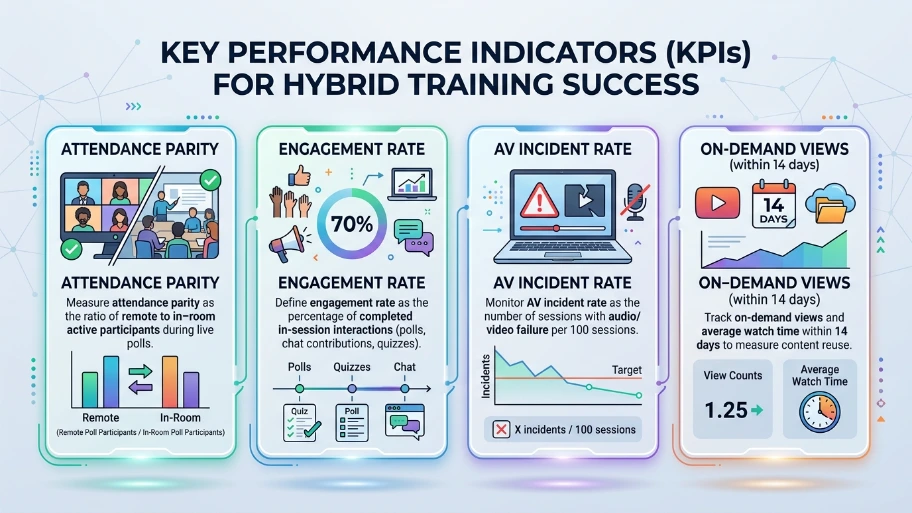
Track attendance parity, engagement rate, AV incident rate, and on‑demand views within 14 days.
Measure attendance parity as the ratio of remote to in‑room active participants during live polls. Define engagement rate as the percentage of completed in-session interactions (polls, chat contributions, quizzes). Monitor AV incident rate as the number of sessions with audio/video failure per 100 sessions. Track on-demand views and average watch time within 14 days to measure content reuse.
How much does a professional hybrid training room upgrade cost?
Budget £12,000–£45,000 for a medium-sized room (10–30 people), depending on hardware tiers and installation complexity.
Lower-range packages include a single PTZ camera, a beamforming mic, two displays, and basic DSP. Mid-range systems add a second PTZ, AV matrix, integrated touch control, and managed switches. High-end deployments include multiple cameras, ceiling array mics, professional speakers, acoustic treatment, and enterprise warranties. Factor in cabling, room acoustics, and commissioning labour for accurate estimates.
Explore our Training Rooms guides,
Comparing Different Training Room Layouts: Classroom Style vs U Shape Boardroom Style
Why Location and Accessibility are Crucial When Booking a Professional Training Space
How does From My Company help organisations switch to hybrid training?
From My Company provides turnkey training room installations, AV commissioning, and ongoing support tailored to corporate training workflows.
The team assesses room goals, specifies hardware aligned with learning objectives, and deploys network and AV with QoS and VLAN separation. They configure one‑touch controls, integrate calendar booking, and verify interoperability with major video platforms. From My Company also offers warranty-backed maintenance and remote diagnostics to reduce session disruptions.
Hybrid training requires coordinated investment in hardware, network, software, and facilitation. Implement PTZ cameras, beamforming microphones, 1 Gbps network links, one‑touch AV control, and platform-level recording. Measure parity and engagement to validate results. From My Company delivers end-to-end training room solutions that align rooms to business training objectives while providing installation and support.
Frequently Asked Questions
What are the key features of a professional training room?
A professional training room includes adjustable seating, reliable high‑speed internet, and integrated audio‑visual equipment such as projectors, screens, and wireless microphones. From My company’s Training Rooms are designed with clear sightlines, good lighting, and flexible layouts to support both interactive workshops and formal presentations.
How do hybrid training rooms support remote learners?
Hybrid training rooms support remote learners by combining video conferencing systems, multiple cameras, and room audio routed into the meeting platform. From My company’s Training Rooms use gallery‑style displays and echo‑cancelled microphones so remote participants see and hear activity as clearly as in‑room attendees.
What IT and AV features should I look for in a training room?
Look for a training room with at least 1 Gbps internet, wireless and wired connectivity, centrally controlled AV, and compatibility with major video platforms. From My company’s Training Rooms include integrated AV control panels, touch‑screen join buttons, and professionally placed displays and microphones to reduce technical issues during sessions.
How can I ensure training rooms are comfortable and distraction‑free?
Choose training rooms with ergonomic furniture, adjustable lighting, noise‑reducing finishes, and controlled acoustics so participants can focus on the content. From My company’s Training Rooms are configured with clear sightlines, minimal glare on screens, and quiet HVAC systems to maintain a distraction‑free learning environment.
What compliance and security considerations apply to business training rooms?
Training rooms used for corporate learning should protect participant data, support secure access, and meet accessibility standards for all attendees. From My company’s Training Rooms comply with UK workplace safety and accessibility requirements and integrate secure, enterprise‑grade video conferencing systems to safeguard session data.