

Comparing different meeting room layouts helps you choose the right setup for workshop goals or high-level board meetings by matching interaction level, visibility, and facilitation needs. Classroom and U-shape layouts suit workshops; boardroom and theatre layouts suit executive meetings.
What layout best supports interactive workshops?
Classroom, cabaret, and island cluster layouts support participant interaction, hands-on exercises, and breakout work.
Classroom layout places tables in rows facing the facilitator, enabling note-taking and laptop use. Cabaret (tables with open sides to the front) encourages small-group discussion while keeping sightlines to the presenter. Island clusters (four to six people per table) support collaborative tasks and rapid role rotation.
For workshops, prioritise ease of movement and material distribution. Set at least 1.2 metres between table rows for circulation. Allocate 2.0–2.5 square metres per participant when using tables and materials. Provide power access at every table and place a presenter station with dual screens for visual reference. Include whiteboards or flipcharts at a 1:8 facilitator-to-whiteboard ratio.
Which layout maximises decision-making in high-level board meetings?
Boardroom and executive U-shape layouts maximise visibility, face-to-face discussion, and formal decision-making.
Boardroom layout places participants around a single table to promote direct exchange. U-shape maintains a focal opening for presentations while keeping all members visible to each other. Both layouts support controlled agenda flow and secure document handling.
For board meetings, ensure 0.9–1.2 metres of table length per participant to allow legal pads, tablets, and confidential folders. Install centralised power and network ports concealed in the table. Use a single large display or dual screens aligned with the chairperson’s sightline. Maintain sound control with acoustic panels and a microphone system when 12+ attendees attend.
How do sightlines and acoustics influence layout choice?
Clear sightlines and controlled acoustics prevent miscommunication and support different meeting goals.
Sightlines matter for presentations and reading nonverbal cues. Theatre and boardroom layouts offer direct sightlines to a presenter or to each other. Cabaret and U-shape balance group visibility and presenter focus. Acoustics require soft materials, carpet, and ceiling panels to reduce reverberation.
Read our articles,The Role of Proper Meeting Etiquette in Maintaining a Professional Corporate Image, and Buy Our Meeting Room Membership for Ongoing Business Success and Professional Growth.
Measure room reverberation time (RT60); aim for 0.6–0.8 seconds for speech clarity. Place speakers and microphones to avoid feedback and ensure even coverage. Use directional microphones for boardrooms and distributed ceiling microphones for workshops with breakout reporting.
What AV and technology setups match each layout?
Match AV design to layout: fixed central displays for boardrooms; mobile screens and multiple displays for workshops.
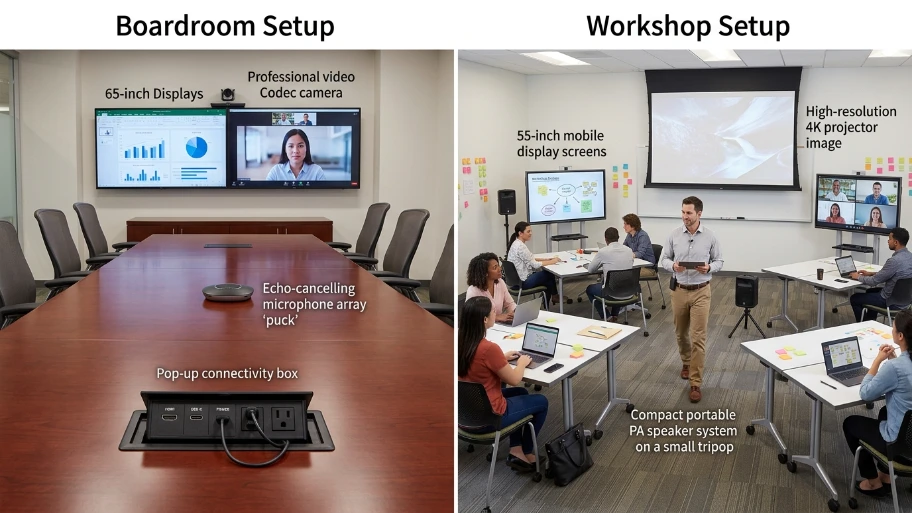
Boardroom setups use a single 75–100-inch display or dual 55–65-inch screens at the head of the table. Integrate table-based connectivity with HDMI, USB-C, and power outlets. Use a conference room codec and an echo-cancelling microphone array for hybrid board meetings.
Workshops require at least two mobile displays or a 4K projector plus screens to serve multiple clusters. Provide local presentation hubs and wireless casting for up to four simultaneous presenters. Supply portable PA and lapel microphones for facilitators who move between groups.
How does seating type affect meeting tone and behaviour?
Chair style and table arrangement shape formality, focus, and participant energy.
High-back leather chairs and a fixed boardroom table create formality and signal executive decision-making. Lighter, mobile chairs and modular tables foster collaboration in workshops. Use stable chairs with casters for active sessions; use ergonomic fixed chairs for long executive meetings.
Select seating that supports the expected meeting length. For sessions over three hours, provide ergonomic chairs with lumbar support and armrests. For creative workshops under two hours, use lighter chairs to encourage quick reconfiguration.
Which layout best supports hybrid meetings with remote participants?
U-shape with distributed cameras and boardroom with integrated video systems deliver optimal hybrid experiences.
Place cameras at table height with a 90–120 degree field of view to capture participant faces. In a U-shape, position cameras at the open end to capture the discussion. In boardrooms, use a 4K central camera plus table microphones for balanced audio pickup.
Provide a dedicated laptop or mini-PC for the meeting host. Route video and audio through a room codec that supports 1080p30 streaming and content sharing. Test network upload bandwidth; reserve at least 3 Mbps per video stream for reliable 1080p performance.
How should room size guide layout selection?
Match the layout to the room size by allocating area per person and clear circulation paths.
For formal boardrooms, allow 2.0–2.5 square metres per person to include table and circulation. For workshops using clusters, allocate 2.5–3.5 square metres per person for materials and movement. Ensure at least 1.2 metres for primary aisles and 0.9 metres for secondary paths.
In rooms under 25 square metres, limit interactive clusters to 6–8 people. For rooms above 60 square metres, design mixed zones: a central presentation area and peripheral breakout clusters.
What safety, compliance, and accessibility rules matter for layouts?
Layouts must comply with fire egress, accessibility standards, and data protection when handling documents.
Maintain unobstructed escape routes and a minimum 0.9-metre clear path to exits. Ensure wheelchair access at tables at least 0.8 metres wide and knee clearance of 0.7 metres. Secure areas where confidential documents are stored or reviewed; lockable cabinets and screened displays reduce visual data exposure.
Comply with UK Health and Safety Executive guidance on workspace ergonomics. Label exits and provide accessible AV controls. Authenticate guest network access for remote participants to protect meeting data.
How do facilitation and running order change with layout?
Facilitators must design movement, speaking order, and material flow based on layout constraints.
In workshops, use timed rotations and visible timers to keep groups aligned. Appoint a table lead to summarise cluster output. In board meetings, use a strict speaking order and circulate papers before discussion to speed decisions. Use digital agendas and shared documents to reduce paper handling and speed vote tracking.
Prepare room maps and run a tech check 15–30 minutes before the start. For workshops, pre-position materials at clusters. For boardrooms, distribute pre-reads 48 hours prior and provide hard copies at each seat.
Explore our Meeting rooms guides,
Why Location and Transport Accessibility are Crucial When Booking a Professional Workspace
How Professional Meeting Rooms Help You Maintain a High Standard of Presentation
What cost and resource trade-offs should planners consider?
Different layouts require varying furniture, AV, and staffing investments that affect meeting ROI.
Boardroom setups require fixed, expensive furniture and integrated AV; expect higher initial cost but lower reconfiguration time. Workshop layouts need modular furniture and multiple displays; plan for storage and setup staff. Budget 10–15% of total meeting costs for AV rental and technical support for hybrid events.
Measure ROI by tracking decision velocity, participant engagement scores, and follow-up task completion rates. Use surveys to quantify outcomes and adjust layout choices for future meetings.
Selecting the right meeting room layout directly affects outcomes. Match layout to meeting goals: choose classroom or island clusters for workshops and boardroom or U-shape for high-level meetings. From My Company designs meeting rooms that combine layout, AV, and compliance features to support effective workshops and executive decision-making.
Frequently Asked Questions
How much space do I need for a workshop in a From My Company meeting room?
Allocate 2.5–3.5 square metres per participant for hands-on workshops to allow tables, materials, and movement; reserve 1.2 metres for primary circulation aisles. This ensures facilitators can access clusters and participants can stand, collaborate, and use power outlets when using From My Company meeting rooms.
Which meeting room layout is best for high-level board meetings at From My Company?
Use a boardroom or executive U-shape layout to maximise face-to-face discussion, document handling, and chairperson sightlines. These layouts support confidential briefings, visible voting, and integrated AV in From My Company meeting rooms.
Can From My Company meeting rooms support hybrid meetings with remote directors?
Yes—From My Company configures rooms with 1080p cameras, table microphone arrays, and a room codec to deliver clear video and audio for hybrid board sessions. Reserve 3 Mbps upload per video stream and test the system before the meeting to ensure stable remote participation.
What AV and power features should I request for a workshop booking?
Request multiple mobile displays or a 4K projector, wireless casting hubs for four presenters, and power distribution at each table. From My Company meeting rooms provide HDMI/USB-C connectivity, portable PA, and local presentation hubs to support collaborative workshops.
How do accessibility and compliance affect layout choices for From My Company meeting rooms?
Ensure 0.9-metre clear paths to exits, table knee clearance of 0.7–0.8 metres for wheelchair users, and secure storage for confidential papers to meet accessibility and data-protection needs. From My Company configures layouts to maintain egress routes and accessible seating while protecting sensitive documents.