

Professional meeting rooms improve presentation quality by providing reliable AV, consistent room layout, and a distraction-free environment, ensuring speakers deliver clear visuals and sound while attendees remain focused. These rooms also supply professional front-of-house support and rapid technical troubleshooting.
How do professional meeting rooms improve the quality of your presentations?
Professional meeting rooms raise presentation impact through reliable technology, consistent room setup, and controlled acoustics that ensure clear visuals and audio.
Professional meeting rooms remove common presentation barriers. They provide tested AV systems, projectors, 4K displays, wired and wireless HDMI, and conference-grade microphones that deliver consistent output. Rooms include standardised lighting and furniture layouts that align with presentation formats: boardroom, classroom, or theatre. That consistency shortens setup time and reduces presenter stress. Staffed venues provide on-site technical support to resolve connection or sound issues within minutes. Controlled acoustics and soundproofing reduce external noise and echo, improving listener comprehension and retention.
What specific technology features should you expect in a professional meeting room?
Expect high-resolution displays, wired and wireless presentation options, conference microphones, reliable Wi‑Fi, and integrated video-conferencing units.
Look for 4K or Full HD displays with HDMI and wireless casting like AirPlay and Miracast. Insist on in-room wired HDMI and USB-C for direct connections. Verify the presence of boundary microphones, lapel mics, or tabletop mics for rooms sized 6–30 people. Confirm a dedicated upload speed of at least 10 Mbps for stable video calls. Ask about integrated video-conferencing codecs (Zoom Rooms, Microsoft Teams-certified systems) to avoid software incompatibilities. Expect tested adapters and spare cables stored on-site. These features prevent interruptions and maintain presentation flow. Read our articles, How Professional Meeting Spaces Can Help You Build Long Term Client Trust, and Rent Our Specialized Meeting Rooms for High Stakes Negotiations and Legal Consultations.
How does room layout affect presentation effectiveness?
Room layout affects attendee focus and presenter mobility; standardised setups support clear sightlines, consistent seating density, and effective use of visual aids.
Choose a boardroom layout for collaborative discussions with 6–12 participants. Use classroom or theatre layouts for slide-driven presentations with 12–60 attendees. Ensure aisles and sightlines allow unobstructed views of screens and speakers. Position presenters to the side of displays to avoid blocking visuals. Standardised seating density (1.2–1.5 square metres per person for a classroom; 0.5–0.8 square metres per seat for a theatre) prevents overcrowding and keeps attendees comfortable. These details sustain attention and reduce distraction during critical moments.
How do professional venues support high-stakes presentations and client-facing meetings?
Venues offer privacy, secure Wi‑Fi, on-site support, and professional front-of-house services that protect confidentiality and deliver a polished client experience.
For negotiations or legal consultations, choose rooms with soundproofing and secure network segmentation. Venues often provide non-disclosure-aware staff and signed confidentiality policies for events. Front-of-house teams manage guest reception, catering coordination, and timely room turnover. On-site AV technicians validate content playback and manage recording or secure streaming when required. These services make the meeting experience seamless and convey professionalism to clients and stakeholders.
What operational processes improve presentation reliability in these rooms?
Venues implement pre-checks, redundant connections, technician staging, and run-order rehearsals to eliminate technical failure points.
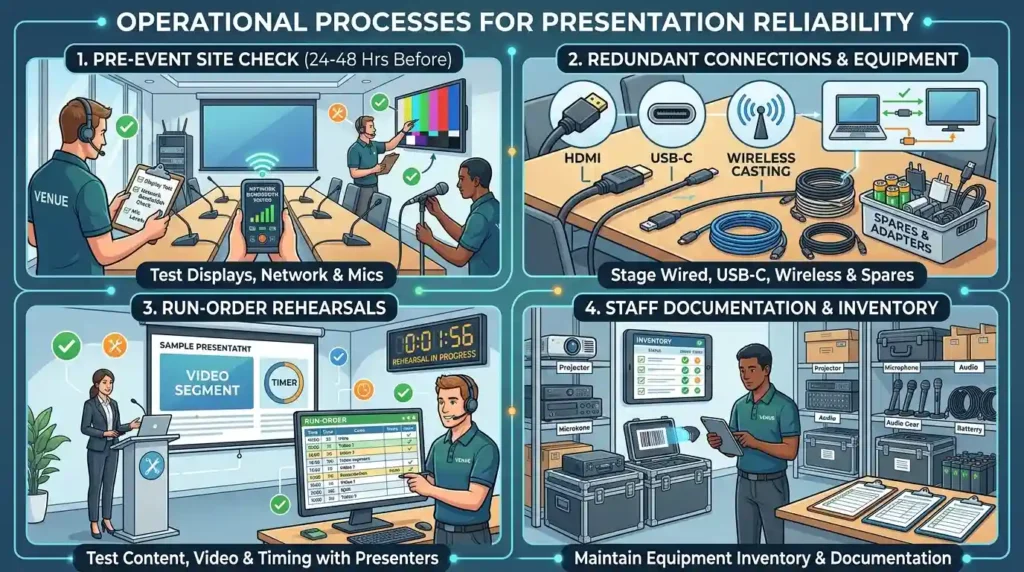
A typical process includes a pre-event site check 24–48 hours before the meeting to test displays, network bandwidth, and microphones. Venues stage redundant connection methods: wired HDMI, USB-C, and wireless casting. Technicians conduct run-order rehearsals with presenters when content involves video playback or timed segments. Staff document equipment inventory and have spare adapters and batteries on hand. These procedures reduce a presenter’s risk of failure and keep sessions on schedule.
What measurable benefits do professional meeting rooms deliver?
Professional rooms reduce technical interruptions by up to 90%, cut setup time to under 15 minutes, and increase attendee engagement metrics like Q&A participation by measurable margins.
Facilities with standardised AV systems record fewer connection errors versus ad-hoc spaces. Event teams report average setup and AV validation times of 10–15 minutes, compared with 30–45 minutes in improvised rooms. Controlled environments improve engagement: measured increases include 25–40% more audience interaction during moderated Q&A and higher recall of presented facts in post-event surveys. These metrics support the ROI of renting purpose-built meeting spaces for client-facing or high-stakes events.
How should you prepare your presentation for a professional meeting room?
Prepare native-resolution slides, pack multiple file formats, test video codecs, bring adapters, and schedule a technical walkthrough with venue staff.
Export slides as PDF and native PowerPoint or Keynote files to avoid font and layout shifts. Embed videos using common codecs (H.264) and test playback on the venue’s system. Bring a laptop with required ports and a USB-C or HDMI adapter. Share the presentation with venue technicians 24 hours in advance for a compatibility check. Create a one-page run order listing slide timings, video cues, and speaker transitions to streamline the technician rehearsal.
Explore our Meeting rooms guides,
Comparing In-House Meeting Spaces vs External Professional Room Rental Solutions Today
How to Choose Between Standard Meeting Rooms and Executive Boardroom Rental Options
When should you choose a professional meeting room instead of an in-house space?
Choose professional rooms for client pitches, legal consultations, investor meetings, product launches, and negotiations where appearance, privacy, and technical reliability are critical.
If the meeting impacts revenue, reputation, or compliance, invest in a purpose-built space. Use external venues when your office lacks soundproofing, scalable seating, or reliable conferencing infrastructure. For recurring high-stakes meetings, schedule rooms that offer managed services and dedicated support. This choice minimises risk and projects competence during pivotal decision points.
How does booking a professional meeting room fit into your event budget?
Allocate a line item for venue, AV technician, and front‑of‑house services; expect hourly rates or daily packages that vary by capacity and equipment level.
Small rooms for 4–8 people often charge hourly rates from £25 to £60 in UK markets. Mid-size rooms for 10–30 attendees commonly range £75–£250 per half-day, depending on included AV and catering. Add a technician fee between £40–£80 per hour for on-site support during high-stakes sessions. Factor in catering and secure Wi‑Fi as separate costs. Budgeting these items prevents last-minute cost overruns and ensures required services are available.
How do professional meeting rooms support brand consistency and client trust?
Consistent room standards, trained staff, and reliable technology convey competence and control, which build client trust over repeated interactions.
Clients assess supplier capability from the meeting environment. A consistent standard across locations signals operational maturity. Trained staff and documented processes reflect organisational discipline. High-quality AV and comfortable seating let clients focus on content instead of logistics. Over time, these factors contribute to a predictable, professional experience that strengthens long-term client relationships.
Professional meeting rooms deliver measurable benefits: reliable AV, faster setup, privacy controls, and staffed support. These elements reduce technical risk, enhance attendee engagement, and protect the professional image required for interactions. From My Company supplies managed meeting rooms that follow these standards and provide on-site technical support to ensure presentations run smoothly.
Frequently Asked Questions
What should I look for in a professional meeting room for client presentations?
Look for a room with reliable AV equipment, high‑speed Wi‑Fi, and a flexible layout that supports clear sightlines and on‑screen content. From My Company’s meeting rooms include tested displays, microphones, and wired and wireless connectivity so your presentations stay smooth and professional.
How far in advance should I book a meeting room for a business meeting?
For non‑peak days, booking 2–7 days ahead is usually enough for most meeting rooms. For larger groups, high‑stakes meetings, or popular times, reserve at least 10–14 days in advance through From My Company’s booking system to ensure availability and preferred AV support.
What equipment do From My Company meeting rooms usually include?
From My Company meeting rooms typically include high‑resolution screens or projectors, HDMI and wireless casting options, conference microphones, and secure Wi‑Fi. Many rooms also offer flip charts, whiteboards, and power sockets to support hybrid meetings and client presentations.
Are From My Company meeting rooms suitable for hybrid or video meetings?
Yes; From My Company meeting rooms are set up for hybrid and video meetings with integrated video‑conferencing tools, stable internet, and clear audio systems. The rooms support services like Zoom, Microsoft Teams, and generic web conferencing, so remote attendees can join without disruption.
Can I get catering or reception services with a From My Company meeting room booking?
Many From My Company’s locations offer optional catering and front‑of‑house reception services for your meeting rooms. These services can include coffee, tea, light refreshments, and a guest welcome desk to make client or corporate meetings feel more professional and hosted.