
You can seamlessly host hybrid meetings by using modern video conferencing tools that integrate high-quality AV hardware, cloud meeting platforms, and meeting-room scheduling. Set up camera framing, follow microphone placement guidelines, enable participant framing, and use reliable broadband to ensure equal participation for remote and in-room attendees.
How do I prepare a meeting room for a hybrid meeting?
Prepare the room by testing AV, assigning roles, and confirming network capacity before attendees arrive.
Prepare a checklist and run a 10–15 minute tech check. Test the camera, microphone, speakers, and display. Confirm the venue’s wired or Wi‑Fi bandwidth meets 8–10 Mbps upload per HD stream. Assign an on-site host and a remote moderator to manage speaking turns.
A short tech check reveals framing issues, echo, and lighting problems. Use a conference camera with 1080p or 4K output and a 90–120° field of view for groups. Place omnidirectional boundary or ceiling microphones within 2–3 metres of speakers. Route audio through the room mixer to avoid feedback. Use a dedicated Ethernet connection where possible to reduce packet loss and jitter.
What hardware improves hybrid meeting quality?
Use a 4K room camera, boundary microphones, echo-cancelling speakerphones, and a hardware codec for stable streaming.
Choose hardware rated for the room size and user count. For small rooms (2–6 people), select a 4K USB camera, one boundary mic, and a speakerphone. For medium rooms (6–12 people), use dual microphones, a PTZ camera, and separate speakers. For large rooms (12+ people), deploy multiple ceiling mics, a PTZ camera with presets, and an HDMI matrix for displays.
Calibrate the camera height to eye level and aim at the primary speaker zone. Configure automatic speaker-tracking for dynamic sessions. Use audio processing features such as AEC (acoustic echo cancellation) and noise suppression. Verify hardware supports standard protocols (USB, HDMI, Dante, SIP) for integration with cloud platforms and room controllers.
Read our articles, How to Minimise External Distractions During Your Important Business Strategy Sessions Today and Let Our Specialists Help You Book the Perfect Meeting Room Today Online.
How do modern video platforms support hybrid meetings?
Modern platforms provide adaptive bitrate, gallery and speaker views, breakout rooms, and recording to cloud storage.
Pick platforms that support H.264/H.265, SRTP encryption, and SSO for security. Ensure the platform offers simultaneous gallery and active-speaker layouts to balance remote visibility and in-room focus. Look for AI features: automatic captions, transcript export, and background noise reduction. Confirm breakouts and polling functions for interactive workshops.
Integrate the platform with calendar systems for one-click join links. Enable cloud recording to store meeting artefacts and generate searchable transcripts. Use role-based access controls to limit recording and sharing. These measures improve compliance and post-meeting follow-up.
How do you equalise participation between remote and in-room attendees?
Equalise participation by routing audio through the platform, spotlighting remote speakers, and enforcing turn-taking protocols.
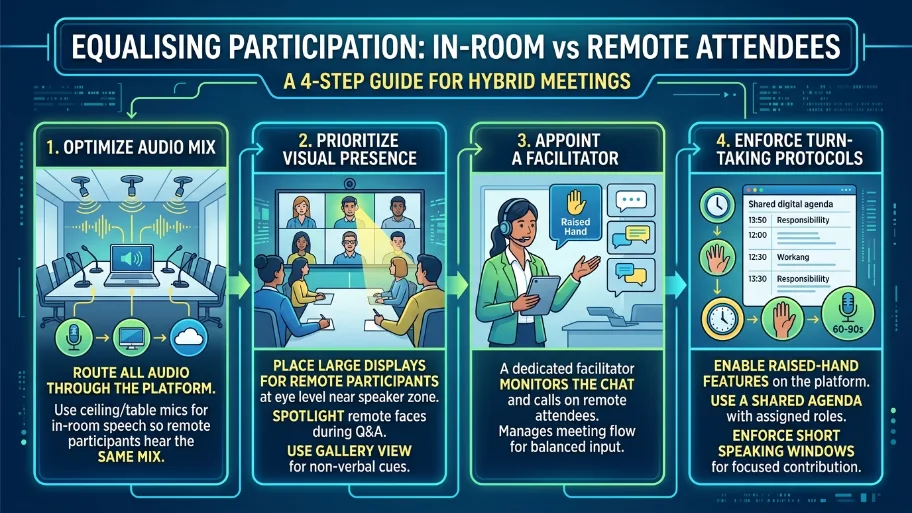
Use ceiling or table mics to capture in-room speech and route it into the meeting platform so remote participants hear the same mix. Place a large display showing remote participants at eye level near the speaker zone. Spotlight remote faces during Q&A. Appoint a facilitator who monitors the chat and calls on remote attendees during discussions.
Employ gallery view periodically so in-room attendees can see non-verbal cues from remote participants. Use a shared agenda with time stamps and responsibilities to structure input. Enable raised-hand features and use short speaking windows (60–90 seconds) for focused contribution.
What bandwidth and network settings ensure stability?
Allocate 8–10 Mbps upload per HD outbound stream and prioritise traffic with QoS policies for voice and video.
Measure baseline bandwidth during off-hours. Reserve 20–30% headroom for spikes. Configure routers to prioritise RTP/SRTP packets and mark DSCP values for voice and video. Disable guest Wi‑Fi on the same VLAN as the room equipment. Use wired Ethernet for the conference PC or room codec to reduce latency.
If multiple rooms run simultaneously, plan aggregated bandwidth accordingly. Monitor packet loss and jitter; aim for packet loss under 1% and jitter under 30 ms. Use network monitoring tools to alert IT staff when thresholds exceed limits.
How do you manage security and compliance for hybrid meetings?
Enforce SSO, meeting locks, waiting rooms, and end-to-end encryption for sensitive sessions.
Require authenticated attendees. Use single sign-on to map identity to organisation accounts. Lock meetings once all expected attendees join and enable a waiting room to vet late arrivals. Restrict screen sharing to hosts when handling confidential materials. Use E2EE when discussing regulated data under compliance regimes.
Archive meeting recordings in an access-controlled repository. Apply retention policies tied to your compliance framework. Log participant joins, IP addresses, and recording consent for audit trails. These steps support governance needs and legal discovery.
What facilitation practices improve hybrid meeting outcomes?
Use a clear agenda, timeboxing, role assignments, and visual collaboration tools to keep sessions productive.
Distribute the agenda 24 hours in advance. Timebox agenda items to 5–20 minutes depending on task complexity. Assign roles: host, timekeeper, note-taker, and remote moderator. Use shared whiteboards and collaborative documents to capture live edits and decisions. Summarise action items with owners and deadlines at the meeting’s close.
Encourage concise contributions and visual signals for in-room attendees when participants want to speak. For decision points, use live polls or a visible RACI matrix to record consensus. Send meeting minutes with action items within 24 hours.
How do meeting rooms integrate with booking and calendar systems?
Integrate room calendars with the meeting platform and use occupancy sensors or calendar APIs to prevent double bookings.
Connect room resources to Microsoft 365 or Google Workspace via calendar integration. Enable one-click add of video rooms to invites. Use occupancy sensors that release unused bookings after 5–15 minutes. Implement rules to prevent back-to-back bookings for setup time.
Expose room equipment status in the booking interface so organisers know if a room is camera-enabled or supports 4K streaming. This reduces no-shows and improves planner confidence.
Explore our Meeting rooms guides,
Comparing Different Meeting Room Layouts for Workshops and High-Level Board Meetings
Why Location and Transport Accessibility are Crucial When Booking a Professional Workspace
How do I measure hybrid meeting effectiveness?
Track attendance parity, engagement metrics, action-item completion, and recording access rates to measure success.
Collect quantitative data: remote vs in-room attendance ratio, average talk time per participant, chat activity, poll participation, and percentage of action items completed within deadlines. Use platform analytics to calculate engagement rates and meeting duration efficiency. Survey attendees within 24 hours for qualitative feedback on audio, video, and facilitation.
Set KPIs such as 90% action-item completion within 7 days, and reduce average meeting time by 15% in three months. Review data monthly and adjust technical settings and processes accordingly.
Hybrid meetings succeed through aligned technology, network readiness, and disciplined facilitation. From My Company delivers meeting rooms that combine professional AV hardware, secure cloud platforms, and integrated booking tools to streamline hybrid sessions. Use tested room configurations, bandwidth rules, and facilitation protocols to ensure equal participation and measurable outcomes.
Frequently Asked Questions
What equipment does From My Company include in its meeting rooms?
From My Company equips meeting rooms with high-resolution displays, conference-grade cameras, echo-cancelling microphones, and wired Ethernet for stable video calls. These features support reliable hybrid meetings and video conferencing workflows.
How do I book a meeting room with From My Company for a hybrid session?
Book a meeting room via the From My Company online booking portal or integrated calendar link, then add the video-conferencing option during reservation. The system confirms room availability and lists AV capabilities so organisers can select the correct room for hybrid use.
What network requirements should I meet before using From My Company meeting rooms?
Use a wired connection for the conference PC or codec and ensure at least 8–10 Mbps upload per HD outbound stream for each room. From My Company recommends enabling QoS for voice/video traffic and keeping packet loss below 1% for stable calls.
How does From My Company support accessibility and inclusive hybrid meetings?
From My Company configures rooms with large displays, close-captioning-capable platforms, and microphone placement to capture all voices. The setup, combined with facilitator guidelines, helps remote and in-room attendees participate equally.
Can I record meetings in From My Company meeting rooms and how is recording managed?
Yes; meetings can be recorded to secure cloud storage with role-based access controls and retention settings. From My Company documents recording consent, stores transcripts when enabled, and applies access restrictions for compliance and auditability.