
Yes, choose a layout that matches group size, learning goals, and interaction type while prioritising sightlines, audio, and flexible furniture.
How do I match room layout to group size and learning goals?
Match the layout to the exact headcount and teaching method: use theatre for 50+ lecture groups, classroom for 16–40 instructor-led sessions, U-shape for 8–20 discussion-led groups, and breakouts for workshops under 30.
Choose a layout after you confirm the exact number of attendees and the primary learning goal. Measure usable floor space in square metres. Allocate 1.5–2.0 m² per seated participant for tight setups and 2.5–3.0 m² for hands-on activities. Verify that sightlines allow every attendee to see the presenter and screens without obstruction.
Which technical features must the layout support?
Ensure the layout provides direct sightlines to displays, clear microphone coverage, and wired or gigabit Wi‑Fi at every seat.
Place displays at a height visible from the back row. Position microphones for presenter mobility; use boundary or lapel mics for sessions with 15+ participants. Provide a minimum of 50 Mbps symmetric internet for video conferencing and a 5–10 Gbps wired backbone if multiple rooms run simultaneous streams. Include HDMI/USB-C on-panel inputs and at least two spare charging points per table.
What seating arrangements improve engagement?
Select seating that supports interaction levels: clusters for small-group tasks, a horseshoe for open discussion, and rows for large lectures.
Arrange chairs to maintain 60–90 cm between seatbacks for comfort. For group work, form clusters of 4–6 chairs with shared tables and power. For Q&A sessions, leave 1.2–1.5 m aisle space to allow presenters to walk among participants. For hybrid sessions, reserve a front row for on-site participants who will interact most with remote attendees and place cameras to capture them.
Read our How to Seamlessly Transition to Hybrid Training Using Modern Video Conferencing Rooms and Let Our Specialists Help You Book the Perfect Training Room for You.
How do I design layouts for hybrid training?
Place camera(s) to capture both presenter and audience; use at least two camera angles and one room microphone per 12 participants.
Mount a primary wide-angle camera behind the presenter that captures the screen and front rows. Add a secondary camera to show audience reactions. Deploy a boundary mic or ceiling array to pick up audience questions; supplement with lapel mics for presenters. Arrange participant seating in shallow rows or clusters so remote viewers see faces clearly. Integrate a control table with a PC or codec near the front for AV management.
What furniture choices increase flexibility?
Choose mobile tables, stackable chairs, and modular lecterns to switch layouts within 15–20 minutes.
Use tables on castors that lock. Select chairs that stack to six units and weigh under 7 kg each. Use fold-flat tables for quick storage. Keep three layout kits: lecture kit (rows), collaborative kit (clusters), and workshop kit (breakout pods). Store cable ducts and power islands in lockable cabinets for rapid reconfiguration.
How does accessibility shape layout decisions?
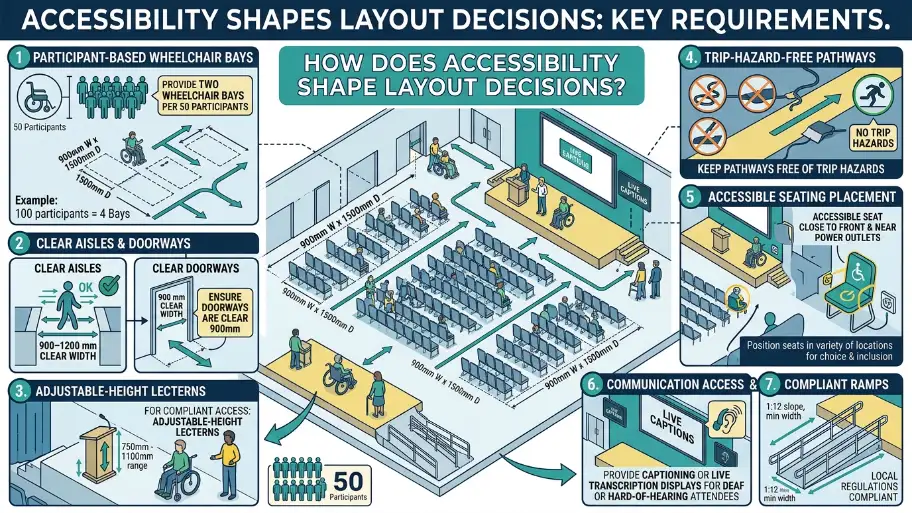
Provide two wheelchair bays per 50 participants, 900–1200 mm clear aisles, and adjustable-height lecterns for compliant access.
Keep pathways free of trip hazards. Position an accessible seat close to the front and near power outlets. Provide captioning or live transcription displays for deaf or hard-of-hearing attendees. Ensure doorways are clear 900 mm, and that ramps meet local regulations.
What lighting and acoustics requirements affect layout?
Use layered lighting with 300–500 lux on presenter areas and 200–300 lux on audience zones; apply acoustic panels to keep RT60 under 0.8 seconds.
Install dimmable front lights for presenter visibility and indirect ceiling lights for participant comfort. Avoid direct glare on screens by angling lights or adding hoods. Add acoustic absorption on walls or ceilings to reduce reverberation. Use sound masking if adjacent rooms run concurrently.
How should power and cable access guide table placement?
Place power islands every 6–8 m and provide at least two AC outlets and two USB-A/USB-C ports per four-person table.
Route cables through recessed ducts or floor boxes to avoid tripping hazards. Mark dedicated AV cable paths for in-room displays and cameras. For workshops requiring laptops and devices, include surge-protected distribution with individual circuit breakers.
What safety and compliance checks are necessary?
Verify capacity against fire-code limits, test emergency egress paths, and document AV equipment PAT testing annually.
Confirm maximum occupancy from the building’s fire certificate. Keep evacuation signage visible and ensure exit routes are unobstructed by temporary furniture. Schedule portable appliance testing and log maintenance for all AV racks and power supplies.
How do I evaluate layout during a site visit?
Count fixed obstacles, measure room dimensions, test sightlines from the back row, and run a full AV check with remote participants.
Bring a tape measure and a checklist: room length and width, ceiling height, number of fixed pillars, location of power outlets, and window positions. Place a test camera at proposed mount points and invite remote colleagues to confirm audio and video clarity. Time for a full layout change to validate the 15–20 minute reconfiguration target.
Explore our Training Rooms guides,
The Importance of High Quality Audio Visual Equipment for Modern Business Training
How to Create an Inclusive and Collaborative Environment for Your Business Training
What budget trade-offs affect layout choices?
Prioritise sightlines, audio quality, and reliable connectivity over premium furniture when the budget is limited.
Allocate budget percentages: AV and connectivity 45%, seating and tables 30%, lighting and acoustics 15%, contingency 10%. Investing in modular AV systems pays off across multiple bookings. Lower-cost chairs remain acceptable if sightlines and technical needs are met.
Choose a layout by matching group size, learning goals, and technical needs. Prioritise sightlines, audio, and connectivity. Verify accessibility, safety, and reconfiguration time. Implement hybrid-ready audiovisuals and mobile furniture to support diverse training formats.
From My Company supplies fully equipped Training Rooms with mobile furniture, hybrid-ready AV, and compliance checks to match your chosen layout. The rooms adapt quickly for lectures, workshops, and hybrid sessions while meeting accessibility and safety standards.
Frequently Asked Questions
How do I choose the best layout for a corporate training session?
Choose the layout that matches your session goal, attendee count, and interaction level. Theatre works for presentations, classroom suits, note-taking, and U-shape or cabaret layouts support discussion and group work.
What is the best training room layout for presentations?
Theatre layout is the most efficient choice for presentation-led training sessions. It maximises seating, keeps attention on the trainer, and gives clear sightlines to screens, slides, and demonstrations.
Which training room layout works best for workshops?
Cabaret, cluster, and hollow-square layouts work well for workshops because they support collaboration and group tasks. These training rooms’ formats give participants space to discuss, write, and work in small teams.
How much space do I need for a training room setup?
Space depends on the layout and activity type. Classroom and workshop setups usually need more room per person than theatre seating because tables, movement, and equipment take up extra floor area.
What should I check before booking a training room?
Check capacity, layout options, AV equipment, internet access, lighting, and accessibility. From My Company Training Rooms also work best when the room layout supports your agenda, presenter visibility, and participant comfort.