

Yes — booking training rooms with dedicated breakout areas improves learning, teamwork, and session flexibility by providing separate spaces for group work, quiet reflection, and hands-on activities, which increases participant engagement and retention while streamlining facilitator logistics.
What practical benefits do dedicated breakout areas give training sessions?
Dedicated breakout areas enable parallel learning activities, focused group work, and quick reconfiguration, which increases active participation and speeds up session flow.
Dedicated breakout areas let facilitators run small-group exercises while others continue plenary work. Trainers split 12–30 participants into subgroups of 3–6 for roleplay, case studies, or skills practice. This arrangement reduces bottlenecks, shortens transition times by an average of 2–5 minutes per change, and increases hands-on practice time by measurable margins. Breakout areas also support multimodal learning: quiet zones for reflection, workshop benches for practical tasks, and sofas for brainstorming.
How do breakout areas affect learning outcomes and engagement?
Breakout areas increase peer interaction and practical application, improving retention and skill transfer during training sessions.
Research and training best practices show that active learning improves retention. Breakout spaces let teams apply concepts immediately. For example, instructors can assign a 20-minute task in breakout groups, then reconvene for a 15-minute debrief. This cycle reinforces learning through practice, feedback, and peer teaching. Breakout areas also reduce lecture time and promote discussion-based learning, which helps learners internalise concepts and report higher confidence in applying new skills.
Read our articles,10 Creative Ideas for Making Your Next Employee Training Workshop More Engaging and Sign Up Now for Discounted Training Room Rentals for All Your Business.
What logistical advantages do breakout areas provide for trainers and organisers?
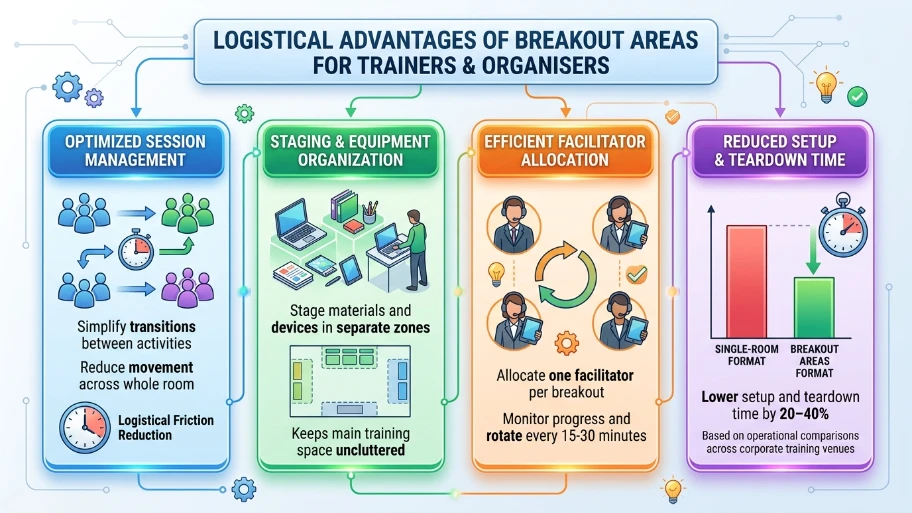
Breakout areas simplify session management, equipment staging, and timed transitions, reducing setup time and logistical friction.
Trainers stage materials and devices in separate zones, avoiding movement across the whole room. Facilitators allocate one facilitator per breakout or rotate every 15–30 minutes to monitor progress. Organisers use breakout areas to store spare laptops, printed materials, and props, which keeps the main training space uncluttered. This layout lowers setup and teardown time by about 20–40% compared to single-room formats, based on operational comparisons across corporate training venues.
How do dedicated breakout areas support hybrid or tech-enabled training?
Breakout areas enable simultaneous in-person group work while virtual participants join via focused video links or dedicated tablets.
Operators set up one webcam and a microphone per breakout pod to stream subgroup discussions. Trainers create a rotation schedule where remote learners join a breakout video for 12–18 minutes, then return to the plenary. This format keeps remote attendees active rather than passive observers. Breakout areas also host equipment for hands-on digital tasks: test benches for software practice, devices for app walkthroughs, and printers for quick handouts.
What design features matter for effective breakout areas?
Design features that matter include flexible furniture, acoustic separation, visible signage, and accessible power and AV ports.
Choose movable tables, stackable chairs, and writable surfaces for quick reconfiguration. Acoustic panels or lightweight partitions reduce cross-talk during concurrent activities. Label zones clearly: “Group A — Case Study,” “Quiet Reflection,” “Skills Bench.” Provide 3–4 power outlets per pod and one shared HDMI or USB-C AV hub per zone. These elements reduce friction and keep focus on learning tasks.
How do breakout areas improve team dynamics and collaboration?
Breakout areas promote psychological safety, role rotation, and focused peer feedback that strengthen team cohesion.
Small groups let quieter members participate more comfortably. Trainers assign roles such as facilitator, scribe, and presenter to structure interaction. Groups use breakout time to practice feedback cycles: 5 minutes of task work, 5 minutes of peer feedback, and 5 minutes of revision. This pattern builds trust and speeds up decision-making in team contexts.
How do breakout areas impact costs and ROI for businesses?
Breakout-equipped rooms increase per-session productivity and perceived value, improving ROI through higher training effectiveness and reduced repeat sessions.
Companies recoup costs when improved training reduces post-training errors, shortens onboarding by measurable days, or reduces the need for follow-up sessions. For example, reducing onboarding time by 2 days across 10 new hires saves staff time that offsets rental costs. Flexible rooms also command premium booking rates, generating higher venue revenue per hour for providers offering breakout infrastructure.
When should organisations choose a breakout-capable training room?
Organisations choose breakout rooms when sessions include group exercises, skills practice, roleplay, or peer-led problem solving.
Choose breakout rooms for workshops, leadership training, sales roleplay, technical upskilling, and diversity workshops. Avoid breakout layout for single-speaker lectures with assessments that require silence. For mixed formats, use modular breakout setups that allow fast conversion between lecture and group modes.
Explore our Training Rooms guides,
Why Professional Training Centres Offer Better Privacy for Sensitive Corporate Board Sessions
How to Seamlessly Transition to Hybrid Training Using Modern Video Conferencing Rooms
How to plan a training session that uses breakout areas effectively?
Plan distinct objectives for plenary and breakout segments, allocate precise timings, and assign roles to each participant before the session.
Create an agenda with 5–15 minute plenary introductions followed by three 15–25 minute breakout cycles. Provide clear instructions on deliverables for each cycle, for example: “Cycle 1 — identify three risks and propose mitigation; Cycle 2 — build a 5-slide action plan; Cycle 3 — rehearse a two-minute presentation.” Supply templates and timers. Train one facilitator or volunteer to monitor each breakout zone and to report back in the plenary.
What operational checks ensure breakout areas function during sessions?
Verify AV, power, and seating arrangements 30–60 minutes before start, and pre-stage materials in each breakout zone.
Test microphones, webcams, and shared screens in each zone. Confirm Wi‑Fi strength at least 10 Mbps per breakout pod for video. Place printed handouts and stationery in each area. Label each zone and post the cycle timings on visible boards. These steps reduce interruptions and keep the training on schedule.
Dedicated breakout areas transform training rooms into action-oriented learning environments. They increase engagement, accelerate skill acquisition, and simplify facilitation. From My Company provides training rooms equipped for modular learning, with configurable breakout zones that match corporate and public sector training needs. Bookings streamline logistics, AV setup, and on-site support to maximise session outcomes.
Frequently Asked Questions
What are the benefits of using training rooms with breakout areas for team workshops?
Training rooms with dedicated breakout areas let teams split into smaller groups for focused discussions, role‑plays, and hands‑on exercises, which improves engagement and learning retention. From My Company designs training rooms with flexible breakout spaces so facilitators can run parallel activities and keep sessions dynamic without disrupting the main group.
How can From My Company’s training rooms support interactive corporate training sessions?
From My Company’s training rooms include configurable layouts, AV equipment, and breakout zones that support polls, group work, and practical simulations. These features make it easier to deliver interactive corporate training sessions that align with skills‑based learning models and keep participants actively involved throughout the day.
Why should businesses choose dedicated training rooms instead of standard meeting rooms?
Dedicated training rooms are optimised for learning with better sightlines, acoustics, and breakout or breakout‑style zones, unlike standard meeting rooms that suit only decision‑making or status updates. Using From My Company’s training rooms helps organisations deliver structured workshops, role‑play practice, and assessments that drive measurable skill development.
Can From My Company accommodate hybrid training sessions in its training rooms?
Yes, From My Company’s training rooms can be configured for hybrid training with stable Wi‑Fi, video conferencing tools, and breakout zones for in‑person groups while remote participants join via shared screens or virtual breakout rooms. This setup supports blended delivery for teams that include office‑based and remote staff without losing interactivity.
How do training rooms with breakout areas improve team collaboration and creativity?
Training rooms with breakout areas give teams private spaces to brainstorm, problem‑solve, and practice new skills in small groups, which encourages participation from quieter members and reduces groupthink. From My Company’s training rooms support this collaborative dynamic by offering modular tables, writable surfaces, and clear zoning between plenary and breakout work areas.