
Yes. A successful client presentation meeting requires a clear objective, tailored content, reliable technology, a professional room layout, and follow-up actions to convert interest into decisions. These five elements together increase engagement and raise conversion rates for meetings.
What primary objective should my client presentation meeting have?
Set one measurable objective: secure a decision, gather feedback from key stakeholders, or advance to a defined next step.
Define the objective in single-sentence terms, for example: “Gain budget approval of £25,000 and a start date within 30 days.” This objective directs content, time allocation, and participant invitations. It also defines the success metric to track after the meeting.
Clear objectives shape the agenda. Allocate 10–15 minutes for introductions, 25–35 minutes for core presentation, 10–15 minutes for demo or evidence, and 10–20 minutes for questions and next steps. Ask for attendee confirmations from decision-makers only; limit non-decision observers to keep the meeting focused.
How should I structure the presentation content?
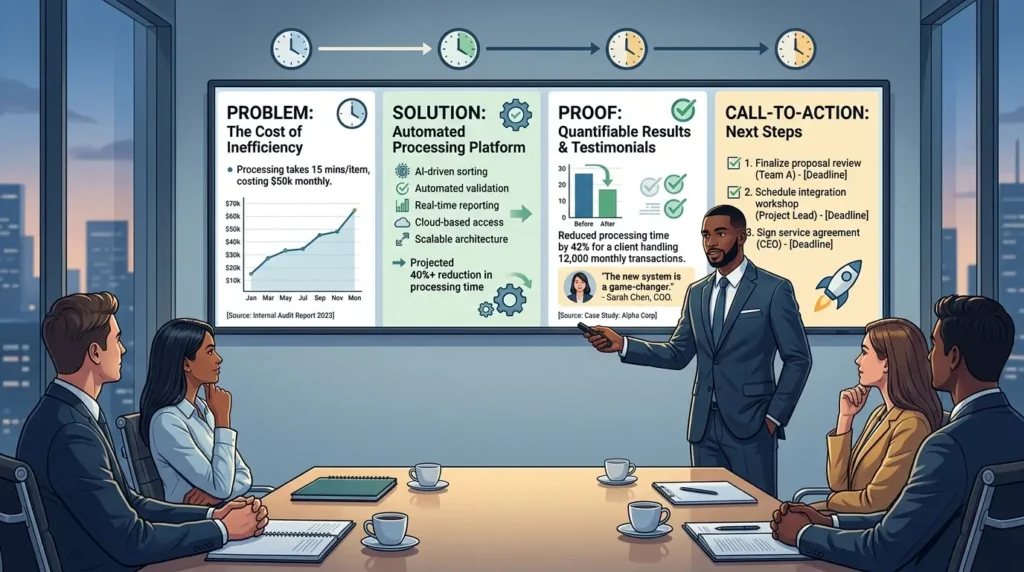
Organise content into problem, solution, proof, and call-to-action sections with time-boxed slides.
Start with a one-slide problem statement that quantifies impact using data. Follow with the solution slide describing features and outcomes. Use one slide for proof: case studies, metrics, or testimonials. End with a call-to-action slide that lists next steps, responsibilities, and deadlines.
Use specific numbers in claims, for example: “Reduced processing time by 42% for a client handling 12,000 monthly transactions.” Cite sources where possible. Keep slides simple: one idea per slide, no more than six bullet points, and one chart per slide. This structure maintains clarity and guides client decision-making.
What role does the meeting room design play in presentation success?
Choose a professional meeting room that supports visibility, acoustics, and client comfort to improve focus and credibility.
Room layout affects interaction. Use boardroom seating for group discussion and theatre layout for one-way presentations. Ensure AV setup includes a screen visible from all seats, a reliable sound system, and HDMI and wireless screen-casting options. Test all equipment 20–30 minutes before the session.
Lighting matters. Provide adjustable lighting to keep the presenter and slides equally visible. Offer bottled water and note-taking materials. Comfortable temperature and ergonomic chairs reduce distractions and extend attention span.
How do I prepare technology and materials for reliability?
Validate hardware, software, and content flow through a full tech rehearsal 24 hours before the meeting.
Confirm projector, laptop, cables, adapters, and Wi‑Fi credentials. Open the final slide deck and demo files to ensure fonts, animations, and embedded videos run correctly. Back up materials in two formats: a cloud copy and a USB copy. Prepare a one-page printed agenda for each attendee.
Also read our articles, The Impact of Professional Workspace Design on Your Overall Corporate Brand Image and Book Your Professional Meeting Room and Enjoy On-Site Catering and Support.
Assign one person to manage tech during the meeting. That person should handle screen sharing, mute/unmute remote participants, and switch presentation modes. Remote access links must include clear dial-in numbers and passcodes. These steps reduce interruptions and maintain a professional pace.
Who should attend the presentation?
Invite fewer than 10 participants and include at least one decision-maker and one technical verifier.
Decision-makers provide budget and timeline approvals. Technical verifiers confirm feasibility and address integration questions. Keep observers to a minimum to avoid diluting accountability. Send pre-meeting material to all attendees three days before, including the agenda, participant list, and a one-page executive summary.
Use a registration prompt in the invite to capture role and specific questions. This data helps tailor the presentation and allocate time for technical or procurement questions.
How long should the meeting last and how to manage time?
Limit meetings to 60–90 minutes with time-boxed agenda items and a visible progress indicator.
Start on time and state the objective within the first two minutes. Use a visible agenda slide that highlights the current section and remaining time. Reserve the final 10–15 minutes for questions and immediate next steps. If a topic requires deeper discussion, schedule a follow-up session with a specific date and owner.
Time discipline signals respect for the client’s schedule. It also concentrates decision-making and shows project management capability.
What evidence and proof points increase conversion rates?
Present three types of evidence: quantitative metrics, short client case studies, and live demonstrations.
Quantitative metrics show impact, for example: “Delivered 30% cost savings across a 12-month pilot.” Case studies should include context, actions taken, and measurable outcomes. Live demos validate claims; perform a scripted demo that lasts no more than 8 minutes and focuses on key features relevant to the client.
Use screenshots and short video clips where demonstrations risk failure. Provide downloadable one-page proof summaries so attendees can review evidence after the meeting.
How do I handle objections and questions during the meeting?
Acknowledge objections, validate concerns with data, and map each concern to a specific mitigation or next step.
Listen actively and restate the objection in one sentence. Respond with data or a reference to a proof point. If the answer requires research, assign an owner and commit to a delivery date no later than five business days. Track all objections in a visible log and include resolution status in the follow-up email.
This method reduces uncertainty and shows that you treat concerns as tasks, not debates.
What should be included in the follow-up process?
Send a concise follow-up within 24 hours summarizing decisions, action owners, deadlines, and the agreed next meeting date.
Include the final slide deck, a PDF proof summary, and meeting minutes. Use bullet points to list action items and dates. Confirm the responsibility for each item and the expected completion date. If the objective involved a purchase decision, attach an initial proposal or contract and a clear call-to-action to sign.
Prompt follow-up increases conversion by 2–3x compared with delayed responses, according to sales operations benchmarks.
Explore our Meeting rooms guides,
Why Your Remote Team Needs Regular Face to Face Meetings in London
Understanding the Impact of Meeting Room Ergonomics on Your Team Productivity Levels
When is it appropriate to use a professional meeting room service?
Use a professional meeting room when client perception, confidentiality, or technical requirements exceed your in-house capabilities.
Professional spaces offer neutral locations, on-site support, and hospitality services. Choose a venue that matches the client’s expectations and meeting objectives. For sensitive negotiations, pick a private room with secure Wi‑Fi and a discreet reception. For high-impact presentations, pick rooms with advanced AV and on-site catering to maintain flow and reduce interruptions.
From My Company provides meeting rooms with configurable layouts, AV support, and hospitality services that align with client expectations.
A successful client presentation meeting combines a single measurable objective, tightly structured content, reliable technology, focused attendees, and rapid follow-up. Each element reinforces the others and reduces friction in the decision process. When professional space and on-site support improve credibility or confidentiality, choose an external meeting room to strengthen outcomes.
From My Company offers professional meeting rooms and on-site support to help you present confidently and close decisions faster. The service supports configurable layouts, AV testing, and hospitality to match specific meeting objectives.
Frequently Asked Questions
How do I book a meeting room with From My Company?
Book a meeting room by selecting the required room size, date, and layout, then confirm AV and catering options in the reservation form. From My Company records the booking, issues a confirmation, and provides arrival instructions and Wi‑Fi details.
What equipment and connectivity are included in From My Company meeting rooms?
From My Company meeting rooms include a high-resolution display, HDMI and wireless screen sharing, conference audio, and high-speed Wi‑Fi. For complex setups, request on-site AV support when you book.
How far in advance should I reserve a meeting room to guarantee availability?
Reserve a meeting room at least 7–14 business days before the event for standard bookings and 21+ days for larger or catered events. Early booking secures preferred layouts, AV support, and any required catering.
Can I change the meeting room layout or add catering after booking?
Yes; update layout and catering requests up to 72 hours before the meeting to allow From My Company to reconfigure the space and confirm menus. Changes inside 72 hours may be limited and could incur additional fees.
What safety and privacy measures do From My Company meeting rooms provide?
From My Company meeting rooms offer secure, password-protected Wi‑Fi, private room options, and soundproofing to protect confidential discussions. Staff follow access controls and hygiene protocols to maintain a secure environment.