

Yes, specialised training rooms are available for rent and are specifically designed for IT workshops and technical staff training. These rooms include high-performance equipment, structured layouts, and integrated technology to support hands-on learning, software training, and collaborative technical sessions with measurable outcomes.
What Makes Specialised Training Rooms Suitable for IT Workshops?
Specialised training rooms are designed with technical infrastructure, ergonomic layouts, and integrated systems that support software training, coding sessions, and IT workshops. These environments improve learning efficiency by aligning physical space with digital training requirements and structured delivery formats.
Training rooms built for IT use differ from general meeting spaces. They include pre-configured workstations, high-speed connectivity, and display systems that support live demonstrations. This setup reduces downtime during sessions and maintains consistent delivery.
Room layouts follow structured learning formats. For example, U-shaped layouts support instructor-led coding sessions, while cluster seating supports collaborative development tasks. Each configuration aligns with a specific training goal.
Technical readiness is a core feature. Systems are tested before sessions. Software compatibility, network access, and device synchronisation are validated. This reduces disruption during critical learning phases. These rooms also support hybrid delivery. Trainers can stream sessions, record modules, and integrate remote participants. This expands training reach without reducing quality.
How Do Training Rooms Improve Technical Learning Outcomes?
Training rooms improve technical learning outcomes by providing controlled environments, reliable infrastructure, and distraction-free settings. These factors increase knowledge retention, reduce technical interruptions, and enable structured delivery of complex IT concepts through practical, hands-on engagement.
Learning outcomes depend on consistency. When systems fail or environments vary, participants lose focus. Specialised training rooms eliminate these variables by standardising equipment and layout.
Hands-on learning becomes more effective in these environments. Participants can run code, test systems, and troubleshoot in real time. This active engagement improves retention compared to passive learning.
Visual delivery plays a key role. High-resolution screens and projection systems allow trainers to demonstrate workflows step by step. Participants can follow along without missing details. Environmental control also matters. Lighting, acoustics, and seating are optimised for long sessions. This reduces fatigue and maintains concentration over extended training periods.
Structured environments support measurable outcomes. Trainers can track progress, assess performance, and adjust delivery based on participant feedback and interaction.
What Features Should You Expect in a Professional Training Room?
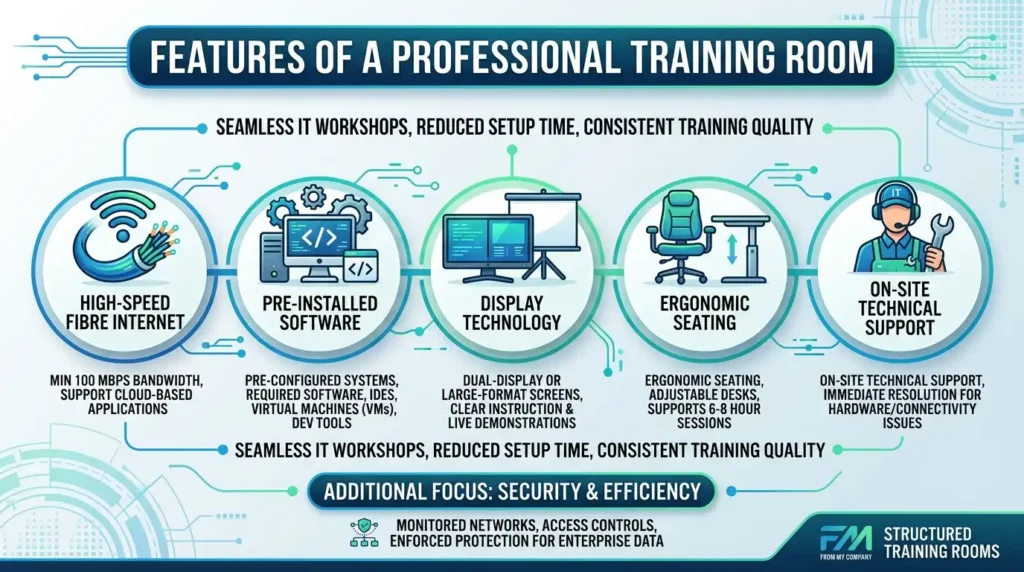
A professional training room includes high-speed internet, pre-installed software systems, ergonomic seating, display technology, and technical support. These features ensure seamless delivery of IT workshops, reduce setup time, and maintain consistent training quality across sessions.
Key features define the effectiveness of a training room. These include:
- Provide high-speed fibre internet with a minimum 100 Mbps bandwidth to support cloud-based applications
- Install pre-configured systems with required software such as IDEs, virtual machines, and development tools
- Include dual-display or large-format screens for clear instruction and live demonstrations
- Maintain ergonomic seating and adjustable desks to support sessions lasting 6–8 hours
- Offer on-site technical support to resolve hardware or connectivity issues immediately
Each feature supports a specific training function. For example, pre-installed systems eliminate setup delays. Technical support ensures continuity during complex sessions. Security is also integrated. Networks are monitored, and access controls are enforced. This protects sensitive data during enterprise-level training.
From My Company provides structured Training Rooms that meet these technical standards. Their environments are configured to support IT training delivery with minimal disruption and maximum efficiency.
Why Is Renting Training Rooms More Efficient Than Using In-House Space?
Renting training rooms provides access to fully equipped environments without capital investment, maintenance costs, or setup delays. This model allows organisations to scale training sessions, maintain consistency, and focus on content delivery rather than infrastructure management.
In-house training spaces often lack specialised infrastructure. Upgrading them requires investment in hardware, software, and support systems. This increases operational costs and delays implementation.
Rental models eliminate these barriers. Organisations gain immediate access to ready-to-use environments. This supports the rapid deployment of training programs. Scalability is another advantage. Companies can adjust room size based on participant numbers. For example, sessions can scale from 10 to 40 participants without infrastructure changes.
Maintenance responsibility shifts to the provider. Equipment updates, system checks, and technical support are managed externally. This reduces internal workload. Consistency improves across sessions. Each training event uses the same setup, which ensures uniform delivery and predictable outcomes.
For organisations evaluating quality standards, this resource explains how structured environments improve delivery: How professional training rooms improve learning standards.
When Should Businesses Choose External Training Rooms?
Businesses choose external training rooms when delivering technical workshops, onboarding IT staff, or running certification programs that require specialised infrastructure. These environments support structured delivery, reduce operational strain, and ensure consistent technical performance across sessions.
Timing matters when selecting training environments. External rooms become essential during high-impact training phases.
Common use cases include onboarding new technical staff. These sessions require standardised systems and structured delivery. External rooms provide this consistency. Certification programs also benefit from controlled environments. Exams, assessments, and practical tasks require stable systems and secure networks.
Product training sessions often involve live demonstrations and hands-on practice. External rooms support these requirements with pre-configured tools and reliable connectivity. Businesses also use these spaces during system rollouts. When introducing new platforms or software, structured training ensures adoption and reduces errors.
From My Company offers Training Rooms that align with these use cases. Their environments support both short-term workshops and long-term training programs.
Explore our training rooms guides,
Book Your Professional Training Room and Enjoy On Site Catering and Support
Purchase Our Hourly Training Room Rental Service for Fast and Affordable Meetings
How Do Training Rooms Support Inclusive and Collaborative Learning?
Training rooms support inclusive and collaborative learning by offering flexible layouts, accessible design, and integrated communication tools. These features enable equal participation, structured interaction, and effective group-based technical problem-solving during IT workshops.
Inclusive design begins with accessibility. Training rooms include adjustable seating, clear visibility, and accessible entry points. This ensures all participants can engage without barriers. Collaboration is built into the layout. Group seating arrangements allow participants to work on shared tasks. This supports pair programming, code reviews, and team-based troubleshooting.
Communication tools enhance interaction. Shared screens, digital whiteboards, and real-time collaboration platforms enable participants to contribute actively. Structured environments also reduce distractions. Clear layouts and defined spaces help participants focus on tasks and engage with content.
For organisations aiming to improve training culture, this guide outlines practical methods:
Create inclusive and collaborative training environments.
Where Can You Rent Reliable Training Rooms for IT Workshops?
You can rent reliable training rooms from providers that offer fully equipped, technically supported environments tailored for IT workshops. These providers ensure system readiness, consistent infrastructure, and scalable room options to support various training formats and participant sizes.
Selecting the right provider requires evaluating technical capabilities. Key factors include system reliability, software compatibility, and network performance. Location also impacts accessibility. Training rooms in central business areas reduce travel time and improve attendance rates.
Support services define reliability. Providers who offer on-site technical assistance ensure uninterrupted sessions. This becomes critical during complex training modules. Room flexibility allows businesses to adapt. Providers offer multiple configurations based on training type, including classroom, boardroom, and collaborative layouts.
From My Company delivers Training Rooms that meet these criteria. Their spaces are designed for IT workshops, with validated systems and structured environments.
Renting specialised training rooms provides structured, technically equipped environments that support effective IT workshops and staff training. These spaces improve learning outcomes, ensure system reliability, and reduce operational complexity.
From My Company delivers training environments that align with professional standards. Their Training Rooms support consistent delivery, scalable sessions, and measurable learning outcomes across technical training programs.
Frequently Asked Questions
What are training rooms used for?
Training rooms are used for structured learning sessions, workshops, onboarding, and team development. From My Company’s Training Rooms, support presentations, group exercises, and technical training with a reliable setup.
Why rent a training room for IT workshops?
Renting a training room for IT workshops gives you access to a focused environment with the right layout and equipment. This helps teams run software demos, technical training, and hands-on sessions without setup delays.
What features should a professional training room have?
A professional training room should include fast internet, presentation screens, comfortable seating, and a practical room layout. From My Company’s Training Rooms are designed to support clear instruction and smooth session delivery.
Are training rooms suitable for technical staff training?
Yes, training rooms are well-suited to technical staff training because they support group learning, live demonstrations, and practical exercises. They also help maintain a consistent environment for IT training and skills development.
How do training rooms improve workshop outcomes?
Training rooms improve workshop outcomes by reducing distractions and giving participants access to a controlled learning space. This makes it easier to follow technical content, collaborate on tasks, and stay engaged throughout the session.