

PAYE registration is the mandatory process of enrolling your business with HMRC as an employer. It enables you to deduct Income Tax and National Insurance contributions from employee wages before payment, ensuring full legal compliance with UK employment tax laws.
What Is PAYE Registration for UK Employers?
PAYE registration is the legal procedure where a business notifies HMRC that it operates payroll. This process creates an employer tax record, enabling HMRC to collect Income Tax and National Insurance contributions directly through employee earnings.
Pay As You Earn (PAYE) functions as the central system used by HM Revenue and Customs (HMRC) to collect employee tax. Employers operate this system as part of their standard payroll routine. When you recruit your first staff member, you become responsible for collecting taxes on behalf of the state.
The system applies to most workers receiving a wage above specific financial thresholds. You must collect tax from directors, full-time staff, part-time employees, and agency workers. You calculate deductions on gross pay before transferring net earnings to worker accounts.
HM Revenue and Customs issues unique references upon successful application. You receive an Employer PAYE Reference Number and an Accounts Office Reference. These identification details validate your payroll submissions and identify your business across official UK tax channels.
When Must a UK Business Register for PAYE?
A UK business must register for PAYE before the first payday if employees earn above the National Insurance Lower Earnings Limit. Registration is also required if workers receive expenses, benefits, or hold another concurrent job.
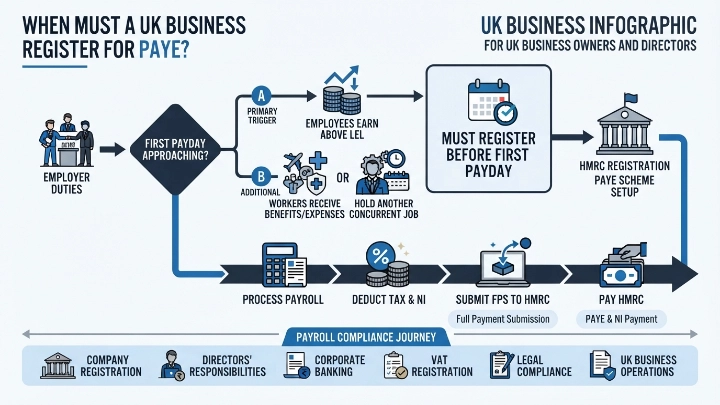
You must complete your application before paying your staff for the first time. HMRC allows businesses to register up to four weeks prior to the initial payday. Early filing prevents delays in issuing wage payments and stops tax calculation errors.
Exceeding official tax thresholds triggers an immediate registration requirement. If an employee earns £123 or more weekly, registration becomes mandatory. If an employee already holds a secondary employment contract, you must register regardless of their earnings level.
Directors receiving dividends or salaries above threshold amounts must register the company. Payments involving company perks, such as private medical insurance or company cars, also demand an active PAYE scheme. Operating without a valid registration during active payroll runs leads to severe statutory penalties.
How Does the UK PAYE System Operate Daily?
The UK PAYE system operates by deducting statutory tax and National Insurance directly from employee salaries using Real Time Information software. Employers submit this payment data electronically to HMRC on or before every official payday.
Daily administration relies on specialized payroll software to calculate accurate tax obligations. Software solutions connect directly to HMRC platforms to download modern tax codes. These tax codes determine the precise tax-free allowance for every individual employee.
The system processes multiple statutory deductions alongside standard Income Tax. You calculate employee National Insurance contributions and employer National Insurance obligations. You also deduct student loan repayments, workplace pension contributions, and court-ordered attachments of earnings.
Every payroll run requires an Full Payment Submission (FPS) sent to HMRC. This digital document lists individual pay figures, statutory allowances, and applied deductions. Sending this file on time ensures your company maintains total compliance with Real Time Information (RTI) regulations.
What Key Statutory Obligations Apply to UK Employers?
UK employer obligations include submitting timely RTI reports, transferring deducted taxes to HMRC by monthly deadlines, maintaining accurate employee records for three years, and distributing statutory end-of-year tax forms.
Submitting payroll reports on time stands as your primary operational duty. You must send an FPS report every time you pay your staff. If you pay no staff during a specific tax month, you must submit an Employer Payment Summary (EPS) instead.
Financial settlement deadlines require strict calendar management from your finance team. You must transfer deducted tax and National Insurance funds to HMRC by the 22nd of each month for electronic payments. If you use postal cheques, the payment must reach HMRC by the 19th of each month.
Record retention standards demand meticulous document organization over long timeframes. You must keep accurate records of all pay figures, tax codes, and statutory payments. Retain these files for three years following the end of the tax year they cover to satisfy official audit checks.
What Are the Penalties for Non-Compliance with PAYE?
Penalties for PAYE non-compliance include immediate financial fines for late RTI filings, compounding interest charges on overdue tax payments, and formal HMRC compliance audits that increase operational risk.
Failing to submit Real Time Information filings on time brings instant automated penalties. HMRC calculates these initial fines based on the total headcount of your workforce. Smaller firms face monthly fines starting at £100 for missed submission deadlines.
Late tax payments accumulate interest charges from the day after the due date. Continued failure to clear outstanding tax balances leads to escalating percentage-based penalties. Persistent non-payment results in legal collection actions, formal court orders, and asset seizure procedures.
Inaccurate reporting triggers separate penalty structures designed to deter deliberate errors. Misreporting worker salaries or using incorrect tax codes results in fines proportional to the lost tax revenue. Establishing strict compliance protocols protects your business against these avoidable financial losses.
How Do You Setup PAYE for Small Businesses?
Setting up PAYE requires collecting company identification numbers, registering online via the GOV.UK portal, selecting compliant payroll software, and gathering complete starter data for all new hires.
The setup procedure requires preliminary documentation gathering before submitting online forms. You need your Companies House registration number, official business address, and unique taxpayer reference. You also need personal details for all active company directors.
The online application processes through the official UK government gateway portal. HMRC processes online applications within 10 to 15 working days. You receive your official employer reference numbers by secure mail once approval completes.
Three core components must be configured prior to your first official payroll run:
Configure compliant payroll software using your official HMRC employer references
Collect starter information using official P45 documents or starter checklist forms
Verify employee bank accounts to establish secure payroll disbursement processes
Businesses expanding operations often secure professional infrastructure during initial growth phases. Utilizing a professional address helps keep director home details off public records. Securing dedicated space like a professional meeting venue provides stable facilities for conducting initial onboarding meetings and payroll reviews.
How Does PAYE Intersect with Workplace Pensions?
PAYE intersects with workplace pensions through automatic enrolment duties, where employers assess staff eligibility, enrol qualified workers into pension schemes, and process contributions through monthly payroll processing.
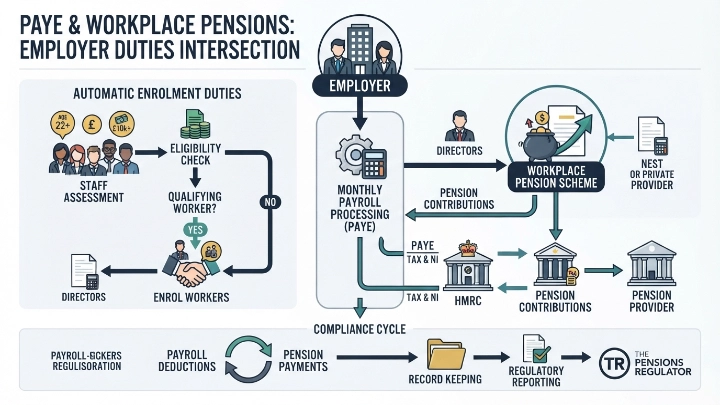
Automatic enrolment law requires employers to evaluate staff eligibility during every payroll run. Workers aged between 22 and State Pension age earning above £10,000 annually must be enrolled automatically. Employers must calculate and deduct both staff and company pension contributions accurately.
Payroll systems manage these contributions directly alongside standard statutory tax deductions. You deduct staff contributions from gross or net pay depending on your pension scheme type. You then transfer these pooled funds to your designated pension provider by monthly statutory deadlines.
Proper integration prevents severe enforcement actions from the Pensions Regulator. You must issue formal enrolment communications to staff within specific statutory timeframes. Maintaining clear alignment between your PAYE records and pension databases ensures seamless legal compliance.
What Records Must Employers Keep for PAYE Compliance?
Employers must keep detailed records of all salary payments, tax deductions, benefits in kind, statutory pay records, and HMRC submission confirmations for a minimum of three years.
Data management standards demand structured digital archiving for all payroll transactions. You must store itemized pay slips showing gross pay, net pay, and precise tax calculations. You must also maintain records of tax code notices sent directly by HMRC.
Statutory pay events require dedicated documentation to validate statutory deductions. Keep records of Statutory Sick Pay, Statutory Maternity Pay, and statutory paternity payouts. Retain signed employee starter declarations and P45 forms provided during recruitment.
Benefits in kind require detailed records for accurate annual reporting. Track company vehicle usage, medical policies, and expense reimbursements provided to staff members. Maintaining organized records simplifies annual P11D reporting and protects your company during formal HMRC tax inspections.
Understanding core responsibilities allows small firms to plan administrative workflows effectively. If you want to evaluate operational approaches, compare choosing payroll workflows against PAYE options to optimize administrative efficiency. As payroll processing requirements grow more complex, seeking specialized PAYE small business assistance ensures your company maintains total compliance with HMRC rules.
Explore our Conference Room guides,
Filing Dormant Accounts: When is Your Company Truly Inactive?
Identity Verification: Why Proof of ID Matters for UK PSCs
Frequently Asked Questions
What is included when booking a conference room with Form My Company?
Booking a conference room through Form My Company includes high-speed Wi-Fi, audio-visual presentation equipment, whiteboards, and customizable seating configurations. Clients also receive on-site reception support to greet guests and handle logistics, ensuring a smooth corporate meeting experience.
How do I reserve a meeting space or conference room online?
You can reserve a fully equipped conference room online via the Form My Company service portal by selecting your preferred location, date, time, and room capacity. The platform provides instant booking confirmation and options to add specialized amenities like catering or extra presentation tools.
Are conference rooms available for hourly, daily, or flexible rentals?
Form My Company offers flexible room rental terms, allowing businesses to book conference space by the hour, half-day, or full day. This on-demand booking model helps remote teams, startups, and established enterprises access professional meeting venues without long-term commercial leases.
Can Form My Company accommodate large corporate events and training sessions?
Yes, Form My Company provides spacious, multi-functional conference rooms capable of hosting board meetings, client presentations, workshops, and corporate training events. Rooms can be configured into boardroom, theater, or classroom layouts depending on group size and event requirements.
Where are Form My Company conference rooms located and are they accessible?
Form My Company conference rooms are situated in prime business districts with convenient access to major public transit links and local parking facilities. Each venue features professional building security, accessible amenities, and modern business lounge facilities for meeting attendees.