

What if the code needed for a company filing belongs to you, not the company? Your companies house personal code is an individual 11-character identifier issued after you verify your identity with Companies House. Keep it secure and easy to retrieve, because you may need it when filing or updating company information.
It’s easy to assume one code covers every company task. The code is personal, but you still need to provide it through the right submission for each relevant role. Directors and people with significant control (PSCs) may have different filing steps, and a missing or incorrect code can hold up a submission. Existing directors and PSCs are within a transition period that ends in November 2026.
This guide explains what the code does, where to find it and how to use it without mixing up your personal details with your company’s. You’ll also learn when directors and PSCs need to provide it, how to prepare the relevant filing, and how to keep the code secure and ready for future use.
Key Takeaways
- See how the companies house personal code fits into your filing workflow, and how it differs from company details and login credentials.
- Learn how to retrieve and securely keep your code, and what to do if you can’t find it or it’s rejected.
- Understand why directors and people with significant control may need to submit the code through different routes.
- Use a pre-filing checklist to match the right person, role and submission route before sending company information.
What is a Companies House personal code, and who needs one?
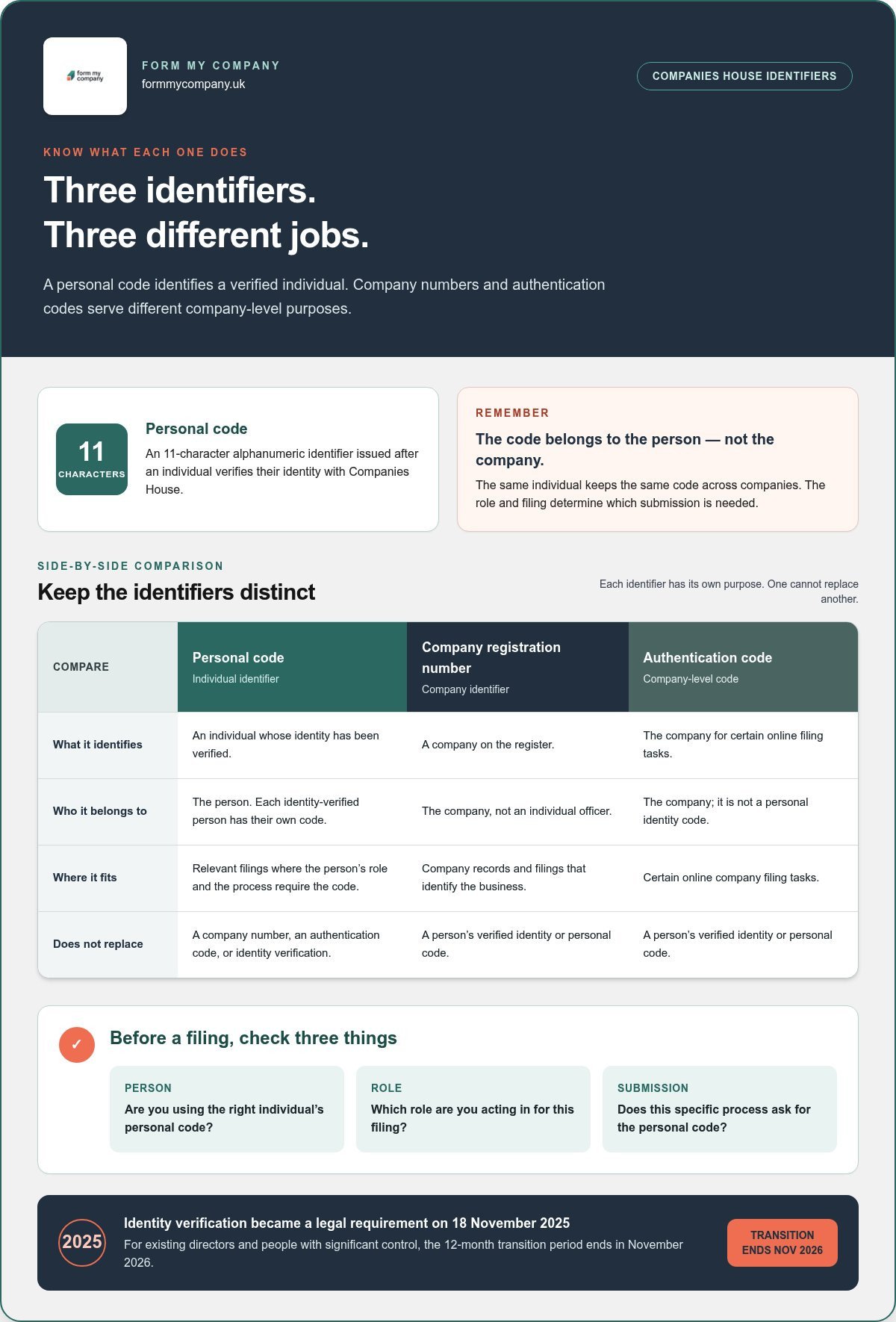
A Companies House personal code is a unique, 11-character alphanumeric identifier issued to an individual after they’ve verified their identity with Companies House. It links that verified person to relevant filings, but it doesn’t show that they own a company or hold a particular role.
In short, the companies house personal code identifies an individual whose identity has been verified when they complete relevant Companies House filings. It belongs to the person, not the business. If the same individual is involved with more than one company, their code stays the same. The company and the person’s role determine which submission they need to make.
Companies House is the UK’s registrar of companies. Its background and role help explain why identity checks sit alongside company records: the register contains information about businesses and the people responsible for them.
Who needs a Companies House personal code?
Identity verification became a legal requirement on 18 November 2025 for company directors and people with significant control (PSCs). A 12-month transition period applies to existing directors and PSCs, ending in November 2026. New and existing individuals need to follow the verification and filing requirements that apply to their role.
A person may be a director, a PSC, or both. These are company roles; the verified identity and code belong to the individual. If someone holds relevant roles across several companies, they still use their own personal code, but the required submission depends on the role and filing. Providing the code for one role or company doesn’t automatically complete every separate requirement.
What a personal code is not
Keep the code separate from other company details. A company registration number identifies the company on the register. An authentication code is a company-level code used for certain online filing tasks. A personal code identifies an individual whose identity has been verified. Each serves a different purpose, so one can’t replace another.
The code isn’t a shared identifier for all the company’s officers. Each identity-verified person has their own code. It is not a company password or a substitute for identity verification: verification comes first, and Companies House issues the code afterwards.
Company obligations are separate from an individual’s identity steps. For example, filing accounts for a dormant company is a company filing task. The personal code doesn’t identify the business or replace its records. Before submitting information, identify who is filing, which role they’re acting in and what the specific filing requires. This distinction is especially useful when one person has several responsibilities.
How to find, save and use your Companies House personal code
Use this sequence to retrieve the code through the route you used to verify your identity, keep it accessible to you and provide it when a relevant filing asks for it. Your identity-verification route affects where you’ll find your code.
- Identify your verification route. Think back to whether you verified directly using the Companies House service linked to GOV.UK One Login, or through an authorised corporate service provider (ACSP). The route matters because the account or provider involved may be where your code is made available.
- Locate the code through that route. If you verified through GOV.UK One Login, sign in to the Companies House account associated with your verification and look for your personal code. If you used an ACSP, follow its process for receiving the code. Check current official Companies House or GOV.UK guidance for route-specific instructions. Avoid unofficial websites and anyone offering to retrieve or share a code.
- Save it securely. If your Companies House account offers the option to save the code to your account, follow the on-screen instructions. Keep a separate secure record as a practical backup, accessible only to you and anyone who genuinely needs it to prepare a relevant filing. Don’t put it in shared notes or send it through an unsecured channel.
- Submit it when requested. Before filing, check that you’re using your own code and that the submission relates to the correct company and role. Enter it in the personal-code field for the relevant process, not in place of a company authentication code or company number.
Where to find a code after identity verification
If you used GOV.UK One Login, start with the Companies House account used during identity verification. Sign in and follow the current prompts to view or save your code. If you verified through an ACSP, follow the provider’s process. Check official guidance if you’re unsure where the code was issued.
Companies House guidance was updated in July 2026 to explain that some users may receive their code by email. Email is not the route for everyone. Check the current guidance for the circumstances that apply to your verification route, and search your inbox, including junk folders, only if an email was expected.
How to save and submit the code safely
Keep the code private and preserve it exactly as issued, including all 11 characters. If someone is helping prepare a filing, share it only through a secure method and only when they need it for that task. Companies House issues the personal code after identity verification.
For support with company administration alongside these steps, explore company administration services. Before submitting, follow the official instructions for the specific filing, as the code’s submission point depends on the process you’re completing.
When directors and PSCs must provide their personal code
The same individual may need to use one personal code in more than one company-role context. The submission route and timing depend on whether they’re acting as a director or a person with significant control (PSC), so completing one step doesn’t automatically satisfy the other.
Identity verification became a legal requirement on 18 November 2025. Existing directors and PSCs have a 12-month transition period, ending in November 2026. Use the table as a guide, then check the relevant Companies House record and current official guidance for the due date that applies to each role.
| Role | Where to submit the code | Timing to check |
|---|---|---|
| Company director | As part of the company’s confirmation statement process | The company’s next confirmation statement due date and any applicable transition requirement |
| Person with significant control (PSC) | Through the separate Companies House PSC submission route | The PSC’s role-specific due date shown in the official company record or guidance |
| Director and PSC | In each relevant role-based submission | Check both deadlines; completing one role’s step doesn’t complete the other’s |
Providing a code as a company director
A director’s code is connected to the company’s confirmation statement process. Before preparing the statement, identify which directors need to provide their codes and make sure the correct details are ready for the filing. One director’s code does not cover the others.
If an agent or another person submits the confirmation statement, each relevant director still needs to provide their own code for the appropriate filing step. Agree how it will be transferred and handled securely, and avoid sending it through an open or shared channel. Preparing the confirmation statement carefully helps keep company information and director details organised before submission.
Providing a code as a person with significant control
PSC details follow a separate Companies House submission route. A director who is also a PSC should check both responsibilities: the director’s code submission in connection with the confirmation statement, and the PSC’s separate code submission. One does not automatically complete the other.
PSC deadlines can depend on the individual’s role and the company’s record. Check the PSC’s official due date rather than relying on the confirmation statement date or assuming there is one company-wide deadline. If one person holds roles in several companies, review each relevant record and submission separately. The code remains the individual’s, but the filing relates to a specific role and company.
Before submitting, match the person, role, company and due date to the filing you’re preparing. Keep a note of each completed step, especially when one person has more than one role. This helps prevent a director’s submission being mistaken for a PSC submission, or vice versa.
If your Companies House personal code is missing or rejected
A missing code, an inaccessible account and a rejected filing are different problems. Start by identifying which one you’re facing, then follow the relevant official Companies House instructions. Don’t keep retrying a filing with guessed details. A mismatch between your identity information and the Companies House record can prevent it from going through.
Account-access problems are about reaching the place where your code is stored; identity-record problems are about whether your personal details match Companies House records. Separating the two helps you choose the right next step without assuming the code itself is invalid.
- You can’t find the code: Check which route you used to verify your identity. If you verified through GOV.UK One Login, revisit the Companies House account linked to that process and follow its current instructions. If you used an authorised corporate service provider (ACSP), check the provider’s code-delivery process. Look for an expected email, including in your junk folder, if current official guidance says your route uses email.
- You can’t access your account: Follow the official GOV.UK One Login or Companies House account recovery instructions that match the account you used. An account-access issue doesn’t necessarily mean your identity details or personal code are wrong. If you verified through an ACSP, follow the provider’s instructions rather than assuming the code will appear in a GOV.UK One Login account.
- Your personal details don’t match: Compare the details you’re entering with the information held on the relevant Companies House record. Check each field carefully, including your name and date of birth. If a record is inaccurate, use the current official process for correcting Companies House details before trying the filing again. Changing a detail in your filing alone won’t correct the underlying record.
- Your code may be compromised: Stop sharing it and follow current Companies House security guidance for reporting or addressing the concern. Don’t post the code publicly or send it to someone who has no clear need to prepare a specific filing. If someone else has already received it, consider who had access and act on the official instructions.
If the code is missing or account access is difficult
Return to the identity-verification route you used, then check the latest official account and code guidance for that route. Delivery and retrieval steps can differ, including for people verified through an ACSP. Avoid unofficial code-recovery services, and don’t assume a replacement can be issued instantly. Follow the current instructions before making another filing attempt.
If personal details do not match or the code may be compromised
Check the Companies House record against your details before submitting again. If they differ, use the official correction process; if you suspect misuse, follow Companies House security guidance. Share your code only with a trusted person who needs it for a particular filing, and only through a secure method.
Once you’ve identified the issue, keep the relevant company filing and identity steps organised. Explore company administration support for help keeping related company records and filing tasks in order.
A practical Companies House personal code checklist for your next filing
Before you submit, check that the right person, role, code and filing route all line up. This is especially useful when one individual has several roles or is connected with more than one company. The companies house personal code belongs to the individual, but each filing still needs to be handled in its own company and role context.
Before a director or PSC submits a filing
Work through these checks for each relevant director or person with significant control (PSC). If you’re an administrator preparing a filing, coordinate with the individual who holds the code and keep any necessary handover secure.
- Confirm identity verification is complete. Make sure the relevant individual has completed the required identity verification and can access their own personal code. Don’t assume someone else’s code can be used, even if they work for the same company.
- Match the person to their role. Establish whether the individual is submitting as a director, a PSC or in both roles. Check current Companies House instructions for the correct filing or separate submission route for each role.
- Check the code and details. Confirm you have the correct individual’s code and that the personal information being entered matches the Companies House record. Review the company details too, so the filing relates to the intended company.
- Verify the current due date. Check the relevant company or PSC record and current official guidance. Don’t rely on another role’s deadline or assume that a company’s filing date covers every individual submission.
- Agree secure handling. If someone else is preparing the filing, arrange a secure way for the code holder to provide the code when needed. Limit access to people who need it for that specific filing, and avoid storing it in an unrestricted shared document.
- Review before submitting. Make sure the code is entered in the correct part of the process and that all supporting company and personal details are accurate. Keep a simple record of which role-based steps have been completed, especially if the same person has multiple responsibilities.
Getting practical company administration support
A clear process helps organise company information, filing tasks and communication with directors or PSCs. Administrative support can help keep these steps orderly, but it doesn’t replace the individual’s identity verification, their responsibility to provide the right code, or Companies House requirements. Companies House issues the code after identity verification.
For broader filing organisation, company administration support can help with routine tasks. Keep the code holder involved whenever their personal code is required, and follow the official instructions for the filing you’re preparing.
With the role, route and deadline checked, you can prepare the next step with greater confidence. Explore company formation and administration services for support with relevant company administration needs.
Make company administration part of your routine
Make code management a repeatable part of your company’s filing process. Decide who tracks upcoming submissions, how directors and PSCs will share information securely, and where you’ll record that each role-specific step is complete. A consistent routine can make future filings easier to organise as responsibilities or company records change.
If you’re setting up a business, Form My Company offers UK company formation packages, including a Digital Package. Companies House issues the personal code after identity verification, so continue to follow its current instructions for the relevant role and filing.
Plan your next step around your business needs, whether you’re forming a company or organising its administration. Explore company formation and administration services and move forward with a clear plan. Small, well-managed steps can help you approach company responsibilities with confidence.
Frequently Asked Questions
Is a Companies House personal code the same as a company authentication code?
No. A personal code relates to an individual’s identity, while a company authentication code is associated with a company and used for certain online filing tasks. For example, a director may need their own personal code for an identity-related filing step, while the company authentication code relates to filings for the business. Keep them separately labelled in your records, and use the credential requested by the specific Companies House service.
Can I use the same personal code for more than one company?
Yes. Your code belongs to you, so you use the same personal code when a relevant filing requires it for different companies you’re connected with. For instance, if you’re a director of two companies, you don’t get a separate personal code for each one. Check each company’s filing requirements independently, though. Providing your code in one company’s process doesn’t automatically complete any step required for another.
Can I give my Companies House personal code to an accountant or agent?
You may need to provide it to a trusted accountant or agent who is preparing a relevant filing for you. Treat it as sensitive personal information: share it only with someone who needs it for a specific task, and use a secure method rather than an open email chain or shared document. Agree which filing it relates to, and avoid passing the code on more widely than necessary.
Do company secretaries need a Companies House personal code?
Not solely because they’re a company secretary, based on the roles covered by the identity-verification guidance. The relevant requirement applies to people acting as directors or people with significant control (PSCs). A company secretary who also holds one of those roles should follow the requirements for that role and any relevant filing. Check current Companies House guidance if the individual’s responsibilities or status change.
What happens if the personal details linked to my code do not match Companies House records?
A mismatch can prevent a filing from being accepted or completed. Compare the details entered with the personal information on the Companies House record, including spelling and dates, before trying again. If the record itself is inaccurate, follow the current official process to correct it rather than changing details in the filing to force a match. Keep a note of what was corrected for your company administration records.
Does receiving a personal code mean I have completed every Companies House filing requirement?
No. Receiving a code means you’ve completed an identity-verification step, but it doesn’t submit filings or confirm that every role-based requirement is complete. For example, a person who is both a director and a PSC may have separate submission steps to manage. Check the relevant company record, filing instructions and due dates, then track each required action separately.