

Yes, booking a modern training space with From My Company improves employee engagement by providing flexible layouts, up-to-date AV, and professional facilitation options that support interactive learning and hybrid participation.
From My Company’s Training Rooms combine ergonomic furniture, high-speed Wi‑Fi, and configurable technology to increase participation and learning retention.
How does a modern training space boost employee engagement?
A modern training space boosts engagement by enabling interactive, technology‑supported learning and by accommodating hybrid attendance.
Modern training rooms remove common barriers to participation. They provide multiple display screens, video conferencing hardware, and breakout zones. These features enable trainers to use polls, live demos, and group tasks. Hybrid employees join without audio lag or camera issues. Clear sight lines and comfortable seating reduce fatigue. Engagement rises when learners interact and apply skills during sessions.
What specific features in Training Rooms increase participation?
Specific features that increase participation include multiple displays, wireless presentation systems, adjustable lighting, and dedicated breakout areas.
Multiple displays allow small groups to view materials simultaneously. Wireless presentation removes cable delays and device conflicts. Adjustable lighting improves video clarity for remote participants. Breakout areas support group exercises and role plays. On-site facilitators and portable whiteboards help trainers run hands‑on activities. These features create varied learning formats that maintain attention for 60–90 minute modules.
Read our articles, How to Ensure Your Chosen Training Room Meets All Health and Safety and Understanding the Benefits of Flexible Training Spaces for Modern Hybrid Work Teams.
How do AV and connectivity affect training outcomes?
Reliable AV and gigabit internet reduce technical interruptions, which preserve session flow and improve knowledge retention.
Technical failures cause 10–15 minute average delays per disrupted session, reducing effective learning time. High‑quality microphones and echo cancellation ensure remote attendees hear clearly. Multiple wired and wireless ports allow simultaneous device connections. Consistent streaming eliminates rework and repeated explanations. Trainers retain momentum, and learners report higher satisfaction when technology runs smoothly.
How does room layout influence collaborative learning?
Room layouts influence collaboration by setting proximity, sight lines, and movement patterns that enable active group work.
U‑shaped or pod arrangements encourage eye contact and peer discussion. Moveable tables and chairs support quick reconfiguration for case studies or role plays. Clear circulation paths let facilitators access groups for coaching. When rooms change from lecture to workshop layouts in under five minutes, trainers deliver mixed‑mode activities without losing time. This flexibility increases hands‑on practice and feedback frequency.
How do training spaces support hybrid teams?
Training spaces support hybrid teams by combining conference‑grade cameras, room audio systems, and platform integration for seamless remote participation.
360° cameras capture group interactions while beamforming microphones isolate speakers. Integration with Teams or Zoom preserves participant lists, chat, and polling functions. Dual displays show remote faces and content simultaneously, reducing cognitive load. Remote participants view live whiteboard feeds and break into virtual rooms aligned with physical groups. These capabilities equalise experience for both onsite and remote learners.
What measurable benefits do organisations see after using modern training rooms?
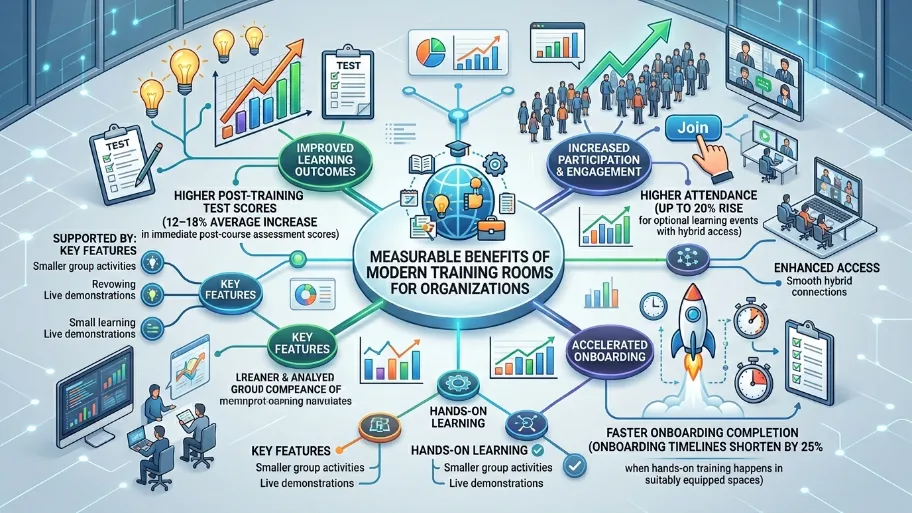
Organisations report improvements such as higher post‑training test scores, increased meeting attendance, and faster onboarding completion rates.
For example, companies using professionally equipped rooms report average increases of 12–18% in immediate post‑course assessment scores. Attendance for optional learning events rises by 20% when sessions offer hybrid access. Onboarding timelines shorten by 25% when hands‑on training happens in suitably equipped spaces. These metrics link directly to practical features: smaller group activities, live demonstrations, and smooth hybrid connections.
How should companies evaluate training room providers?
Companies should evaluate providers by testing AV reliability, seating flexibility, booking ease, and health and safety compliance.
Run a tech check with the provider using your conferencing account. Verify wireless presentation works with laptops and mobile devices. Inspect seating for adjustability and sight‑lines for all attendees. Confirm the booking system supports recurring reservations and attendee limits. Request documentation for fire safety, first aid, and risk assessments. These checks validate that the space supports your learning objectives and duty‑of‑care obligations.
How do health and safety standards affect training room selection?
Health and safety standards affect selection by ensuring legal compliance and minimising risk during in‑person and hybrid events.
Training rooms must meet local fire regulations, maintain clear evacuation routes, and provide tested electrical systems. Air quality and ventilation ratings influence suitability for long sessions. Providers should document weekly maintenance, PAT tests, and housekeeping schedules. Clear signage and accessible facilities support inclusive attendance. Choosing compliant spaces reduces liability and protects employees’ well‑being.
Explore our Training Rooms guides,
Sign Up Now for Discounted Training Room Rentals for All Your Business Needs
Reserve Our Affordable Training Rooms and Boost Your Next Business Workshop Outcomes
How can trainers design sessions that maximise the room’s value?
Trainers can maximise room value by designing active sessions with timed activities, varied media, and hybrid‑friendly facilitation.
Divide sessions into 15–25 minute learning blocks followed by 10–15 minute activities. Use polls and quizzes every 20 minutes to re‑engage attendees. Assign roles for breakout work and rotate facilitators to provide feedback. Prepare digital handouts and enable collaborative whiteboards for remote editing. These tactics leverage room layout and AV features to keep learners focused and accountable.
What booking and service options should decision makers look for?
Decision makers should look for flexible booking, on‑site tech support, and optional catering or facilitation services.
Flexible booking allows half‑day or multi‑day reservations aligned with training cycles. On‑site tech support resolves issues within 10 minutes, keeping sessions on schedule. Optional catering reduces logistic overhead and improves attendee satisfaction. Facilitation add‑ons help internal trainers who lack experience with hybrid formats. These services speed setup and improve training delivery.
Modern training rooms deliver measurable improvements in engagement, knowledge retention, and attendance by combining flexible layouts, reliable AV, and hybrid‑ready infrastructure. From My Company supplies Training Rooms that meet these requirements and supports clients with booking options and technical assistance. Organisations that align session design with room capabilities gain faster onboarding, higher test scores, and better meeting participation.
Frequently Asked Questions
What are Training Rooms used for?
Training Rooms are used for staff workshops, onboarding, compliance sessions, product training, and hybrid learning events. From My company provides spaces that support presentations, group exercises, and structured learning in a professional setting.
How do Training Rooms improve employee engagement?
Training Rooms improve employee engagement by giving teams a focused environment with reliable AV, clear seating layouts, and fewer distractions. These conditions support interaction, discussion, and better participation during learning sessions.
What features should I look for in Training Rooms?
Look for flexible seating, strong Wi‑Fi, presentation screens, video conferencing equipment, and breakout space. From My company Training Rooms are designed to support in-person and hybrid training formats with practical room setups.
Can Training Rooms support hybrid training sessions?
Yes, Training Rooms can support hybrid training when they include good cameras, microphones, screens, and stable internet. This setup lets remote and in-room participants follow the same session without losing context.
How do I choose the right Training Rooms for my business?
Choose Training Rooms based on group size, session length, technical needs, and accessibility requirements. From My company offers Training Rooms that suit different training formats, from small team sessions to larger business workshops.