Setting up seamless video streaming for a live event requires dedicated high-speed bandwidth, dual-encoder hardware redundancy, multi-camera audio integration, and optimized streaming platform configuration. This architecture eliminates video latency, prevents packet loss, and delivers uninterrupted high-definition broadcasts to both local and remote attendees simultaneously.
What Hardware Is Required for Live Event Video Streaming?
Live event streaming requires a dedicated hardware encoder, primary and secondary SDI cameras, multi-channel audio mixers, and a bonded cellular or wired network router. This hardware stack guarantees frame rate stabilization, uncompressed signal processing, and continuous broadcast redundancy during live network fluctuations.
Executing a successful live stream demands commercial-grade hardware designed for continuous high-throughput operations. Consumer webcams and software-only encoding fail under heavy dynamic loads. Signal acquisition begins with professional video cameras outputting uncompressed 3G-SDI or HDMI signals. SDI cables lock physically into place, preventing accidental disconnections during live production. Dual camera setups provide redundant signal paths while enabling dynamic switching between wide stage shots and individual speakers. Audio capturing relies on multi-channel digital mixers connected directly via XLR inputs. Dedicated audio interfaces prevent signal distortion and guarantee sub-millisecond audio-to-video synchronization across all streaming outputs.
Signal processing requires a standalone hardware encoder rather than relying on laptop software. Hardware encoders contain dedicated graphics processing units that execute H.264 or HEVC compression without dropping frames. Dual encoding units process primary and secondary streams simultaneously to distinct Content Delivery Networks. Bonding routers combine multiple internet connections, including local Ethernet, 5G cellular SIM cards, and satellite links, into a single robust pipeline. If one network drops packets, the bonding router seamlessly routes traffic through the remaining connections without dropping the broadcast stream.
How Do You Configure Dedicated Network Bandwidth for Hybrid Events?
Configuring network bandwidth requires allocating a symmetrical upload speed of at least 20 Mbps, establishing a dedicated VLAN, and enforcing Quality of Service priority protocols. This network isolation isolates video stream packets from public attendee traffic, preventing stream buffering and resolution drops.
Bandwidth availability dictates video stream quality and connection stability. Standard asymmetrical commercial internet plans prioritize download speeds while severely limiting upload capacity. Live streaming demands high symmetrical upload capacity to transmit continuous high-definition data payloads. A single 1080p stream running at 60 frames per second requires a baseline upload speed of 10 Mbps. Professional redundancy standards require double the baseline speed, setting the minimum network threshold at 20 Mbps dedicated upload capacity.
Network administrators must configure a Virtual Local Area Network (VLAN) specifically for production equipment. When general venue attendees connect to public Wi-Fi, their mobile devices saturate shared network channels. Separating production hardware onto an isolated VLAN eliminates bandwidth competition entirely. Routers must also enforce Quality of Service (QoS) rules. QoS protocols instruct network hardware to prioritize real-time video packets over background file downloads or web browsing traffic. If venue traffic surges, the network automatically drops lower-priority data to maintain the live video transmission.
| Streaming Component | Technical Specification | Operational Purpose |
| Bandwidth Allocation | 20 Mbps Symmetrical (Minimum) | Prevents frame dropping and buffering during peak usage |
| Network Architecture | Dedicated VLAN | Isolates broadcast signals from venue attendee Wi-Fi traffic |
| Encoding Hardware | Dual H.264/HEVC Encoders | Processes primary and secondary streams concurrently |
| Audio Processing | XLR-based Digital Mixer | Maintains sub-millisecond lip-sync alignment |
| Network Redundancy | Bonded Routers (Ethernet + 5G) | Eliminates stream disconnects during ISP connection failures |
How Do You Integrate Audio Systems for Clear Live Stream Sound?
Integrating live stream audio requires capturing sound directly through balanced XLR line-out feeds, applying hardware compression, and isolating room microphonics from digital audio channels. This signal chain eliminates background room echo, acoustic feedback, and volume fluctuations for online viewers.
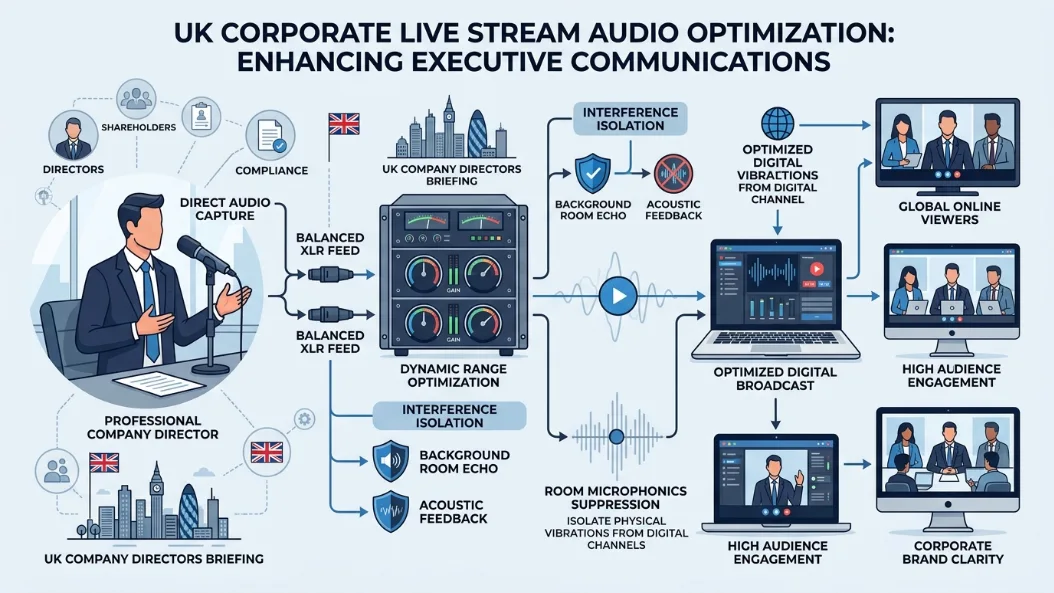
Audio quality determines stream retention rates far more than video resolution. Remote viewers abandon live broadcasts instantly when sound contains reverberation, clipping, or low volume levels. Achieving broadcast-grade audio requires taking a direct pre-fader auxiliary send from the main venue mixing console. Room microphones capturing ambient audience noise must remain on independent channels. Isolating room audio allows audio engineers to mix clear presenter speech for remote feeds while maintaining natural audience reactions.
Balanced XLR connections shield audio signals from electromagnetic interference caused by power cables and stage lighting rigs. Digital signal processors (DSPs) apply noise gates to suppress environmental HVAC humming during silent speaker pauses. Hardware compressors smooth out drastic volume spikes when speakers alternate between whisper-soft remarks and sudden louder points. Monitoring stream audio requires dedicated headphones taking a feed directly from the encoder output. Checking the post-encoding audio feed guarantees that digital compression artifacts or sync delays are caught and corrected before reaching remote audiences.
What Platform Settings Guarantee Low-Latency Video Transmission?
Optimizing low-latency streaming requires configuring a keyframe interval of two seconds, selecting dynamic bitrates between 4,500 and 6,000 Kbps, and enabling Ultra-Low Latency RTMP protocols. These precise parameter settings keep stream latency under three seconds while preserving 1080p visual sharpness.
Configuring broadcast software or hardware encoders requires aligning technical parameters with the targeted Content Delivery Network (CDN). The Real-Time Messaging Protocol (RTMP) remains the standard format for ingesting live video feeds into distribution platforms. Encoders must output a fixed keyframe rate set precisely at two-second intervals. Variable keyframe intervals confuse platform decoders, causing severe playback stuttering and audio desynchronization. Selecting a Constant Bitrate (CBR) mode prevents sudden data drops, ensuring predictable data throughput across network nodes.
Platform selection dictates how remote audiences experience the event alongside in-person attendees. High latency delays interactive elements like live Q&A sessions, chat polls, and direct speaker interactions. Configuring Low-Latency or Ultra-Low Latency streaming modes reduces transmission delays from standard 30-second buffers down to under three seconds. Maintaining sub-three-second latency allows presenters to address online chat inquiries in real time, mirroring the immediate engagement experienced by local audience members.
How Do You Test and Execute a Live Event Video Stream?
Testing a live video stream requires running a full-scale dry run 24 hours prior, executing bandwidth stress testing, verifying secondary backup encoders, and monitoring real-time telemetry analytics. This pre-event protocol identifies equipment bottlenecks, signal drops, and hardware failures before going live.
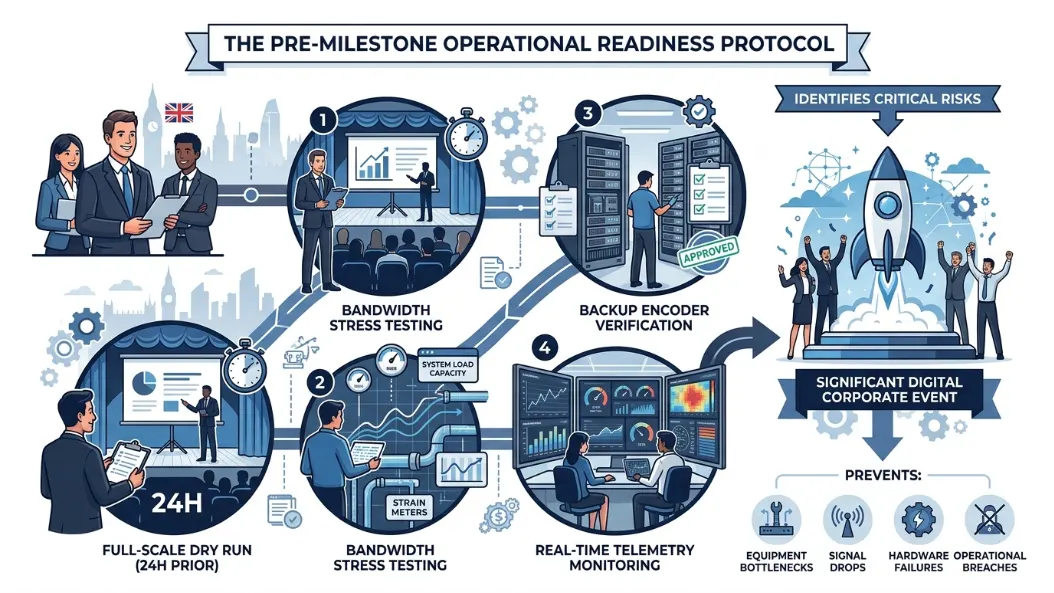
A successful live stream relies on rigorous pre-broadcast testing protocols executed well in advance of the start time. Running a complete technical rehearsal 24 hours prior exposes routing errors, latency spikes, and audio mismatches. During rehearsals, production teams must run video equipment continuously for two hours. This duration tests hardware thermal limits and verifies sustained network stability under real production conditions. Production engineers must stress-test local bandwidth by simulating high-volume venue traffic while monitoring stream telemetry data.
On the event day, production crews initialize the broadcast pipeline two hours before scheduled start times. Live telemetry dashboards monitor vital metrics, including CPU utilization, output frame rates, and network bitrates. Backup encoders must stream continuously to a private secondary server destination. If the primary encoder encounters a hardware malfunction, engineers switch the CDN ingest source to the secondary stream instantly.
Maintaining professional stream execution involves managing audience engagement across multiple locations simultaneously. Organizers seeking strategies on how do you keep remote attendees engaged in a live event can optimize interactive tools without degrading network capacity. Professional venues simplify broadcast operations by providing pre-configured networking infrastructures. Organizers looking to host seamless broadcasts should book fully-equipped Conference Rooms that include dedicated symmetrical fiber lines, built-in AV integration, and onsite technical support. Event planners ready to secure turnkey facilities can easily reserve hybrid event spaces via Form My Company to guarantee high-performance live streaming capabilities.
Explore our Conference Rooms guide,
Physical vs Digital Statutory Registers: Which Should You Choose?
How to Calculate the ROI of Professional Interview Rooms
Frequently Asked Questions
How do I choose the right conference room size for a business event?
Selecting the correct conference room size depends on your total head count, layout requirements, and whether you are hosting a hybrid or in-person meeting. Professional facilities like Form My Company Conference Rooms offer scalable room configurations equipped with AV technology, seating arrangements for boardroom or workshop setups, and dedicated bandwidth to accommodate both local and remote attendees.
What equipment should be included in a hybrid conference room rental?
A fully equipped hybrid conference room must include commercial-grade hardware, such as high-definition SDI/HDMI cameras, multi-channel digital audio mixers, and dedicated high-speed symmetrical internet connection. Booking dedicated spaces through Form My Company ensures access to built-in video conferencing systems, low-latency streaming infrastructure, and on-site technical assistance for seamless execution.
How much internet speed is needed to live stream a conference?
A reliable live conference stream requires a dedicated symmetrical upload speed of at least 20 Mbps, isolated on its own Virtual Local Area Network (VLAN). Standard public Wi-Fi networks often suffer from packet loss and bandwidth spikes, making pre-configured venue networks like those in Form My Company Conference Rooms essential for smooth, high-definition broadcast delivery.
What is the difference between a meeting room and a conference room?
While standard meeting rooms are designed for small internal discussions, conference rooms cater to larger business gatherings, hybrid seminars, and formal corporate presentations. Form My Company offers specialized Conference Rooms built with advanced acoustic insulation, multi-camera AV setups, and corporate amenities required for professional event delivery.
Can I book a hybrid-ready conference room on an hourly or daily basis?
Yes, commercial business centers allow flexible booking models tailored to project scope, ranging from hourly sessions to full-day corporate events. Form My Company provides flexible booking options for business service clients, offering instant reservation access to fully serviced Conference Rooms equipped with enterprise-grade networking and audio-visual setups.