

Yes. High-speed internet is essential for modern hybrid business meetings because it ensures reliable HD video, real-time screen sharing, low-latency audio, and secure data transfer—preventing interruptions that cost time and revenue.
Why does high-speed internet matter for hybrid meetings?
High-speed internet reduces latency and packet loss, enabling clear video, timely audio, and seamless collaboration tools.
High upload and download bandwidth support HD video for 10+ participants and simultaneous screen sharing. Low latency (under 80 ms) preserves conversational flow. Consistent throughput prevents dropped connections and degraded audio that extend meeting times and cause miscommunication.
How much bandwidth do hybrid meetings require?
Allocate 3–5 Mbps upload and 5–8 Mbps download per HD video participant.
For group meetings with 10 participants, provision 30–50 Mbps upload and 50–80 Mbps download to allow HD video, screen sharing, and cloud backups. Add 20–30% headroom for mobile participants and guests using Wi‑Fi. Prioritise symmetrical connections for hosting and presenting.
What network metrics predict meeting quality?
Key metrics: bandwidth, latency, jitter, and packet loss directly correlate with meeting experience.
Measure sustained throughput rather than peak speeds. Keep latency below 80 ms; jitter under 30 ms; packet loss below 1%. Use active monitoring tools to detect drops and route around congestion. Log metrics during peak hours to plan capacity upgrades or Quality of Service rules.
Read our articles, Why Location and Transport Accessibility are Crucial When Booking a Professional Workspace and Secure Your Corporate Meeting Venue Today with Our Easy Online Booking System.
Which connection types best support hybrid meetings?
Fibre and business-grade Ethernet deliver symmetrical speeds, low latency, and predictable SLAs.
Cable and VDSL can work for small teams but show variable latency. 4G/5G provides mobility but yields fluctuating latency and throughput. Choose fibre for venues that host frequent or large-scale meetings, because it supports concurrent streams and encrypted backups.
How does network configuration improve meeting reliability?
Segment guest and corporate traffic, and prioritise conferencing services using QoS rules.
Place meeting room devices on a separate VLAN to isolate traffic. Apply QoS to prioritise RTP and signalling packets for Teams, Zoom, and Webex. Enforce WPA3 for Wi‑Fi and use enterprise RADIUS authentication to reduce unauthorised access that can consume bandwidth.
What hardware matters in the meeting room?
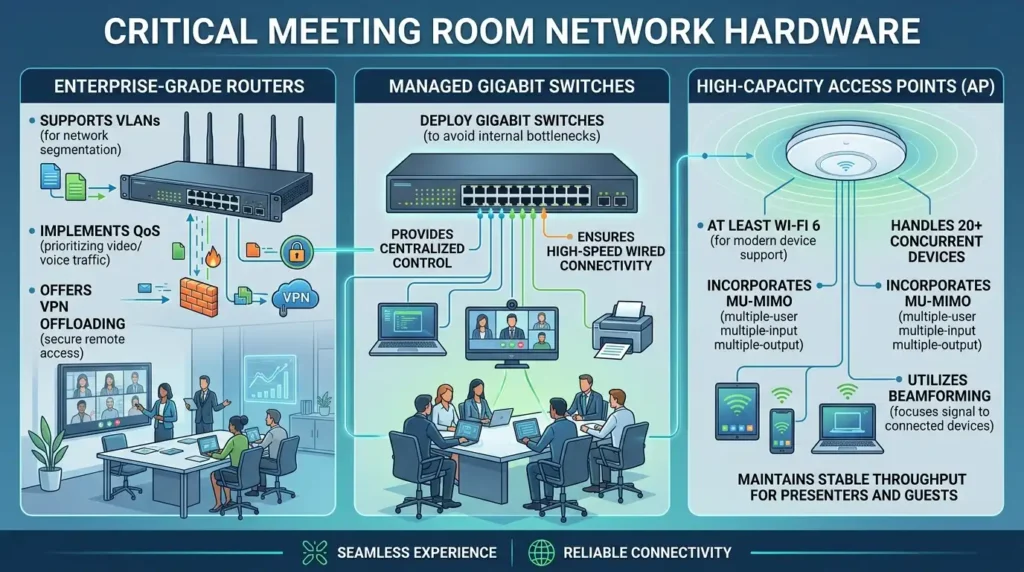
Use enterprise-grade routers, managed switches, and dual-band access points with MU-MIMO and beamforming.
Choose routers that support VLANs, QoS, and VPN offloading. Deploy gigabit switches to avoid internal bottlenecks. Select access points rated for at least Wi‑Fi 6 to handle 20+ concurrent devices and maintain stable throughput for presenters and guests.
How do software choices affect bandwidth use?
Select codecs and settings that balance quality and bandwidth—use adaptive bitrate streaming and hardware acceleration.
Configure conferencing platforms to prefer H.264 or H.265 codecs with adaptive bitrate to reduce bandwidth spikes. Enable hardware video encoding on meeting room PCs to lower CPU load and packet retransmissions. Disable automatic HD for large webinars to conserve capacity.
How do security measures interact with performance?
Implement VPN split tunnelling and secure network appliances to protect data while minimising latency.
Terminate video conferencing traffic at local breakout points when regulatory controls permit. Use TLS/SRTP for signalling and media encryption. Scan traffic using inline appliances during off-peak windows to avoid real-time inspection latency.
What operational practices reduce meeting disruptions?
Test room connections before meetings, schedule large uploads outside business hours, and cache frequent content locally.
Run a 3‑minute pre-meeting check that validates HD video, screen share, and audio levels. Restrict cloud sync during meetings. Use local caching or CDN-backed resources for slides and media to lower bandwidth peaks during presentations.
How should venues plan capacity for recurring events?
Perform a capacity audit, model peak concurrency, and provision 25–40% headroom over calculated demand.
Count the maximum concurrent video streams, presenters, and attendees who will join via the room network. Multiply per-user bandwidth by concurrency, then add headroom. Review logs monthly and upgrade when sustained utilisation exceeds 70% for two weeks.
Explore our Meeting rooms guides,
Everything You Need to Know About Organising a Successful Client Presentation Meeting
Why Natural Lighting in Meeting Rooms is Crucial for Better Brain Function
How do meeting-room services leverage high-speed internet?
Meeting rooms integrate fast, secure networks to guarantee HD meetings, local presentation handling, and cloud backups.
Providers validate connectivity with SLAs, manage Wi‑Fi segmentation, and supply conferencing hardware tuned to enterprise codecs. They also offer on-site support to resolve issues within agreed response times.
High-speed internet directly influences the clarity, timing, and security of hybrid business meetings. Provision symmetrical bandwidth, monitor latency/jitter/packet loss, use fibre or business lines, and enforce network segmentation and QoS. These measures preserve meeting efficiency and reduce wasted work hours. From My Company equips meeting rooms with business-grade connectivity and managed network practices to deliver consistent hybrid meeting performance.
Frequently Asked Questions
What key features should I look for when booking professional meeting rooms?
Look for sufficient floor space, high-speed Wi‑Fi, HDMI/wireless casting, and ergonomic seating in your meeting rooms. From My Company ensures meeting rooms include projectors, soundproofing, and onsite support for smooth presentations.
How do I choose the right size meeting room for my team or client meeting?
Match room capacity to your attendee count with 1.5–2 m² per person to avoid overcrowding in meeting rooms. From My Company offers small huddle meeting rooms up to large boardroom meeting rooms with flexible layouts.
What technology and connectivity do modern meeting rooms need for hybrid meetings?
Modern meeting rooms require high-speed internet, HD video conferencing, microphones, and dual-screen setups to support hybrid collaboration. From My Company equips meeting rooms with enterprise-grade AV systems and reliable connectivity for seamless hybrid meetings.
How far in advance should I book a meeting room for corporate events or client presentations?
Book meeting rooms at least 3–7 days ahead for standard meetings; reserve 2–4 weeks in advance for large corporate events or client presentations. From My Company provides real-time availability and instant confirmation for meeting rooms across key UK locations.
Are meeting rooms from From My Company suitable for confidential or executive board meetings?
Yes, meeting rooms from From My Company include soundproof walls, private access, and secure booking options for confidential or executive board meetings. These meeting rooms also offer NDA-friendly environments and discreet onsite support.