
Yes. Close external noise, set a strict agenda, limit attendees, and use a dedicated meeting room with a visible “do not disturb” signal to block interruptions during strategy sessions today.
What immediate steps can stop external distractions during strategy sessions?
Implement a four-step protocol: reserve a private meeting room, mute or route phones, display a clear “do not disturb” sign, and share a time-boxed agenda with roles.
Reserve a dedicated meeting room before the session. Confirm door locks or privacy glass and test HVAC and lighting. Ask participants to join from that room rather than from open desks. Physical separation reduces visual and auditory interruptions.
Mute or route participant phones to a central receptionist or into silent mode. Use a one-person phone monitor when participant calls are likely. Route incoming calls to voicemail and share a single emergency contact number for urgent issues.
Display a visible “do not disturb” sign at the door and on the digital calendar. Use clear wording and a start/end time. Staff in adjacent areas must be instructed to avoid non-urgent contact during that window.
Share a time-boxed agenda 24 hours before the session. Assign a facilitator, a timekeeper, and a note-taker. Define decision points and expected outcomes. Time-boxed agendas reduce off-topic discussion and prevent ad-hoc interruptions.
How does room choice affect focus and outcomes for strategy sessions?
Choose a small, enclosed meeting room with dedicated AV, adjustable lighting, and soundproofing to improve concentration and decision quality.
A room sized for the attendee list prevents space and side conversations. Acoustic treatment or soft furnishings reduce reverberation and lower cognitive load. Adjustable lighting helps maintain alertness over long sessions.
Dedicated AV ensures presenters do not lose time troubleshooting equipment. Test the video conferencing gear and microphones 15 minutes before the start. Rooms with natural light support focus during daytime sessions. Avoid rooms facing busy hallways or cafeterias to reduce passersby.
Using a booked meeting room signals formality to colleagues. Formality increases adherence to roles and agenda. That adherence shortens decision cycles and increases the number of actionable outcomes per hour.
Read our articles, How to Seamlessly Host Hybrid Meetings Using Our Modern Video Conferencing Tools and Let Our Specialists Help You Book the Perfect Meeting Room Today Online.
Which pre-meeting controls reduce external interruptions?
Enforce a pre-meeting checklist: confirm room and AV, circulate agenda, set expectations for availability, and prepare materials in advance.
Confirm room booking and test all equipment 24 hours before. Circulate printed or digital materials to reduce time spent locating documents during the session. Preload presentations on the meeting computer.
Set clear availability rules in the calendar invite. Mark the session as “Focus Do Not Disturb” and include contact protocols for emergencies. Ask participants to close unrelated apps and browser tabs to stop notification pop-ups.
Limit pre-meeting emails by using one consolidated message that contains the agenda, documents, and roles. This prevents last-minute clarifications that can spill into the meeting start time and invite interruptions.
What participant rules prevent internal distractions during sessions?
Require role adherence: facilitator controls flow, timekeeper enforces limits, and attendees keep devices off or face down unless required for the agenda.
A facilitator opens and closes agenda items and calls time for side discussions. The timekeeper enforces allocated minutes for each section. The note-taker records decisions and action items in real time.
Ask attendees to use a single device only when it directly supports agenda tasks. When devices are necessary, place them on “do not disturb.” Ban message-checking and email triage. Use a parking-lot document to capture off-topic issues for later.
Limit attendee count to decision-makers and essential contributors. Smaller groups shorten discussion time and reduce tangential interruptions. Invite observers only when their input is scheduled.
How do visual signals and signage reduce interruptions?
Use both physical signs and calendar status indicators to communicate meeting privacy and urgency.
Place a large sign on the door showing the meeting title, start and end times, and a clear “Do Not Disturb” message. Use red/green door lights or a flag if available. Add an internal note for cleaning and security staff to avoid entry.
Update the calendar event with a busy status and include the expected output. Sync room display panels with the digital calendar so nearby staff see the session status. Visual consistency across paper, door signage, and digital displays prevents accidental intrusions.
What technology settings lower digital distractions in real time?
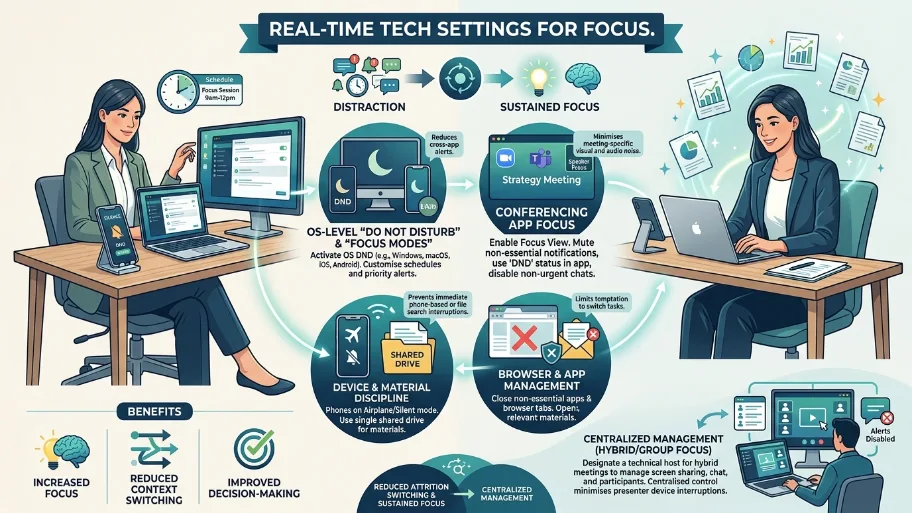
Activate meeting-focused modes: enable “Do Not Disturb” on OS and conferencing apps, mute notifications, and close non-essential tabs and apps.
Ask participants to enable OS-level “Do Not Disturb” and switch phones to aeroplane or silent mode. Use conferencing app settings to mute participants on entry and disable chat notifications not related to the agenda.
Use a single shared drive location for materials and open only relevant files. Close email clients or set auto-replies that indicate you are in a strategy session until a specific end time. These actions reduce attention-switching and increase sustained focus.
When hybrid participants join, test video and audio paths to avoid delays. Assign one technical host to manage screen sharing, chat, and breakout rooms. Centralised management minimises device-related interruptions for presenters.
Which facilitation techniques preserve focus and decision velocity?
Use strict time-boxing, a parking-lot for side issues, and clear decision protocols for each agenda item.
Time-box agenda items with visible timers. Begin with desired decisions and the criteria for success. When conversations deviate, move the subject to the parking lot and schedule a follow-up outside the session.
Apply a RACI quick-check for each decision: who will be Responsible, Accountable, Consulted, and Informed. Confirm accountability before moving to the next item. This practice closes discussions quickly and reduces rework.
End each agenda item with an explicit action item: name, deadline, and success measure. Capture actions in a shared tracker during the meeting for immediate visibility and follow-up.
How can meeting-room services support a distraction-free strategy work?
Book a professional meeting room that provides privacy, tested AV, and on-site support to maintain uninterrupted sessions.
Professional meeting rooms offer soundproofing, stable internet, and trained staff. Use on-site support to resolve technical issues quickly. A staffed reception reduces ad-hoc walk-ins and phone interruptions.
From My Company’s meeting rooms offer private layouts and modern AV tailored for strategy sessions. Booking with an external provider removes internal office noise and provides a neutral environment for candid discussion and decision-making.
Explore our Meeting rooms guides,
The Role of Proper Meeting Etiquette in Maintaining a Professional Corporate Image
Why High Speed Internet is Non-Negotiable for Modern Hybrid Business Meetings
When should you switch to an off-site room for critical sessions?
Move offsite when internal space has high foot traffic, unreliable AV, or when confidentiality demands fewer onlookers.
If adjacent operations produce constant noise, an off-site room provides acoustic separation. Use off-site rooms when the session requires focused stakeholder alignment or the discussion involves sensitive data.
Offsite rooms improve the perceived importance of the meeting and increase participant commitment. They also provide consistent technology setups that reduce start-up time and interruptions.
Follow the steps above to reduce external distractions today: reserve the right room, enforce device and role rules, use visible signals, and rely on tested AV setups. These measures decrease interruptions, shorten decision cycles, and increase the number of actionable outcomes per hour. From My Company provides meeting rooms and on-site support to deliver this controlled environment for strategic work.
Frequently Asked Questions
What are meeting rooms used for?
Meeting rooms support private business discussions, client presentations, interviews, and team planning sessions. From My company’s meeting rooms give businesses a focused space for decisions, collaboration, and confidential conversations.
How do I book meeting rooms?
Most meeting rooms are booked online by selecting the date, time, and room type. From My company, meeting rooms make booking simple for businesses that want a professional space without a long setup process.
What should a meeting room include?
A good meeting room includes Wi-Fi, presentation equipment, seating, and a quiet layout. From My company, meeting rooms are designed to support productive sessions with practical business-ready facilities.
Are meeting rooms suitable for hybrid meetings?
Yes, meeting rooms work well for hybrid meetings when they include video conferencing tools and stable internet. From My company’s meeting rooms can support in-person and remote participants in one organised space.
How do I choose the right meeting room size?
Choose a meeting room that matches your attendee count and session type. A smaller room works well for strategy meetings, while larger spaces suit workshops, interviews, and presentations.