
Setting up Making Tax Digital (MTD) compliant software requires selecting HMRC-recognised accounting software, authorising digital interaction with HMRC online accounts, linking core financial records via API integrations, and executing automated test filings to ensure flawless quarterly VAT return submissions.
Why Is Making Tax Digital (MTD) Compliance Mandatory for UK Businesses?
UK VAT-registered businesses must comply with MTD rules to maintain digital accounting records, submit quarterly tax returns using HMRC-compatible software, prevent manual data entry errors, and avoid financial penalties under the points-based HMRC fine system.
The UK government introduced MTD to transform tax administration across the nation. Every VAT-registered business must now log sales and expenses digitally through software that communicates directly with HMRC. Traditional paper ledgers and manual spreadsheets no longer meet statutory requirements. Failing to maintain digital links between primary accounting ledgers and filing interfaces results in immediate compliance breaches.
Compliance ensures total visibility over taxable turnover, output VAT, and input VAT calculations. Digital record-keeping eliminates manual transcription mistakes between spreadsheet cells. Businesses maintain real-time tracking of tax liabilities, which improves cash flow forecasting and prevents unexpected tax bills. Modern compliance framework mandates that data flow continuously through software without manual copying or pasting.
HMRC enforces strict compliance using an automated penalty system. Late submission of digital returns generates penalty points, leading to financial fines when specific thresholds are breached. Incorrect filings or broken digital links trigger additional fines based on percentages of unpaid tax. Business owners secure their operational integrity by establishing fully compliant software infrastructure from the start.
Which MTD-Compliant Software Fits Your Business Operational Needs?
Choosing suitable MTD-compliant software depends on evaluating system capabilities against business size, multi-currency processing needs, inventory management requirements, direct bank feed support, and native integration features for HMRC digital submission APIs.
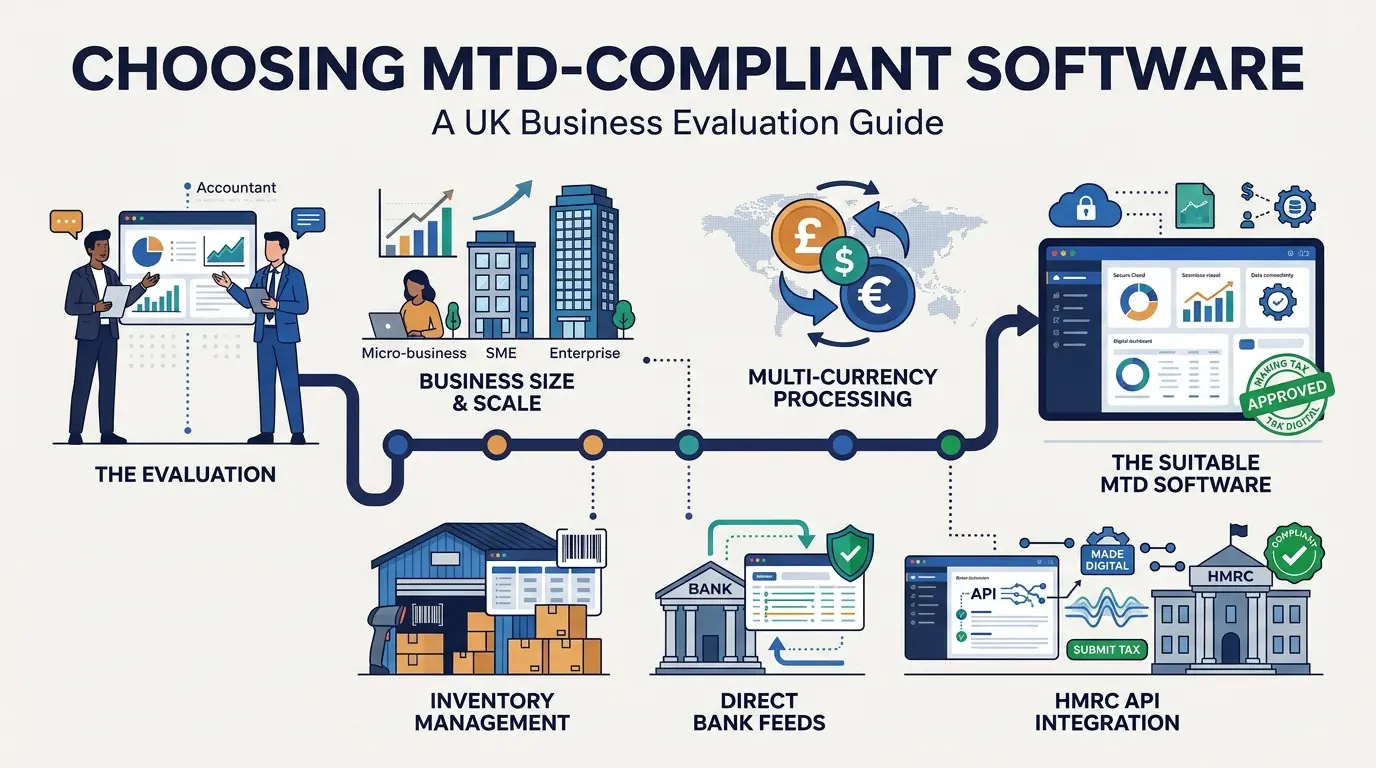
Selecting accounting software requires evaluating specific operational features against corporate structures. Small sole traders benefit from simplified cloud interfaces focusing on income and expenditure tracking. Complex limited companies require software supporting payroll processing, advanced invoicing, multi-currency transactions, and stock control. The selected system must feature on HMRC’s official list of recognised MTD software providers.
Integrating direct bank feeds automates transaction data capture directly into the ledger software. Automated feeds extract daily transaction values, match invoices with payments, and flag unmatched reconciliation items. Businesses reduce bookkeeping overhead while maintaining accurate digital logs required during official HMRC compliance checks. Cloud-based platforms offer continuous data security, multi-user accessibility, and automatic statutory updates without manual software installations.
Bridging software offers an alternative path for businesses relying on complex custom spreadsheets. Bridging tools construct a secure digital link between proprietary Excel models and HMRC servers using API protocol connections. This approach allows legacy businesses to maintain custom financial workflows while achieving mandatory digital filing compliance.
How Do You Create Digital Links to Maintain HMRC Compliance?
Creating digital links involves connecting sales records, purchase ledgers, and banking feeds using automated software pathways, ensuring zero manual transfer, copy-pasting, or re-keying of data across your accounting ecosystem.
Digital linking represents the structural core of Making Tax Digital compliance regulations. HMRC defines a digital link as an automated data transfer between different software programs, products, or applications. Data transfers must occur electronically without manual human intervention. Copying values from an electronic invoice into a separate return calculation spreadsheet violates statutory digital link rules.
Establishing compliant links requires configuring automated data pipelines between point-of-sale systems, e-commerce stores, and core ledgers. When sales clear through online storefronts, API integrations automatically push transaction records straight into the primary accounting platform. Expense management software must scan receipts, extract VAT amounts, and push raw data directly to purchase ledgers without manual input.
Digital links must remain unbroken throughout the entire accounting lifecycle up to final return submission. Software platforms extract summaries of digital records to populate nine mandatory boxes on official VAT returns. Maintaining clear audit trails allows tax inspectors to trace any box value on a return back to individual underlying transactions instantly.
What Are the Steps to Connect Accounting Software with HMRC Online Services?
Connecting accounting software with HMRC requires logging into the business Government Gateway account, granting administrative permissions to the software, verifying API authorization tokens, and running system diagnostic checks to confirm live data communication.
Linking operational accounting platforms to government tax infrastructure requires precise authentication protocols. Business owners initiate connection within software setting modules by choosing HMRC authorisation options. Software portals redirect users to secure Government Gateway logins to confirm identity credentials using multi-factor authentication.
Completing authentication grants software permission to read tax information, fetch filing obligations, and submit VAT returns electronically. Authorisation tokens automatically renew between accounting software and HMRC systems to ensure seamless connectivity. Businesses needing setup guidance for initial administrative configurations often seek expert VAT registration assistance to ensure accurate account structuring.
Verifying active connections requires running preliminary data test routines within the accounting platform. Test routines pull active filing schedules directly from government databases, confirming API compatibility. Once connected, software displays future tax deadlines, outstanding payment balances, and historical filing records within central administrative dashboards.
How Do You File MTD VAT Returns Directly Through Software?
Filing MTD VAT returns through software involves reconciling monthly transactions, generating nine-box return summaries automatically, auditing digital calculations, and submitting returns directly to HMRC via authenticated API connections.
Executing quarterly filings starts with comprehensive ledger reconciliation. Bookkeepers must reconcile bank statements, reconcile petty cash transactions, verify outstanding invoices, and validate purchase receipts before generating return figures. Automated software tools run pre-filing checks to identify duplicate entries, missing supplier VAT numbers, and incorrect tax rate assignments across transaction logs.
Generating return summaries populates official nine-box compliance metrics automatically from digital records. The software calculates total output tax due, total input tax recoverable, total sales values excluding VAT, and total purchase values excluding VAT. Users review populated numbers without altering underlying calculations manually. Businesses evaluating alternative accounting schemes like flat rate or annual options often study what is annual accounting VAT and what are its main benefits to optimize filing schedules.
Submitting returns requires explicit confirmation within accounting user interfaces. Clicking final submission buttons transfers encrypted payload data straight across API links into government servers. Software receives immediate digital submission receipts containing unique transaction reference numbers, time stamps, and exact confirmation totals for legal record retention.
What Common Setup Errors Disrupt MTD Compliance and How to Avoid Them?
Common MTD setup errors include using unapproved spreadsheet tools, breaking digital data links through copy-paste routines, failing to apply correct VAT schemes, and delaying software setup until filing deadlines approach.
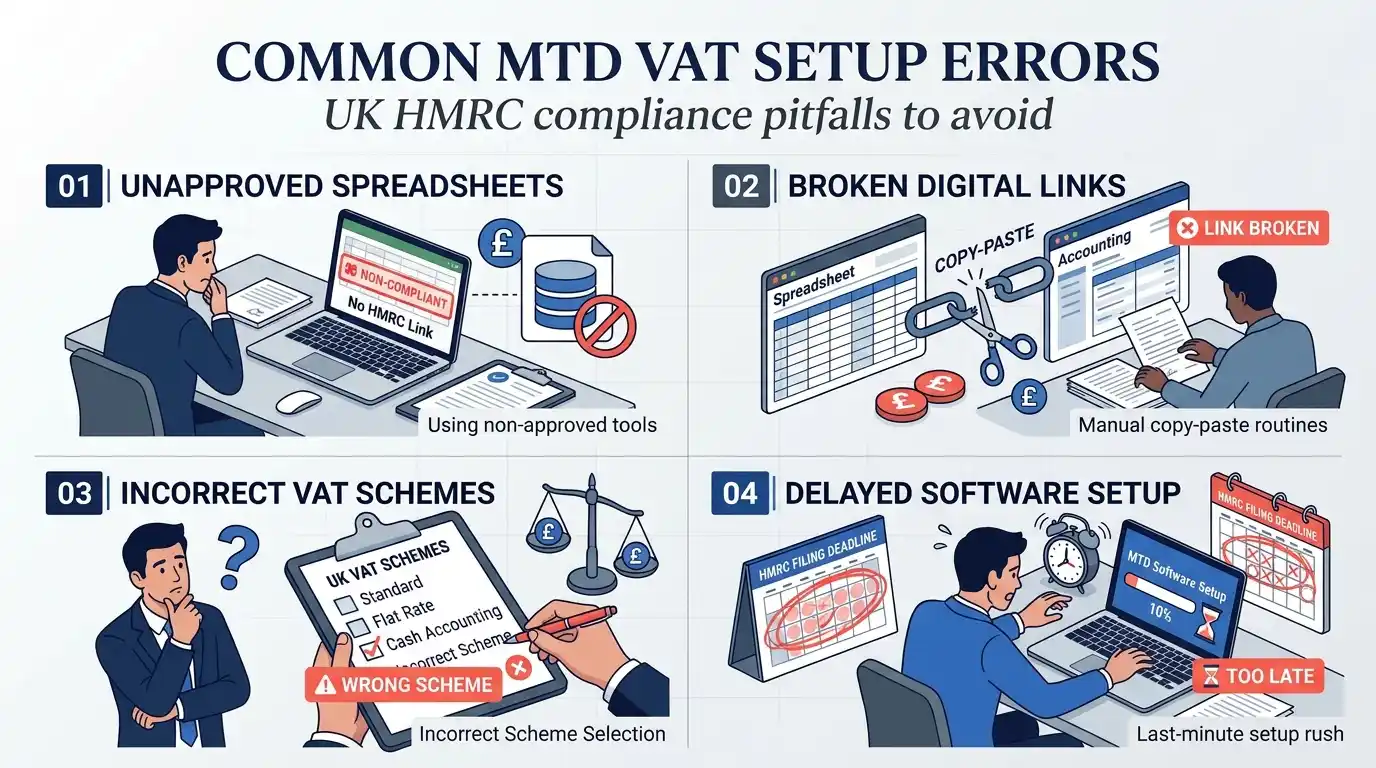
Failing to establish continuous digital links remains the single largest cause of compliance failure. Staff often attempt to export sales summary CSV files, modify entries inside external spreadsheets, and upload files back into filing software manually. This manual editing breaks compliance integrity. Businesses eliminate this risk by enforcing automated data import tools across all internal operational workflows.
Selecting incorrect VAT schemes inside software settings corrupts calculated tax liabilities instantly. Software must be configured to mirror exact scheme registrations, whether standard accounting, cash accounting, or margin schemes. Applying standard accrual rules when registered for cash accounting generates incorrect tax liability points during HMRC automated data audits.
Delaying software onboarding until quarterly return deadlines creates severe operational bottlenecks. Setting up new software platforms demands sufficient time for historic data migration, bank feed verification, and staff training. Business owners must complete software integration at least 30 days before filing deadlines to test system stability thoroughly.
How Form My Company Simplifies Your MTD Transition and Software Setup?
Form My Company delivers complete MTD software integration by evaluating corporate structures, setting up HMRC-compliant cloud software, establishing automated bank links, and executing verified quarterly tax filings.
Navigating Making Tax Digital setup mandates accurate software deployment and strict adherence to HMRC digital guidelines. Form My Company assists business owners through full technical configurations, preventing structural compliance errors. Expert teams evaluate operational needs, configure cloud platforms, and build seamless digital data links across sales and banking ecosystems.
Integrating software setups alongside professional corporate administrative support protects growing companies from costly regulatory penalties. Form My Company handles administrative connections between HMRC accounts and specialized accounting tools. Discover how seamless digital compliance: how Form My Company sets up your MTD-ready VAT system turns complex regulatory requirements into fully automated accounting workflows.
Professional setup services allow company directors to concentrate on core business growth rather than complex compliance software management. Form My Company verifies every digital link, validates scheme settings, and conducts pre-submission audits across quarterly tax filings. Partnering with dedicated corporate service specialists guarantees complete accuracy, legal compliance, and total peace of mind.
Explore More VAT Registration Assistance Guide,
How to Calculate Your Taxable Turnover Accurately to Avoid HMRC Fines
How to Determine the Exact Moment Your Business Must Register for VAT
Frequently Asked Questions
How do I know if my UK business needs mandatory VAT registration?
UK businesses must register for VAT if their total taxable turnover exceeds the £90,000 threshold within a rolling 12-month period or is expected to exceed it in the next 30 days. Companies can also register voluntarily below this threshold to reclaim input tax on business purchases. Form My Company provides VAT Registration Assistance to evaluate turnover thresholds and submit official HMRC applications accurately.
What documents are required to apply for UK VAT registration?
Registering a UK company for VAT requires official director identification, proof of business trading address, bank account details, and incorporation certificates. HMRC may also request sample sales invoices, contracts, or supplier agreements to verify business activity. Using Form My Company’s VAT Registration Assistance ensures all required compliance documentation is validated before HMRC submission to prevent delays.
How long does it take HMRC to process a VAT registration application?
HMRC typically processes online VAT registration applications within 20 to 30 working days. Processing times can extend if HMRC requests additional security verification or business evidence. Seeking VAT Registration Assistance through Form My Company ensures complete accuracy on initial filings, reducing verification inquiries and accelerating receipt of your nine-digit VAT number.
What is the difference between mandatory and voluntary VAT registration?
Mandatory VAT registration occurs when a business exceeds the statutory £90,000 threshold and is legally obligated to charge output VAT. Voluntary registration occurs below the threshold, allowing early-stage companies to recover input VAT on startup expenses and improve B2B credibility. Form My Company offers specialized VAT Registration Assistance to help businesses determine the most tax-efficient timing for registration.
Can non-UK resident directors register a company for VAT in the UK?
Non-UK resident directors can register a UK entity for VAT, but HMRC applies stricter scrutiny regarding business establishment and UK trading evidence. Non-established taxable persons (NETPs) must demonstrate physical or contractual trading activity taking place within the UK. Through professional VAT Registration Assistance, Form My Company assists international founders with HMRC compliance standards and overseas director verification requirements.