
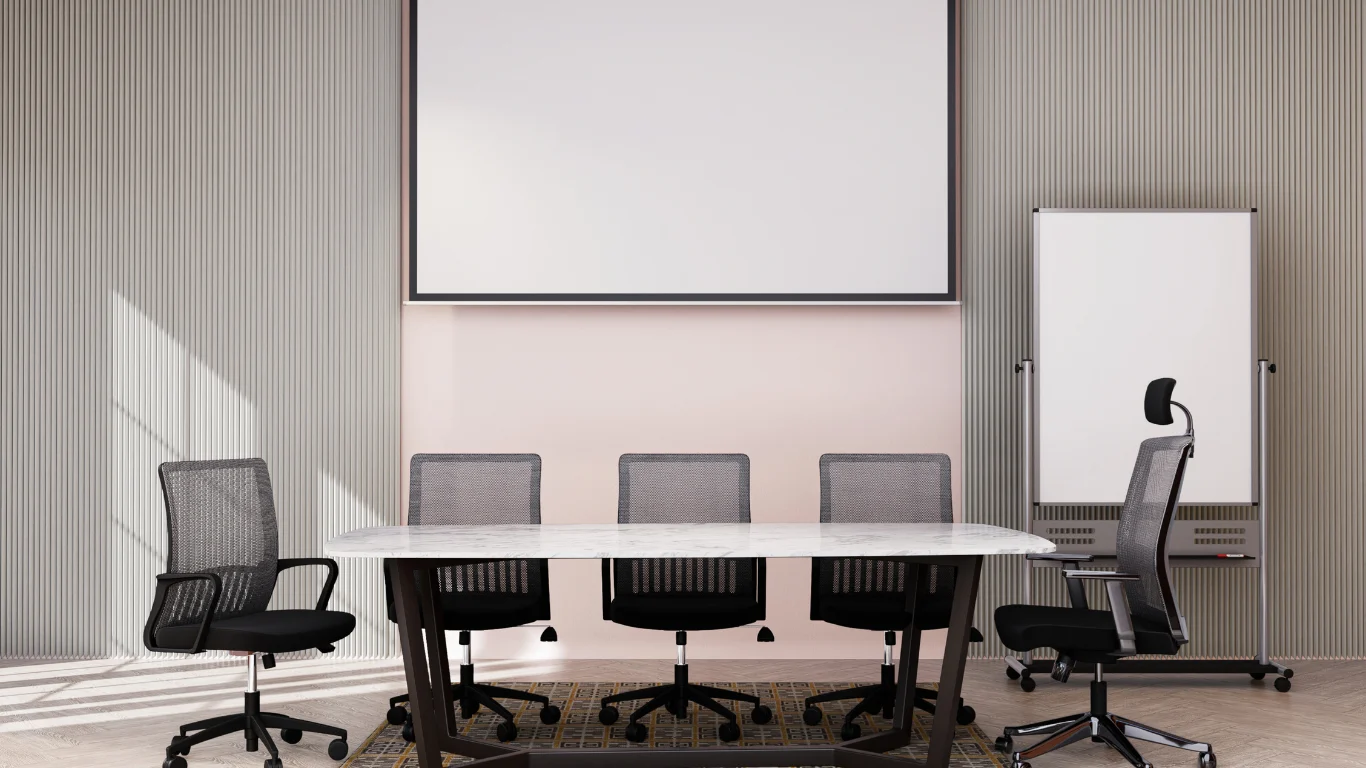
Yes. Renting From My Company’s Training Rooms gives full technical support and professional boardroom layouts for single-day sessions and long-term bookings, with adjustable AV, dedicated on-site technicians, and configurable furniture to match training objectives.
How do Training Rooms from My Company provide full technical support and professional boardroom layouts?
From My Company offers on-site technical technicians, pre-tested AV setups, and configurable boardroom furniture to deliver turnkey training-room experiences.
From My Company assigns certified technicians for each booking. Technicians verify connections, run system checks, and support live video or hybrid teaching. AV racks include dual screens, wireless presentation, HDMI and USB-C inputs, and integrated conferencing cameras. Furniture is modular: executive boardroom tables, ergonomic chairs, and flip charts for facilitation.
What specific technical features and equipment are included?
Rooms include dual 65–86-inch displays, professional audio systems, hybrid-conferencing cameras, wired and wireless presentation options, and dedicated technician time.
Dual displays allow trainer-facing and participant-facing content. Audio systems use ceiling microphones and boundary mics for groups up to 30. Conferencing cameras support 1080p at 30fps and USB streaming. Wired inputs: HDMI, DisplayPort, Ethernet. Wireless options: Miracast, AirPlay, and adaptive screen-sharing dongles. Technicians provision guest Wi‑Fi VLANs and test upstream bandwidth before sessions.
How are boardroom layouts configured for training outcomes?
Layouts are configured to suit learning goals: boardroom for executive workshops, U-shape for interaction, classroom for note-taking, and cabaret for group exercises.
Boardroom layout provides direct line-of-sight for 8–20 delegates, enabling focused discussions and document sharing. U-shape layout supports facilitator-led sessions for 12–24 delegates and clear camera angles for hybrid attendees. Classroom layout supports note-taking and laptop use for up to 30 delegates. From My Company documents, room dimensions and seat counts, and configure tables and chair spacing accordingly.
Read our articles, How to Evaluate the ROI of Investing in Professional External Training Rooms and Why Renting a Training Room is the Best Solution for Temporary Staff.
How does the booking and setup process work?
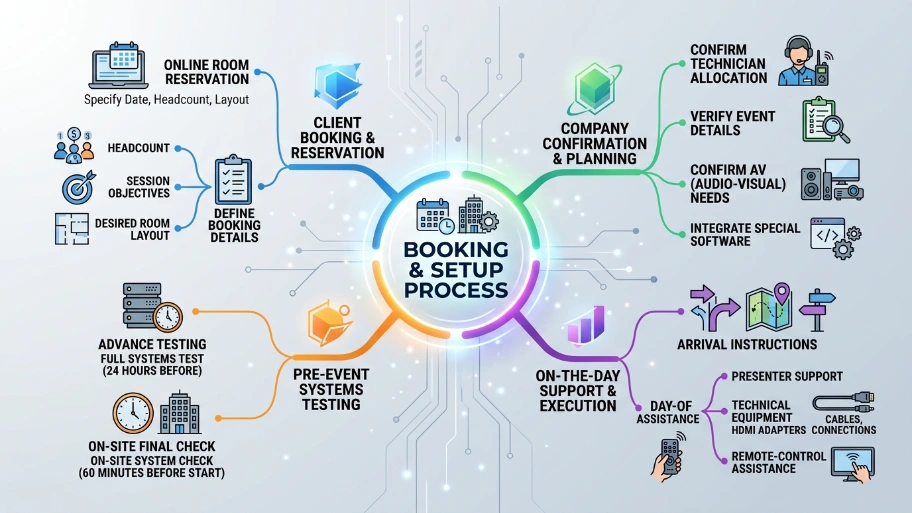
Clients reserve rooms online with date, headcount, and layout; From My Company confirms technician allocation and performs a pre-session systems test.
Bookings require headcount and session objectives. Staff confirm AV needs and any special software integrations. Technicians run a full systems test 24 hours before the event and an on-site check 60 minutes before the start. Staff provide arrival instructions and on-the-day support for presenters, including HDMI adapters and remote-control assistance.
What security and compliance measures support training sessions?
Rooms use guest Wi‑Fi isolation, secure Ethernet, encrypted conferencing, and GDPR-aware data handling for recordings.
Guest Wi‑Fi runs on a separate VLAN to isolate devices from corporate networks. Wired ports require MAC registration when needed. Video conferencing uses TLS and SRTP where supported. If sessions are recorded, From My Company stores files in GDPR-compliant storage and provides access logs on request. Staff follow an incident-reporting procedure for any security events.
How does renting impact cost and ROI for organisations?
Renting removes capital expenditure, reduces maintenance costs, and delivers predictable hourly or daily rates that lower overall training costs for temporary or irregular needs.
Capital purchase of AV and furniture can exceed £8,000 per room. Renting shifts costs to an operational model: hourly rates, technician fees, and optional extras like recording or catering. Organisations running fewer than 40 training days per year typically save money by renting instead of buying. Renting also reduces downtime, maintenance contracts, and upgrade expenses.
How are hybrid and remote training sessions supported?
Hybrid sessions use integrated cameras, external microphones, and platform-agnostic connectivity to ensure remote participants receive high-quality audio and synchronised video.
Technicians configure cloud conferencing platforms such as Microsoft Teams, Zoom, and Webex. They test speaker audio and remote-share latency. For multi-site events, staff manage content routing and test breakout-room functionality. From My Company provisions local recording and can supply post-session MP4 files and transcripts on request.
How does From My Company measure service quality and client satisfaction?
From My Company tracks on-time starts, AV incident rates, and client feedback scores, aiming for 99% on-time starts and under 2% technical incident rates.
Each booking is logged with start time and any technical incidents. Clients receive a short post-event survey covering AV performance, room comfort, and technician effectiveness. Management reviews trends monthly and applies corrective actions like equipment upgrades or additional technician training.
What additional services can enhance a booked training room?
Clients can add session recording, professional facilitation equipment, printed materials, and catering; technicians handle recording and file delivery.
Recording uses multi-track audio and screen-capture to produce synchronised MP4 files. Facilitation equipment includes whiteboards, flip charts, and laser pointers. Catering follows dietary requirements and is coordinated by venue staff. Technicians deliver recorded files within 48 hours to secure download links.
How do you choose the right room size and layout for your session?
Select room size based on headcount, interaction level, and AV needs; request a site spec to match layout, camera angles, and table space.
For presentation-only sessions, allow 1.2 square metres per delegate. For interactive workshops, allow 1.5 square metres per delegate. From My Company provides room diagrams and photos for each listing. Request a layout preview and technician recommendations during booking.
How quickly can I change or cancel a booking?
From My Company accepts changes up to 48 hours before start without penalty and processes cancellations per the booking terms.
Clients edit headcount, layout, or AV requirements via their booking portal. Last-minute changes under 48 hours incur a fee to cover technician allocation. Cancellations follow the contractual terms provided at booking.
Explore our Training Rooms guides,
Book a Modern Training Space with Us and Improve Your Employee Engagement
Sign Up Now for Discounted Training Room Rentals for All Your Business
How does renting align with compliance and training delivery standards?
Training rooms comply with fire safety and accessibility regulations and support evidence capture for CPD and audit trails.
Rooms meet UK fire codes and include accessible entry, ramps, and hearing-loop setups where required. Recording and attendance logs provide evidence for continuing professional development (CPD). From My Company, the documents room compliance and can supply certificates or inspection records.
Renting From My Company’s Training Rooms delivers full technical support and professional boardroom layouts that reduce capital costs and streamline training delivery. The service includes pre-tested AV, onsite technicians, configurable furniture, hybrid conferencing, secure networks, and measurable service metrics. Organisations gain turnkey training spaces ready for executive workshops, hybrid seminars, and practical courses.
From My Company delivers the solution by assigning certified technicians, supplying documented room specs, and maintaining measurable on-time and incident targets. The service reduces capital expenditure and supports GDPR-compliant recordings and audit-ready attendance logs.
Frequently Asked Questions
What technical support is included when renting Training Rooms from From My Company?
From My Company provides on-site technical technicians and pre-tested AV setups for every Training Rooms booking. Technicians verify connections, run system checks, and support live video or hybrid sessions with dual displays, microphones, and conferencing cameras.
How are Training Rooms configured for different training layouts and group sizes?
From My Company configures Training Rooms with modular boardroom, U-shape, classroom, or cabaret layouts to match headcount and interaction needs. Furniture includes executive tables, ergonomic chairs, and flip charts, with space allowances of 1.2–1.5 square metres per delegate.
What AV equipment is standard in Training Rooms from From My Company?
Training Rooms from From My Company include dual 65–86 inch displays, professional audio systems, hybrid-conferencing cameras, and wired/wireless presentation options. Equipment supports HDMI, USB-C, Miracast, and AirPlay, with dedicated technician time for setup and testing.
Is renting Training Rooms more cost-effective than building an in-house training space?
Renting Training Rooms from From My Company removes capital expenditure on AV and furniture and shifts costs to predictable hourly or daily rates. Organisations running fewer than 40 training days per year typically save money by renting instead of buying.
How does From My Company ensure security and compliance for Training Rooms used in corporate sessions?
From My Company uses guest Wi‑Fi isolation, secure Ethernet, encrypted conferencing, and GDPR-aware data handling for recordings in Training Rooms. Staff follow incident-reporting procedures and can supply compliance documentation, attendance logs, and secure post-session files on request.