
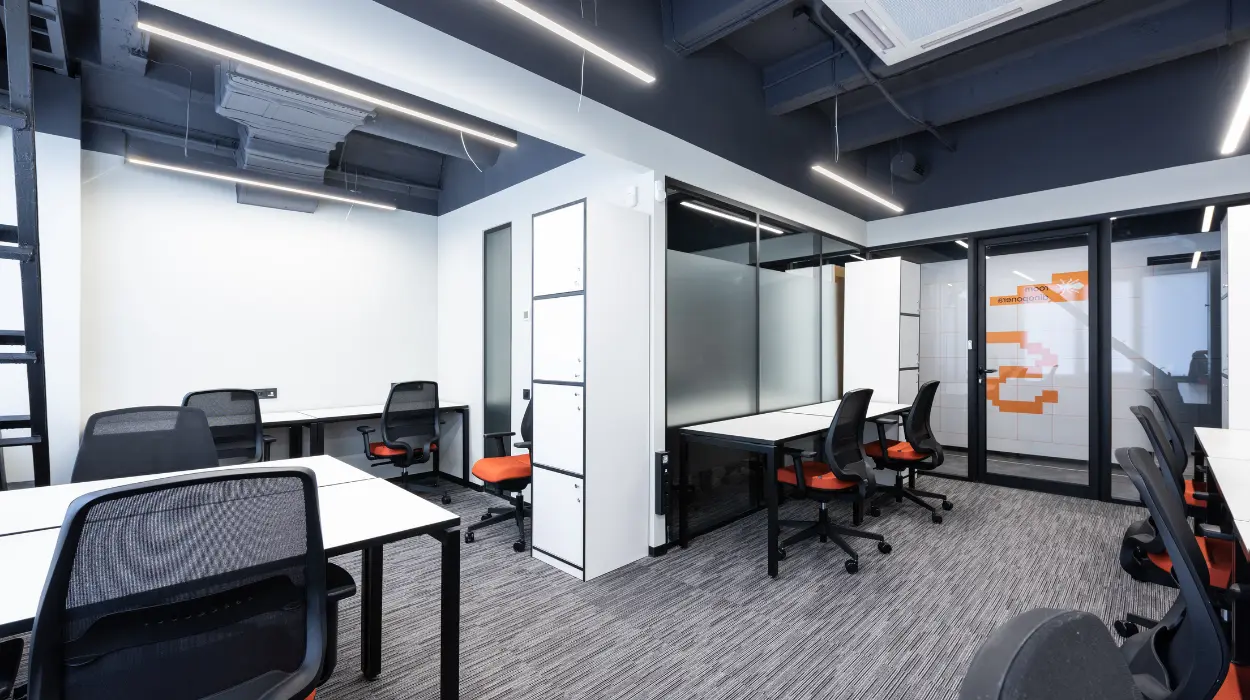
Yes. Creating an inclusive, collaborative training environment requires deliberate policies, accessible facilities, diverse facilitation, and interactive design that support equal participation for all learners.
How do you design training spaces that accommodate diverse needs?
Design training spaces to include adjustable seating, clear sightlines, assistive technology, and accessible entry points to ensure all participants can engage fully.
Arrange rooms with movable furniture to support group work. Provide wheelchair-accessible routes, ramps, and tables at different heights. Install hearing loops and offer real-time captioning for spoken content. Ensure lighting is even and glare-free to assist low-vision participants. Include clear signage in high-contrast text and consider large-print materials. These physical adjustments reduce barriers and make participation practical for diverse learners.
How do you structure training sessions to promote collaboration?
Structure sessions with short interactive activities, role-based group tasks, and rotating facilitators to ensure active contribution from every participant.
Begin with a 5–10 minute icebreaker that pairs participants with different roles. Use breakouts of 3–5 people for problem-solving tasks that last 15–25 minutes. Assign clear roles, note taker, presenter, timekeeper, to distribute responsibility and avoid dominance by a few voices. Rotate roles across activities to develop varied skills. Use structured reflection prompts at the end of each activity to surface learning and keep conversations focused.
How do you make training content accessible and inclusive?
Provide content in multiple formats text, audio, visuals, and interactive elements and supply materials at least 48 hours before the session.
Offer slide decks with speaker notes, downloadable transcripts, and audio recordings. Share pre-reading and short videos to prepare learners. Use plain language and define sector-specific terms with brief glossaries. Tag visual elements with descriptive alt text for screen-reader compatibility. Deliver assessments in flexible formats, such as written responses, recorded presentations, or live demonstrations, to accommodate different communication strengths. Read our article, “How Professional Training Rooms Help You Maintain a High Standard of Learning, and Rent Our Specialized Training Rooms for IT Workshops and Technical Staff Training.
How do you train facilitators to handle inclusion and collaboration?
Train facilitators on inclusive language, bias mitigation, active listening, and group management techniques with practical role-play exercises.
Provide a facilitator handbook that lists ground rules, intervention phrases, and de-escalation steps. Run 4-hour workshops where facilitators practice redirecting dominant speakers and inviting quieter participants. Teach specific prompts: “Tell us one insight you want us to hear,” or “What’s a different perspective on this?” Use recorded sessions for feedback and continuous improvement. Monitor facilitator performance with participant surveys that ask about fairness and participation levels.
How do you measure whether training is inclusive and collaborative?
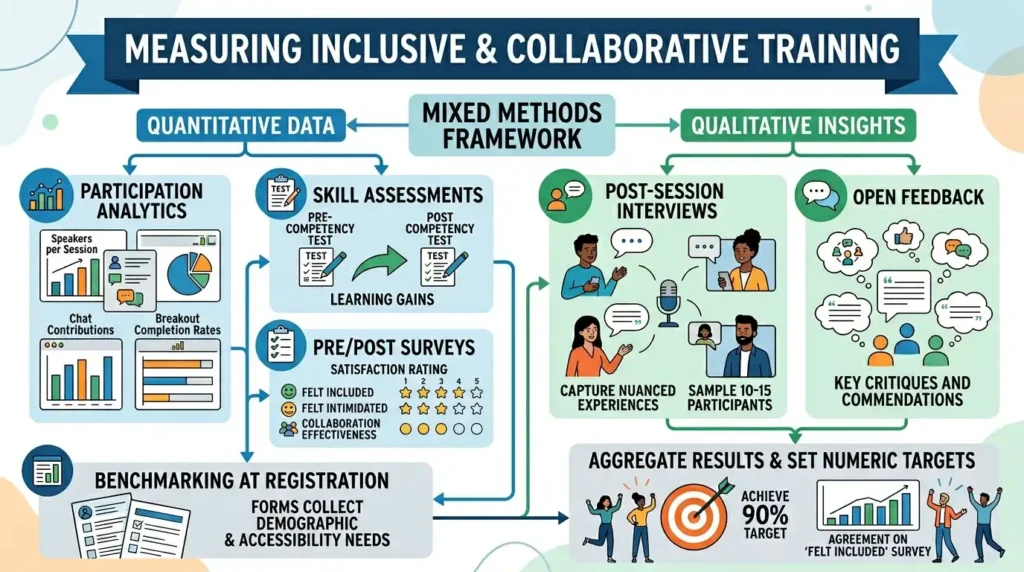
Use mixed methods: pre/post surveys, participation analytics, skill assessments, and qualitative feedback to measure inclusion and collaboration.
Gather demographic and accessibility needs information during registration to benchmark inclusion. Track participation metrics: number of speakers per session, chat contributions, and breakout completion rates. Use competency tests before and after training to quantify learning gains. Conduct short post-session interviews with a sample of 10–15 participants to capture nuanced experiences. Aggregate results to set numeric targets, for example, achieving at least 90% agreement on “felt included” in participant surveys.
How do you use technology to enhance inclusion and collaboration?
Deploy collaboration platforms with captioning, shared whiteboards, and role-based permissions to enable synchronous and asynchronous participation.
Choose video platforms that support live captions, chat moderation, and breakout rooms. Use shared digital whiteboards for collective ideation and document versioning for group drafting. Enable recording with searchable transcripts for on-demand review. Assign moderator roles to manage questions and escalate accessibility requests quickly. Integrate polling tools that anonymise responses to gather honest feedback.
How do you adapt activities for remote or hybrid learners?
Design parallel in-room and remote activities, synchronise materials, and assign hybrid-specific facilitation roles to maintain equal engagement.
Ensure remote participants see the same slides and whiteboard content via screen sharing. Use pairs that mix in-room and remote attendees for breakout work. Assign a remote co-facilitator to monitor chat and signal remote participants when to speak. Time activities to allow short breaks every 45–60 minutes to reduce screen fatigue. Provide remote participants with clear camera and microphone guidance to improve audio quality.
How do you create policies that reinforce inclusion and collaboration?
Implement written policies covering accessibility accommodations, anti-harassment rules, and equitable participation expectations; publish these pre-training.
Require participants to confirm understanding of ground rules during registration. Offer a simple accommodation request form that specifies lead times—at least 5 working days for assistive tech. State consequences for policy violations and provide an anonymous reporting route. Use data from past trainings to refine policies every six months. Publish a short policy summary in session invites to set expectations early.
How do you ensure content remains culturally and contextually relevant?
Localise examples, use diverse imagery, and consult subject-matter experts from different backgrounds during content review.
Audit training materials for cultural references and jargon that may not translate across regions. Replace or add examples that reflect varied organisational contexts, such as public sector, SMEs, and multinational teams. Include case studies from different industries to broaden relevance. Conduct a pre-session pilot with 8–12 participants who reflect the target audience for feedback on cultural fit.
Explore our Training Rooms guides,
Everything You Need to Know About Organising a Professional Corporate Training Event
The Role of Proper Training Room Facilities in Enhancing Professional Workshop Engagement
How do you scale inclusive training practices across an organisation?
Standardise templates, create a central resource library, and train 10–15 internal champions to replicate best practices across teams.
Develop templates for session plans, facilitator scripts, and accessibility checklists. Host a resource library with recorded exemplar sessions and editable materials. Select internal champions by team and run a two-day train-the-trainer program for each champion cohort. Measure adoption by tracking the number of teams using standardised templates and by sampling sessions quarterly for compliance with inclusion metrics.
Creating an inclusive and collaborative training environment requires coordinated design, facilitation, technology, and measurement. Use clear physical accessibility, varied content formats, structured activities, facilitator training, and data-driven evaluation to ensure equal participation. From My Company supports this approach by supplying dedicated Training Rooms configured for accessibility, collaboration, and technical integration.
Frequently Asked Questions
What are Training Rooms used for in a business setting?
Training Rooms support staff development, onboarding, workshops, and compliance sessions in a structured setting. From My company Training Rooms give teams a dedicated space for focused learning, collaboration, and equipment setup.
How do I choose the right Training Rooms for corporate training?
Choose Training Rooms with flexible seating, good lighting, reliable AV equipment, and accessible facilities. For business training, From My company recommends checking room layout, capacity, and technical setup before booking.
Are Training Rooms suitable for hybrid or remote learning sessions?
Yes, modern Training Rooms often support hybrid learning with video conferencing, screens, and strong internet connectivity. These features help in-person and remote attendees participate in the same session with less friction.
What features should professional Training Rooms have?
Professional Training Rooms usually include moveable furniture, presentation tools, fast Wi-Fi, and quiet surroundings. They also benefit from accessibility features that support different learning needs and improve session flow.
Why do businesses rent Training Rooms instead of using office space?
Businesses rent Training Rooms to create a more focused environment, separate training from daily operations, and support a better learning experience. This setup is useful for structured workshops, technical sessions, and team development.